Salesforce–NetSuite Integration: Mapping and Setup
Plan Salesforce–NetSuite sync with customer IDs, field ownership, order dependencies, object write limits, and recovery tests before production.
- Author
- Alexis Favre · Co-Founder & CTO
- Published
- Updated
- Read time
- 8 min read

Connect the customer lifecycle without blurring system ownership
Salesforce–NetSuite integration links the sales customer lifecycle with ERP records such as customers, sales orders, and invoices. A reliable design preserves cross-system identities, assigns ownership to each field, and handles dependent records in order. Two-way sync means approved changes can travel in both directions; it does not mean every ERP object should accept writes from the CRM.
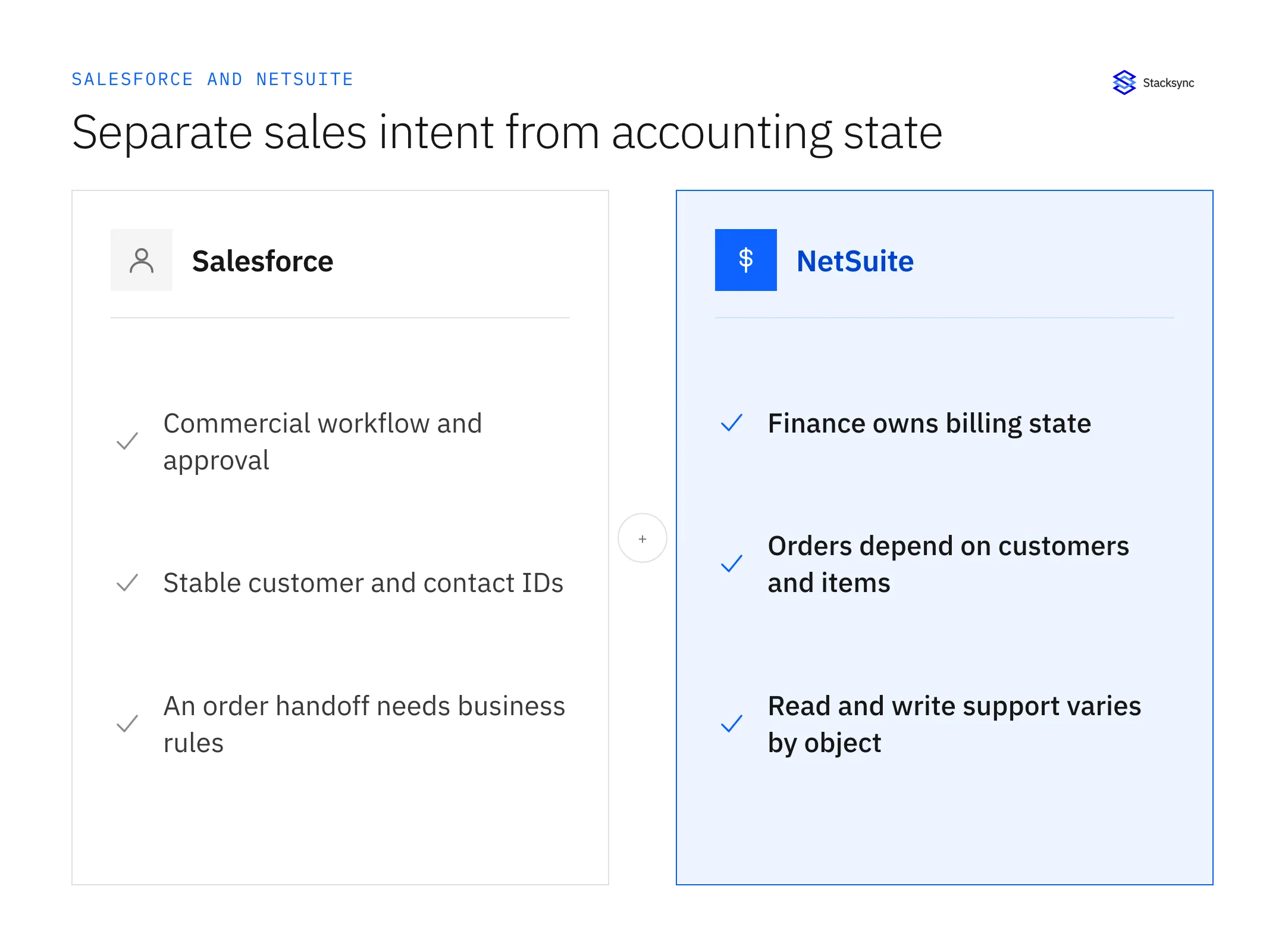
Start with a concrete business handoff: for example, an approved sales outcome creates or updates a customer in NetSuite, while finance-controlled billing status becomes visible in Salesforce. That Salesforce record often starts as a prospect a rep saved from LinkedIn into Salesforce, so the identity you sync downstream is only as clean as that first capture. Separate that business workflow from raw record replication. A replicated opportunity is not automatically an approved sales order.
Use the Salesforce–NetSuite integration page for the Stacksync overview. This guide focuses on the mapping, setup, and acceptance decisions that make the connection useful in production.
Choose the integration method against your actual objects
| Approach | Useful fit | Evaluation question |
|---|---|---|
| Oracle NetSuite Salesforce Connector | The Oracle-provided workflow matches your NetSuite/Salesforce setup | Check OneWorld, subsidiary, access and supported workflow requirements |
| Other packaged CRM–ERP integrations | A standard order/customer workflow matches the package | Does the package support your subsidiaries, customizations and approval path? |
| Managed sync platform | Selected records need ongoing movement across CRM, ERP and other systems | Which objects and fields are writable in the chosen connector? |
| Custom SuiteTalk/Salesforce implementation | A specialized process warrants engineering ownership | Who maintains identity, retries, API changes and business-event logic? |
| Scheduled extract or warehouse load | The requirement is reporting rather than operational write-back | Is the refresh window acceptable and is the destination intentionally read-only? |
Oracle publishes a Salesforce Connector setup guide for its NetSuite Connector Platform SuiteApp. The documented prerequisites include a OneWorld account with a subsidiary and Salesforce integration-user setup. Evaluate this native option against the actual workflow rather than assuming no official connector exists.
Compare the same record set and failure cases across options. A prebuilt flow can save implementation work when it matches the process; a generic sync can expose the data while still requiring explicit business rules. Record those remaining responsibilities in the integration evaluation worksheet.
If you are a software company offering Salesforce and NetSuite sync to your own customers, including their custom objects, see embedded two-way sync, which runs one sync per customer into a database your product owns.
Map business identities before business values
Keep the Salesforce record ID and NetSuite internal ID linked through a stable cross-system key. Names and email domains are useful search hints, but they are poor permanent customer identities: both can change and neither is necessarily unique across subsidiaries or account hierarchies.
| Business entity | Illustrative relationship | Design decision |
|---|---|---|
| Customer | Salesforce Account ↔ NetSuite Customer | Define entity/subsidiary identity and the match rule |
| Person | Salesforce Contact ↔ NetSuite Contact | Preserve the correct customer relationship |
| Commercial handoff | Approved sales outcome → ERP order process | Define the trigger and required approvals separately from sync |
| Billing visibility | NetSuite invoice/payment status → Salesforce fields or custom object | Finance remains the writer of accounting state |
| Products and lines | Product/item IDs plus parent order reference | Validate item identity, quantity, unit and currency semantics |
These are design examples, not an automatic mapping specification. Confirm object and field support in your account.
Oracle recommends external IDs and supported upsert operations for avoiding duplicate NetSuite records, while noting that not every record type supports an external ID. Check NetSuite’s external-ID guidance. Choose the supported identity mechanism for the actual endpoint rather than assuming one universal key policy.
A CRM deal amount and an ERP invoice total may intentionally differ because of tax, shipping, discounts, currency conversion, or partial billing. Do not keep overwriting one with the other to force equality. Map the distinct meanings and reconcile the business totals at the right level.
Check read and write support separately
The Stacksync NetSuite object matrix distinguishes supported reads, supported writes, request-access objects, and read-only outputs. It currently lists Customer and Contact as readable and writable, Saved Searches as read-only, and custom-object writes as requiring access. Some accounting/reference-object writes are marked as coming soon.
That object-level distinction belongs in the mapping workbook. If sales needs to see an account balance, a one-way projection may be correct. If sales needs to change a customer address, verify the specific customer field, required references, and permissions. A connector labeled “two-way” does not make a saved search writable.
Recheck the current matrix when planning the rollout. ERP customizations, required fields, validation, and access roles can affect an otherwise supported record. Test the actual account configuration, including subsidiaries and custom record definitions if they are part of the scope.
Set up a controlled Salesforce–NetSuite connection
- 01Complete the field mapping workbook, including identity, owner, direction, nulls and lifecycle actions.
- 02Have the NetSuite administrator prepare the documented integration authorization and required permissions.
- 03Create the Salesforce connection using the intended integration identity and validate its object access.
- 04Create the NetSuite connection and select the supported objects required for the first workflow.
- 05Validate a small set of existing customer identities before enabling creates or dependent records.
- 06Map approved fields, establish parent references, and run a bounded initial load.
- 07Enable the permitted return flow, then test exceptions and recovery before expanding scope.
The Stacksync NetSuite authorization guide documents Token-Based Authentication, integration credentials, access-token credentials, and the account ID. Administrator setup is required. Follow that current guide rather than copying credentials or permission lists from an unrelated integration.
For Salesforce, confirm the supported capture mode and object permissions. Stacksync documents triggers and incremental polling; measure end-to-end freshness for your objects under the expected load. Keep secrets out of planning workbooks and test evidence.
Load dependent records in a predictable order
A sales order depends on valid customer and item references. Its lines depend on the parent order and appropriate item identities. Model these dependencies explicitly so a missing parent becomes a recoverable exception, rather than a reason to create a guessed duplicate customer.
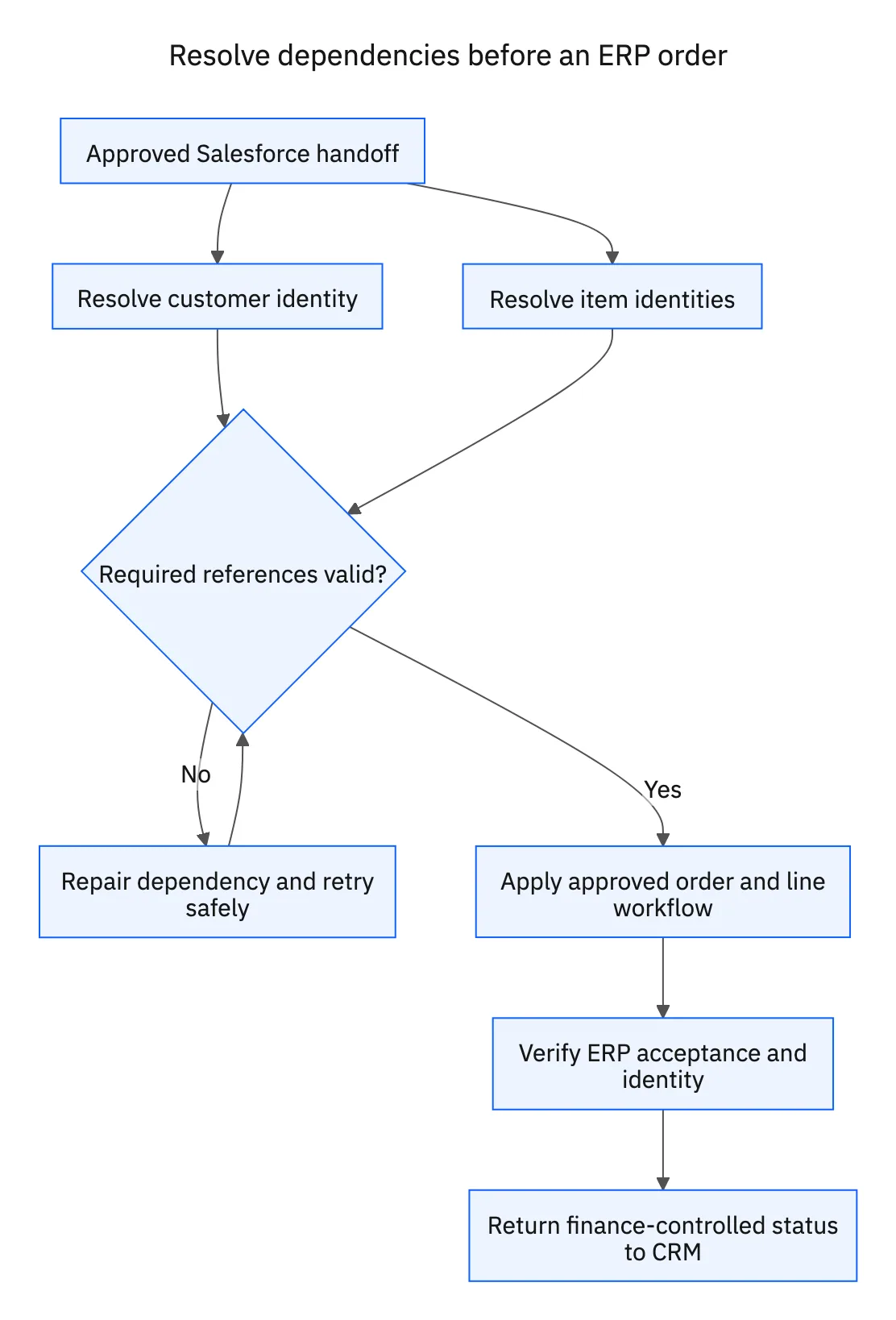
For an illustrative first rollout, establish customer and item mappings, validate them, then process the approved order handoff. After the ERP accepts the record, make the relevant status visible in Salesforce. Use a stable operation identity for the create path and test a timeout after the destination may have committed.
Decide how corrections behave. A changed opportunity after an approved order may require an amendment workflow rather than a blind update to the ERP record. An invoice in a closed accounting period may not be editable even if the API exposes that object. The business owner must specify the allowed lifecycle transitions.

Test the finance-impacting failures
| Case | Required observation |
|---|---|
| Repeat customer or order creation | One intended business entity/action remains |
| Missing customer or item reference | A visible dependency failure with a repair path |
| Different currency or subsidiary | The correct record context is preserved |
| Rejected enum or required field | The record fails visibly without corrupting successful records |
| Finance and sales edit concurrently | The agreed owner controls the field |
| Partial billing or canceled order | The lifecycle follows the approved business process |
Reconcile record IDs and selected business totals, not only counts. Ten invoices on each side can still represent different invoices. Inspect line quantities, amounts and references for a representative set, and retain the expected exceptions where CRM and ERP deliberately model different concepts.
Use the retry and replay guide to choose an appropriate repair. In Stacksync, Retry to sync reads current source values; verify whether that matches the intended business correction before applying it to a finance-sensitive record.
Apply this in fire, life-safety and security integrators: installed asset and replacement relationship
Fire and security integrators use this same Salesforce–NetSuite pairing to connect installed-equipment context with customer and service records. Keep device and site identity explicit, and separate administrative record updates from inspection or technical certification decisions.
| Record to reconcile | Responsible owner | Rule to preserve |
|---|---|---|
| Installed asset | Service asset administrator | Retain the device identity, site and installation relationship. |
| Replacement relationship | Service supervisor | Link predecessor and replacement equipment rather than erasing history. |
| Billing customer | Finance | Keep the payer and service agreement reference distinct from the asset owner. |
An exception to plan for: Replacement reuses a location label. Keep a new device identity and link it to the same functional location. Acceptance check for the pilot: replacing a device preserves the prior service history.
The fire, life-safety and security integrators hub connects the broader operating context. These guides develop the specific record mappings and decisions for this application:
Finish with a scoped proof of concept
The useful proof of concept includes your actual customer identity rule, one dependent order, one finance-owned return field, and one failure that the team can recover. Record the accepted object limits and the owner of any additional workflow logic.
Complete the production-readiness checklist and retain the mapping workbook as the change record. To evaluate Stacksync, book a Salesforce–NetSuite integration review with the object list, subsidiaries, volume, and the business handoff you need to prove.
FAQ
Frequently asked questions










Explore these integrations and topics
- integrationSalesforce and NetSuite integration
- connectorNetSuite integrations
- connectorSalesforce integrations
- platformTwo-way sync
- platformCRM and ERP integration
- Two-way sync guidesUnderstand two-way sync, record matching, field ownership, and production readiness.
- CRM and ERP integration guidesPlan account, order, invoice, and payment flows between commercial and finance teams.
Related articles