






















What Is Two-Way Sync? How It Works and 3 Examples
Understand two-way sync, field ownership, conflict handling, and recovery with CRM, ERP, and database examples plus a practical mapping workbook.
- Author
- Ruben Burdin · Founder & CEO
- Published
- Updated
- Read time
- 7 min read

Two-way sync keeps approved changes moving in both directions
Two-way sync, also called bidirectional sync, propagates selected data changes from system A to system B and from B to A. The integration matches records, maps fields, and applies rules about which changes each system may make. Its purpose is to keep the agreed data consistent across two editing surfaces.
Two-way describes direction, not speed or universal write access. The integration may be event driven or scheduled. Some fields can flow in both directions while others have a single owner. A finance-owned credit status, for example, can flow from the ERP to the CRM while a sales-owned account note travels the other way.
Temporary differences are possible while a change is in transit or a destination rejects it. A useful specification says what should eventually agree, how quickly it should agree under the expected workload, and what happens when it cannot. “Both systems are always identical” is not a workable acceptance test.
Use this guide for the concepts, the Stacksync two-way sync overview for the product, and the field mapping workbook to document your own integration.
Start with identity and ownership
Identity determines whether a destination row is the same customer, order, or contact as the source record. Names, email addresses, and domains can change or collide. Establish a matching rule, keep the paired system identifiers, and test what happens when a record is merged, converted, or created again after a timeout.
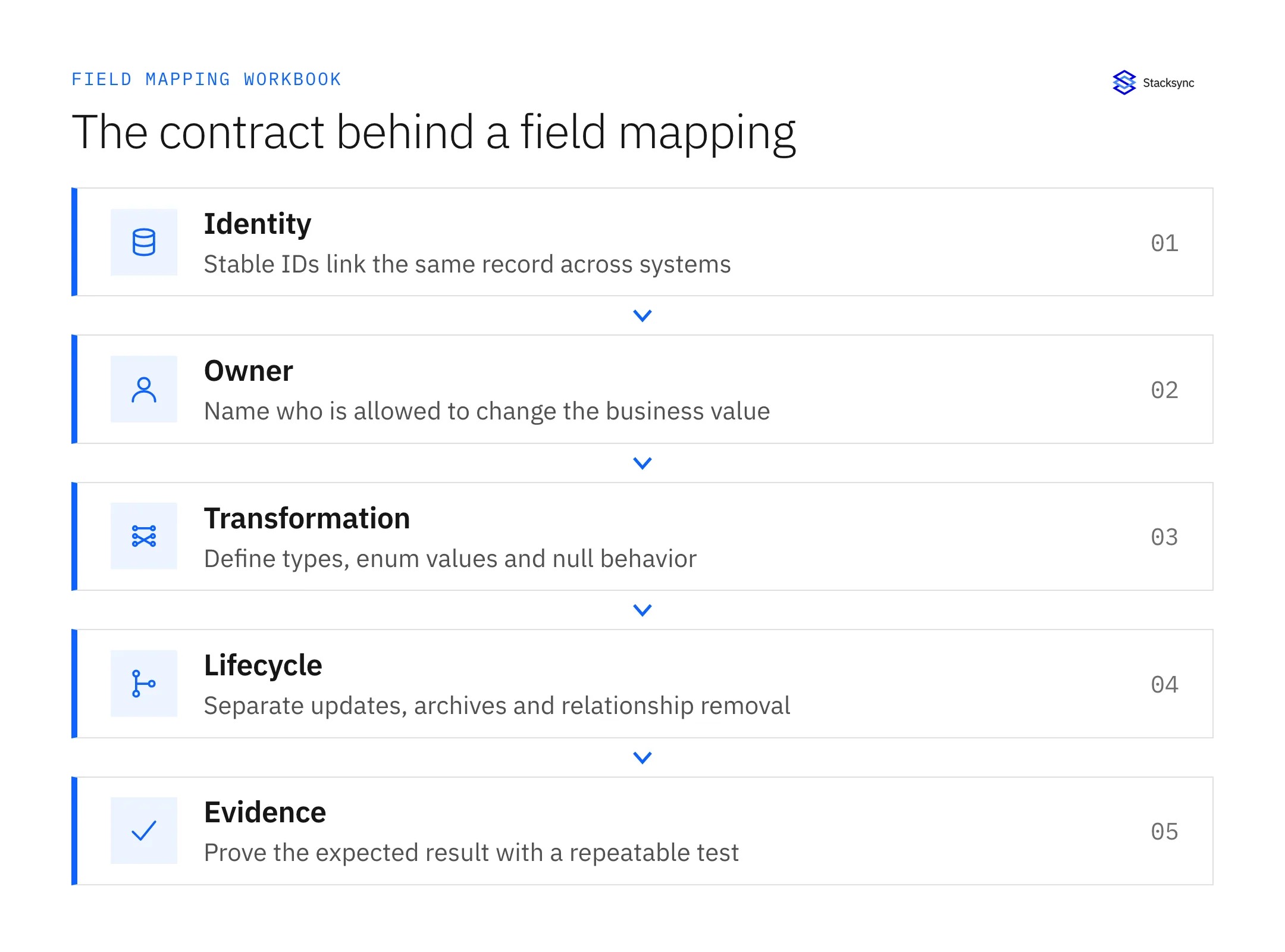
| Decision | Example | Failure to test |
|---|---|---|
| Record identity | Persist the CRM and ERP customer IDs together | A repeated create makes a second customer |
| Field owner | ERP controls billing status | An older CRM value overwrites finance |
| Transformation | Translate explicit status codes | An unknown code is silently discarded |
| Null behavior | An intentional clear differs from an omitted field | A partial update erases a useful value |
| Lifecycle | Removing a relationship preserves its records | A removed association deletes a customer |
A mapping should include the API field name, type, allowed values, ownership, and a test. A lossy transformation needs a deliberate policy: converting a timestamp to a date cannot reconstruct its original time on the return trip. Make that mapping one-way or preserve the missing information separately.
How a synchronization cycle works
- 01Detect a selected source change through an event, database change stream, or polling.
- 02Find the destination record using the agreed identity.
- 03Validate and transform only the permitted fields.
- 04Apply the ownership or conflict rule if changes compete.
- 05Write the intended value and record the outcome.
- 06Recognize reflected writes so the integration does not repeat its own work.
- 07Expose rejected records and reconcile the resulting state.
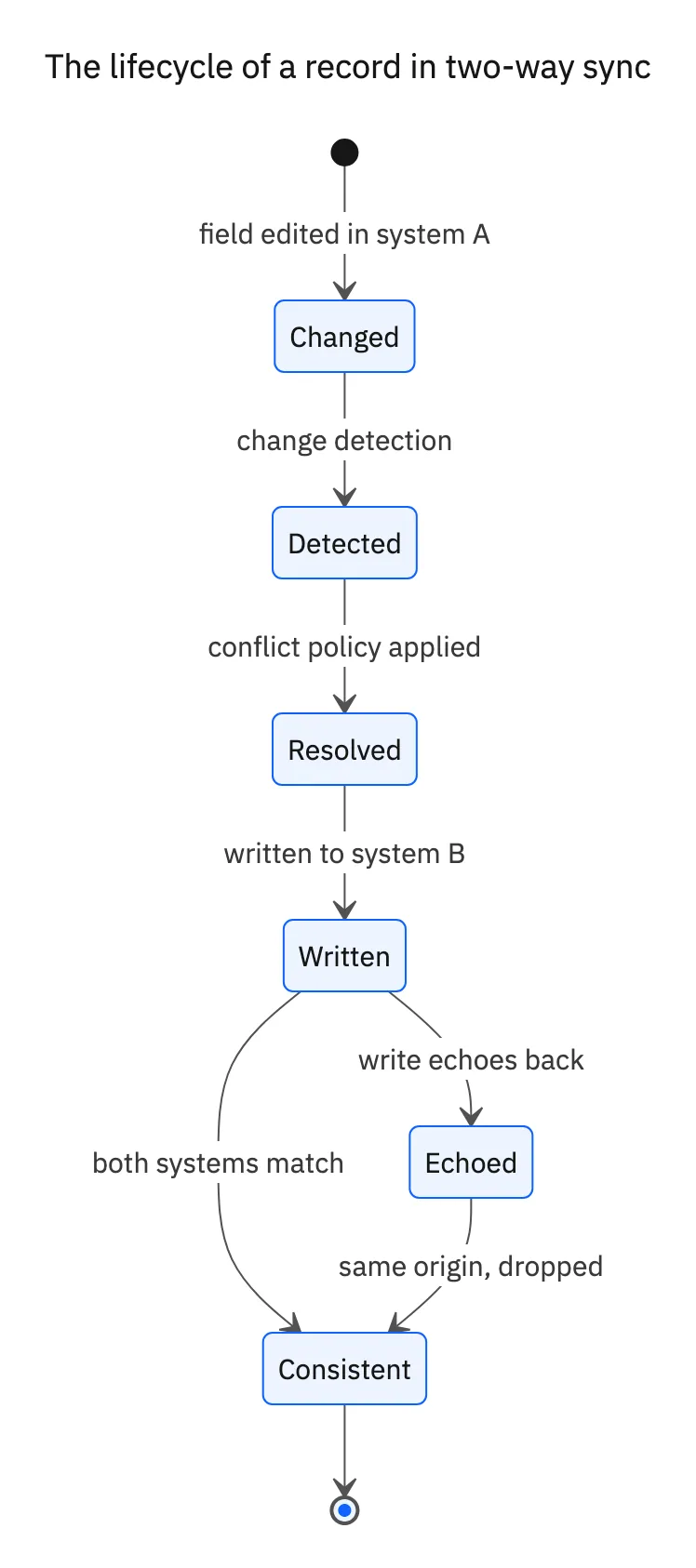
The diagram is an architectural example, not a guarantee that every connector uses the same implementation. A product might track origins, prior values, versions, or another form of shared state. Evaluate the observed behavior: a change should arrive once in the business sense, and its reflection should not create another unintended action.
Choose a conflict policy the business understands
A conflict occurs when competing changes cannot both be accepted under the data model. Two edits to the same phone number are an obvious example. Different fields can also conflict through a business constraint, such as a country and tax identifier that must remain compatible.
| Policy | Use when | Tradeoff |
|---|---|---|
| One system owns the field | The business has a clear authority | The other application is not an independent editor |
| Last accepted write wins | Recency is an acceptable deciding rule | An accidental later edit may replace a correct value |
| Merge independent edits | Field changes are compatible | Cross-field constraints still need validation |
| Request review | The outcome needs business judgment | An unresolved record needs an owner and deadline |
These are design options, not a claim that every integration exposes all four. HubSpot’s Salesforce documentation is a concrete example of product-specific field rules. Confirm the actual setting and test simultaneous edits before relying on it.
Keep direction separate from freshness
| Pattern | Direction | Primary question |
|---|---|---|
| One-way synchronization | A to B | Can B treat the synchronized fields as read-only? |
| Two-way synchronization | A to B and B to A | How are independent edits coordinated? |
| ETL or ELT | Sources into a processing or analytics destination | When is the prepared dataset available? |
| Reverse ETL | Prepared data into business applications | Which derived fields may overwrite application values? |
Any of these patterns can have different timing choices. Event delivery still includes capture, queueing, validation, and destination processing. Polling adds a detection interval. Stacksync’s Salesforce documentation describes trigger and polling modes, so freshness should be tested for the selected object and permissions.
Set a business target, then measure from the original edit to the usable destination value. Include peak activity and backlog recovery. A fast API response only measures one step; it does not prove that the returned data includes the latest business change.
Three practical two-way sync examples
1. Marketing CRM and sales CRM. HubSpot can own qualification while Salesforce owns the sales process. The integration must preserve identity through lead conversion and match companies to the right accounts. A useful test changes a qualification field, converts a lead, and confirms the same person remains linked. See the HubSpot–Salesforce setup guide.
2. CRM and ERP. Salesforce captures commercial intent while NetSuite controls accounting state. A customer handoff needs stable IDs; an order needs valid customer and item references. A returned invoice status should not make the CRM the authority for posting a financial transaction. The Salesforce–NetSuite guide separates supported object writes from the business workflow.
3. CRM and an operational database. An application can read selected HubSpot records in PostgreSQL and write an approved subset back. Preserve the HubSpot ID separately from the local database key, and model associations explicitly. Start read-only if reporting is the only requirement; add write-back when the application has a real editing responsibility. Follow the HubSpot–PostgreSQL blueprint.
If the application is your own SaaS product and each customer brings their own CRM, run the same design once per customer. See embedded two-way sync.
These are illustrative designs. They are not customer case studies or measured performance results. Each becomes an implementation only after the selected object coverage, permissions, mappings, and failure behavior are verified.

Plan for failed and repeated writes
A timeout does not establish that a destination rejected a write. It may have applied the change and lost the acknowledgment. AWS’s idempotent API guidance explains why a stable operation identity matters when repeating requests. Verify both duplicate records and downstream side effects.
Also distinguish replaying a historical event from reading the latest source value again. Stacksync documents current-state retry, revert, and ignore actions in its Issues dashboard. The retry and replay deep dive explains how to choose an action and verify the outcome.
Evaluate a tool with your own records
Shortlist methods that support the required systems and objects. A native connector can be appropriate when its rules fit; a managed platform can simplify a broader topology; a custom implementation may justify ongoing engineering when its behavior is specialized. A connector count alone does not establish fit.
If you hire dedicated Node.js developers for a custom implementation, use the same acceptance criteria as for a managed product. Assign responsibility for API changes, incident response, and the identity and recovery state after the initial build.
Complete the integration evaluation worksheet with evidence for normal updates, simultaneous edits, initial load, invalid values, deletes, and recovery. Use the production-readiness checklist to assign owners and decide whether the tested configuration can ship.
For a Stacksync evaluation, bring your system pair and mapping workbook to a demo. Include one difficult relationship and one failed-write scenario so the discussion leads to a reviewable integration design.
FAQ
Frequently asked questions










Related articles





