Lovable HubSpot Integration: Two-Way Sync
Sync your Lovable app's database with HubSpot in real time, both ways. Keep contacts, deals, and custom objects aligned, no integration code required.
- Author
- Ignacio Malpartida · GTM Engineer
- Published
- Updated
- Read time
- 7 min read

Lovable is an AI-powered app builder that lets you create production-ready web applications from natural language prompts. HubSpot is the CRM platform that powers your sales, marketing, and customer service operations. When you build customer-facing apps in Lovable, the data those apps generate needs to flow into HubSpot and vice versa. Without a sync layer, you end up with two disconnected systems, manual data entry, and stale records everywhere.
Stacksync bridges this gap with a real-time, bidirectional integration between your Lovable app's database and HubSpot. No code required. This guide covers how it works, what you can sync, and how to set it up.
Why Connect Lovable Apps to HubSpot?
What Lovable Builds
Lovable generates full-stack web applications backed by a PostgreSQL or Supabase database. When you describe what you want, Lovable produces working code, deploys it, and gives you a live app with a real database schema underneath. That means every form submission, user action, and data update in your Lovable app writes directly to database tables you own.
The Data Gap Between Custom Apps and CRM
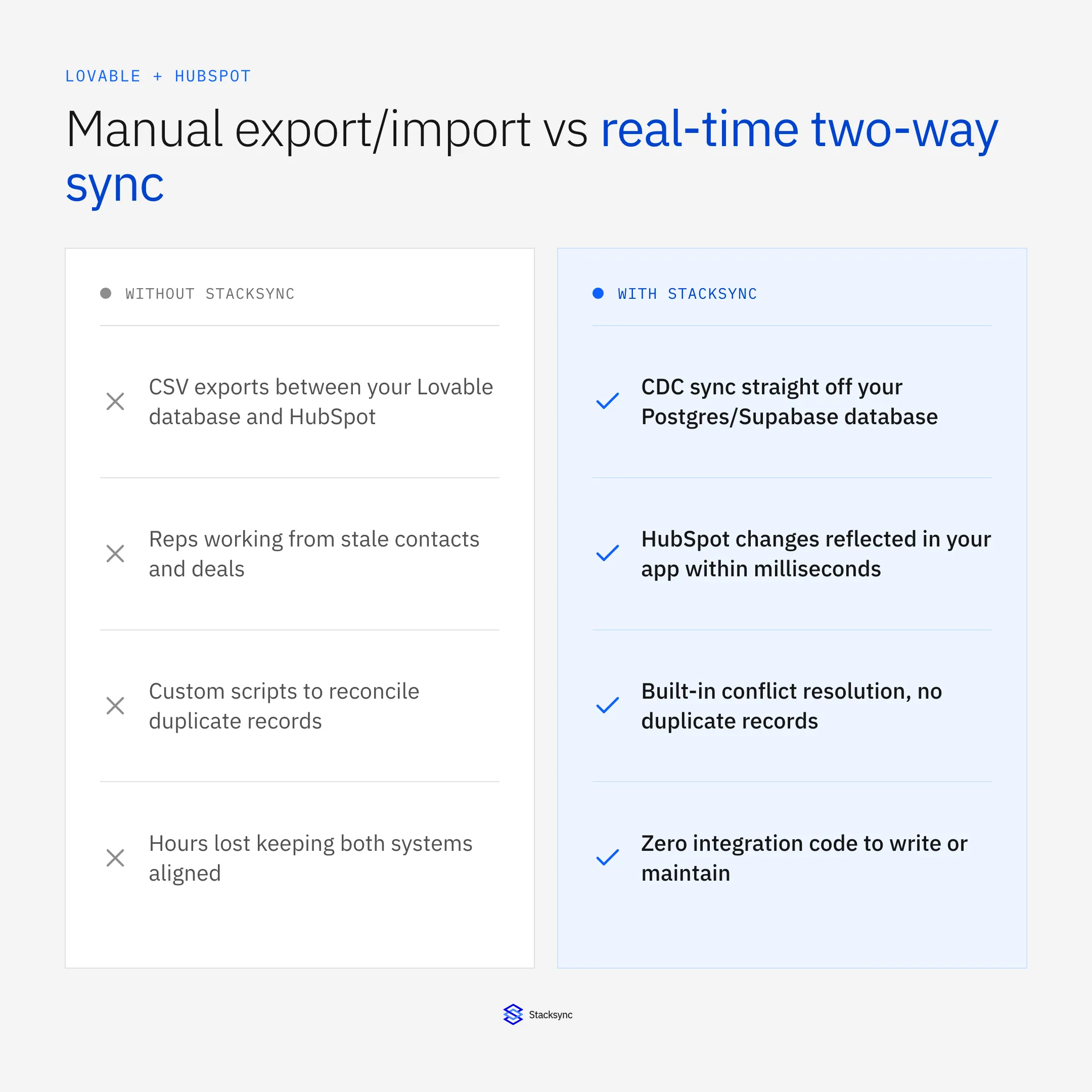
The problem surfaces when your sales team works in HubSpot but your customers interact with a Lovable-built portal. A customer updates their contact information in your app, but HubSpot still shows the old address. A sales rep closes a deal in HubSpot, but your app's dashboard doesn't reflect the new status. These discrepancies multiply across every record and every team member.
Manual CSV exports, scheduled API scripts, and Zapier automations all attempt to solve this but introduce latency, maintenance burden, and failure points. What you need is a persistent, real-time connection that keeps both systems synchronized at the row level.
How Two-Way Sync Works
Lovable App Database to HubSpot
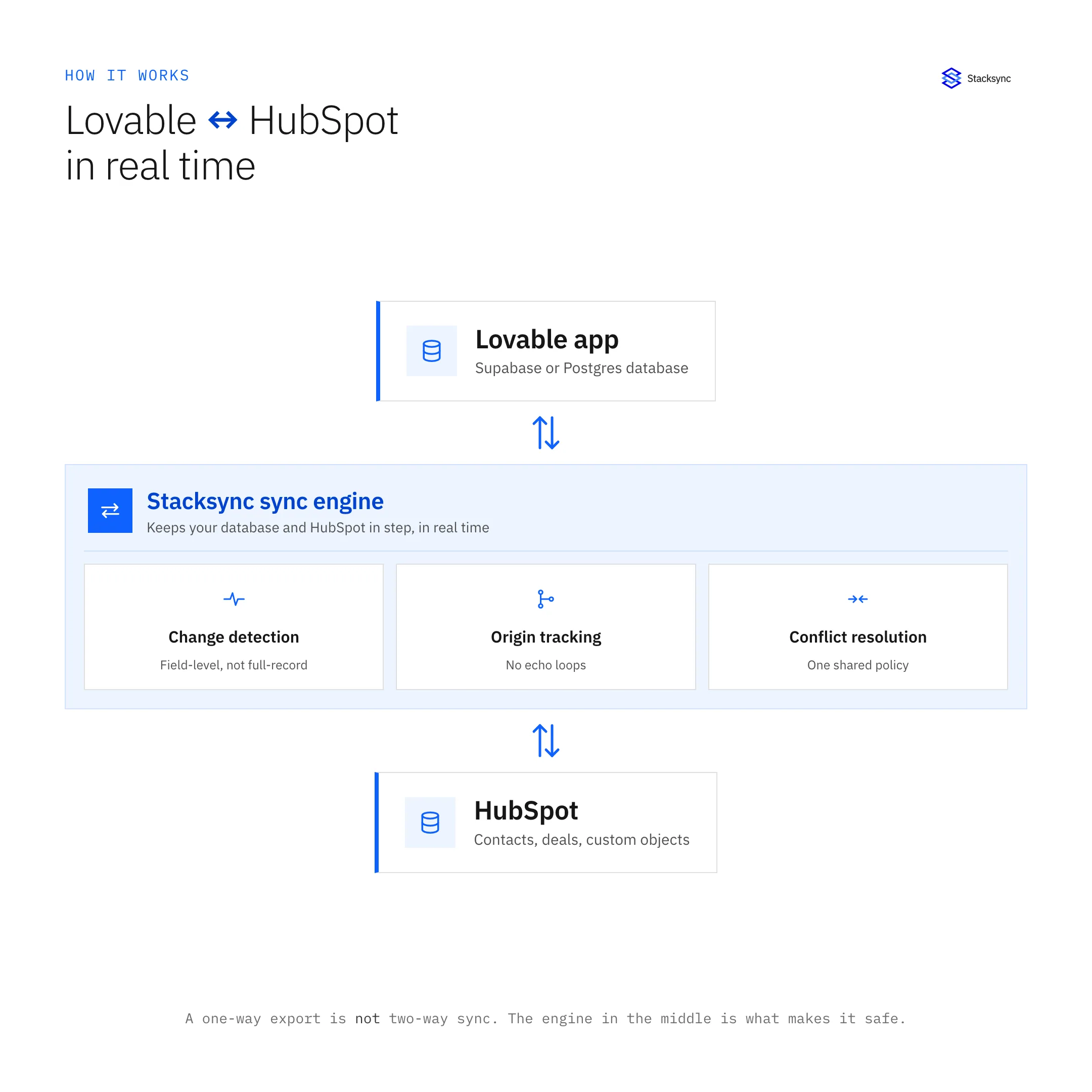
Stacksync monitors your Lovable app's PostgreSQL database using Change Data Capture (CDC). When a row is inserted, updated, or deleted, Stacksync detects the change within milliseconds and pushes it to the corresponding HubSpot object. A new row in your customers table becomes a new HubSpot contact. An updated deal_status column updates the associated HubSpot deal stage.
HubSpot Changes Back to Your App
Stacksync subscribes to HubSpot webhooks so changes made by your sales and marketing teams flow back to your database in real time. When a rep updates a contact's phone number in HubSpot, your Lovable app's database reflects that change immediately. Your app's UI shows the updated data on the next page load without any polling or manual refresh.
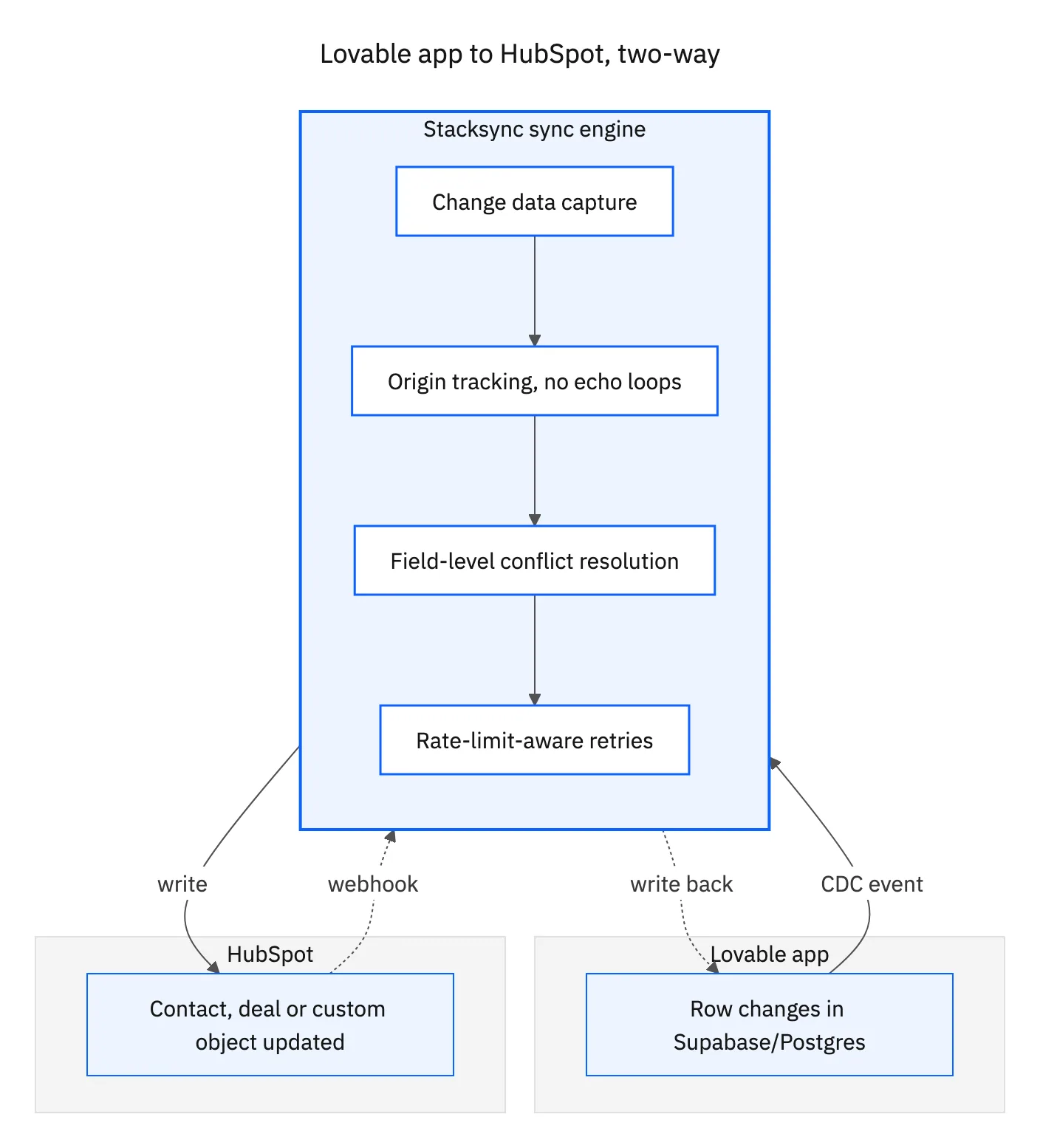
Conflict Resolution
When the same record is modified in both systems simultaneously, Stacksync applies your configured resolution rules. You choose the strategy that fits your workflow:
- System priority: HubSpot always wins, or the database always wins
- Field-level rules: HubSpot owns the
deal_stagefield while the database ownsshipping_address - Timestamp-based: the most recent change wins
Every conflict is logged with before-and-after values so your team can audit decisions and adjust rules over time.
What Data Can You Sync?
Contacts and Companies
Map your Lovable app's user tables to HubSpot contacts and companies. Standard fields like name, email, phone, and address map automatically. Custom properties you've added in HubSpot can be mapped to any column in your database.
Deals and Pipelines
Sync deal records between your app's orders or subscriptions table and HubSpot deal objects. Pipeline stage changes in HubSpot update your app's status fields, and new orders created in your Lovable app appear as deals in your sales pipeline.
Custom Objects and Properties
HubSpot custom objects are fully supported. If you've created custom objects like "Projects", "Tickets", or "Subscriptions" in HubSpot, Stacksync maps them to corresponding tables in your Lovable app's database. Custom properties on standard objects work the same way.
Setting Up the Integration with Stacksync
Step 1: Connect Your Lovable App's Database
In Stacksync, add your Lovable app's PostgreSQL connection string. Stacksync supports direct connections, SSH tunnels, and IP whitelisting. If your Lovable app uses Supabase, you can use the Supabase connection pooler URL. Stacksync automatically detects your database schema, listing all tables and columns available for sync.
Step 2: Authenticate HubSpot
Connect your HubSpot account via OAuth. Stacksync requests only the scopes needed for the objects you plan to sync. No admin-level access is required. Once authenticated, Stacksync loads your HubSpot schema including standard objects, custom objects, and all properties.
Step 3: Map Fields Between Systems
Stacksync's visual field mapper shows your database columns on the left and HubSpot properties on the right. Click to connect them. Stacksync handles data type conversion automatically. A VARCHAR column maps to a HubSpot text property, a TIMESTAMP maps to a date property, and a BOOLEAN maps to a checkbox.
Step 4: Configure Sync Rules
Set the sync direction for each mapping: database to HubSpot, HubSpot to database, or bidirectional. Configure conflict resolution at the global or field level. Set filters if you only want to sync records matching certain criteria, like contacts with a specific lifecycle stage or orders above a certain value.
Step 5: Activate and Monitor
Enable the sync. Stacksync performs an initial full sync to align both systems, then switches to real-time CDC mode. The monitoring dashboard shows sync volume, latency, errors, and conflict resolution events. Set up Slack or email alerts for failures so your team is notified immediately if something breaks.
Real-Time vs Batch: Why Latency Matters
Sub-Second Sync for Customer-Facing Apps
When your Lovable app serves customers directly, latency matters. If a customer updates their profile in your app and then calls your support team 30 seconds later, the support rep needs to see the updated information in HubSpot. Batch sync tools like Zapier and Make poll on intervals of 1 to 15 minutes, which means your support rep might be looking at stale data.
Stacksync's CDC-based approach delivers changes in under one second. The moment data changes in either system, it's reflected in the other.
API Rate Limit Handling
HubSpot enforces API rate limits that batch tools often hit during large syncs. Stacksync manages rate limiting automatically with intelligent queuing and backoff. During initial full syncs of large datasets, Stacksync throttles requests to stay within HubSpot's limits while maximizing throughput. You don't need to worry about 429 errors or failed batches.
Common Use Cases
Customer Portals Built in Lovable
Build a self-service customer portal in Lovable where users view their account details, update preferences, and track orders. All changes sync to HubSpot so your sales and support teams always have the latest customer data. When a rep updates a deal stage in HubSpot, the customer's portal reflects the change instantly.
Internal Tools with CRM Data
Create internal dashboards and admin tools in Lovable that pull live data from HubSpot via your synced database. Instead of building HubSpot API integrations into your Lovable app, query your local database tables that Stacksync keeps synchronized. This is faster, simpler, and doesn't count against your HubSpot API quota.
Lead Capture Forms to HubSpot
Build custom lead capture forms in Lovable with validation logic, conditional fields, and multi-step flows that HubSpot's native forms don't support. Form submissions write to your database and Stacksync pushes them to HubSpot as new contacts with all properties populated. Your marketing team's workflows, sequences, and lead scoring trigger immediately.

Security and Compliance
Stacksync is built for teams that handle sensitive data:
- SOC 2 Type II: annual audit covering security, availability, and confidentiality
- ISO 27001: certified information security management system
- HIPAA BAA: available for healthcare organizations handling protected health information
- Zero persistent storage: Stacksync processes data in transit but never stores your CRM or database records on its servers
- Encryption: TLS 1.2+ for all data in transit, AES-256 for any temporary processing
- Network security: SSH tunneling for database connections, IP whitelisting, and VPC peering available for enterprise plans
Lovable HubSpot Integration vs Alternatives
How does Stacksync compare to other ways of connecting Lovable apps to HubSpot?
| Criteria | Custom API Code | Zapier | Make | Stacksync |
|---|---|---|---|---|
| Setup time | Days to weeks | Hours | Hours | Minutes |
| Sync direction | Custom | One-way per Zap | One-way per scenario | Bidirectional |
| Latency | Depends on implementation | 1-15 minutes | 1-15 minutes | Sub-second |
| Conflict resolution | Must build | None | None | Built-in, configurable |
| Schema changes | Manual code updates | Manual Zap updates | Manual scenario updates | Auto-detected |
| HubSpot custom objects | Supported | Limited | Limited | Full support |
| Rate limit handling | Must build | Basic retry | Basic retry | Intelligent queuing |
| Maintenance | Ongoing | Moderate | Moderate | Zero |
Getting Started
Connecting your Lovable app to HubSpot with Stacksync takes minutes, not days. Here's how to start:
- 01Sign up for a Stacksync account
- 02Add your Lovable app's database connection
- 03Authenticate your HubSpot account
- 04Map fields and set sync rules
- 05Activate real-time two-way sync
Your Lovable app and HubSpot will stay synchronized automatically from that point forward. No code to maintain, no batches to monitor, no data discrepancies to chase down.
Already using Lovable with Salesforce? Check out our Lovable Salesforce integration guide. For a deeper dive into bidirectional sync concepts, read our complete guide to HubSpot two-way sync.

FAQ
Frequently asked questions










Explore these integrations and topics
Related articles