From Zapier to Enterprise: Graduate Your Supabase Integrations with Stacksync
Recognize when Zapier-style integrations can't scale, and how to migrate to production-grade sync with Supabase and Stacksync for reliable operations.
- Author
- Ruben Burdin · Founder & CEO
- Published
- Read time
- 12 min read

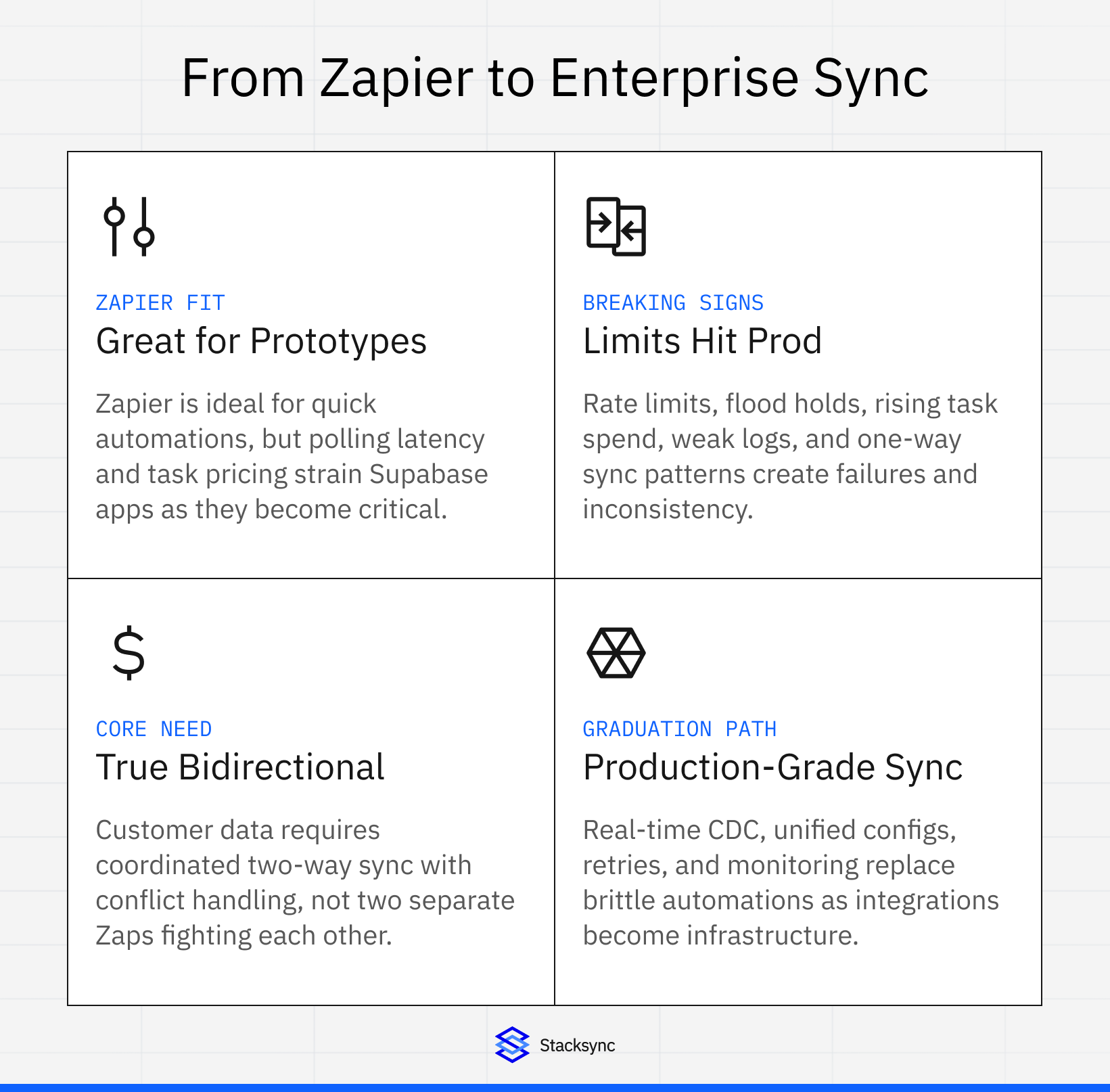
Zapier serves as the perfect on-ramp to integration automation. Within minutes, you connect two apps and automate repetitive tasks without code. However, the moment your Supabase-powered application becomes mission-critical infrastructure, Zapier's productivity-tool DNA reveals fundamental limitations that impact reliability, performance, and cost.
The Zapier Sweet Spot and Its Boundaries
Zapier excels at specific scenarios. Individual contributors automating personal workflows benefit from the 8,000-app ecosystem and no-code builder. Marketing teams connecting form submissions to email platforms find immediate value. Small teams testing integration concepts validate ideas within hours instead of engineering sprints.
The platform's architecture optimizes for these lightweight use cases. Polling triggers check for new data every 1-15 minutes depending on plan tier. Task-based pricing encourages simple, low-volume automations. The visual builder prioritizes ease of use over complex transformation logic.
These design choices become constraints as requirements evolve. Free plans limit polling to 15-minute intervals. Professional plans poll every 2 minutes. Even Team and Enterprise plans cannot achieve true real-time synchronization due to the polling architecture. For Supabase applications requiring instant data consistency, this latency compounds across integrations.
Five Signals You've Outgrown Zapier
1. Rate Limits Block Production Operations
Zapier implements strict rate limiting to protect infrastructure and connected apps. Free and Professional plans restrict private apps to 100 requests every 60 seconds. Team and Enterprise plans increase limits to 5,000 requests per 60 seconds. Zaps with instant triggers encounter 429 errors exceeding 20,000 requests every 5 minutes per user.
When your Supabase application generates high-frequency database events, Zapier throttling creates cascading failures. PostgreSQL triggers firing on each insert, update, or delete quickly exhaust rate budgets. A single bulk operation updating 1,000 records triggers 1,000 individual Zap runs, hitting limits within seconds and queuing subsequent operations.
Free and trial plans face additional constraints with polling triggers held if exceeding 200 requests every 10 minutes per Zap. This becomes particularly problematic for Supabase applications with multiple tables requiring synchronization. Each table needs a separate Zap, and each Zap consumes request quota independently.
2. Task Costs Spiral with Data Volume
Zapier pricing centers on monthly task consumption. Each successfully completed action counts as one task. Free plans include 100 tasks monthly. Professional starts at 2,000 tasks for $29.99 monthly. Team plans begin at higher task tiers with custom pricing.
For Supabase applications, task consumption scales with data velocity. Consider a CRM integration syncing contact updates. Every contact modification in Supabase triggers a Zap writing to Salesforce. With 50 sales reps creating and updating 20 contacts daily, you generate 1,000 tasks daily or 30,000 monthly. This exceeds most Professional plan tiers and requires upgrades to higher-volume pricing.
Multi-step Zaps multiply task consumption. A workflow with one trigger and three actions consumes three tasks per execution. Complex integrations involving data transformation, conditional logic, and multiple destination writes can consume 5-10 tasks per trigger event. Organizations quickly find monthly costs reaching thousands of dollars as usage scales.
3. One-Way Syncs Create Data Inconsistencies
Zapier fundamentally operates as a one-way automation platform. When data must flow bidirectionally between Supabase and external systems, teams create two separate Zaps for each direction. This dual one-way approach introduces race conditions and conflict scenarios that compromise data integrity.
Consider Supabase syncing customer data with Salesforce. One Zap monitors Supabase database changes and updates Salesforce. Another Zap watches Salesforce modifications and writes back to Supabase. When both systems update the same record simultaneously, the syncs create update loops or arbitrary last-write-wins behavior with no conflict resolution.
The timing delays inherent in polling exacerbate these issues. A Salesforce update occurs at 10:00:00. Zapier's next poll happens at 10:02:00. Meanwhile, a Supabase update occurs at 10:01:30. The Supabase-to-Salesforce Zap fires immediately with an instant trigger. When the Salesforce-to-Supabase Zap finally polls at 10:02:00, it overwrites the Supabase change with stale Salesforce data. Both systems now contain incorrect information, and neither represents the intended state.
4. Flood Protection Delays Business-Critical Operations
Zapier implements flood protection to prevent accidental mass operations. When 100 or more events trigger a Zap simultaneously, Zapier holds them and emails requesting confirmation. This safeguard protects against mistakes like accidentally triggering on historical records.
For production Supabase applications, flood protection becomes an operational barrier. Bulk operations like importing customer lists, processing batch transactions, or synchronizing historical data trigger holds requiring manual intervention. Zapier processes replayed runs at 1 per second, meaning 1,000 queued operations take over 15 minutes to complete after approval.
The maximum flood protection override limit of 1,500 events provides insufficient headroom for high-volume scenarios. Database migrations, system cutover events, or seasonal traffic spikes generate tens of thousands of operations requiring synchronization. These scenarios demand enterprise-grade throughput that Zapier's architecture cannot support.
5. Lack of Visibility Creates Debugging Nightmares
Zapier provides task history showing individual Zap executions with input and output data. For simple workflows, this suffices for troubleshooting. Complex multi-system integrations involving Supabase require deeper observability.
Log retention varies by plan tier. Starter plans retain 1 day of logs. Professional offers 7 days. Only Enterprise plans provide 30 days. When integration issues emerge during month-end processing or quarterly reporting, the logs necessary for root cause analysis have expired.
Error handling relies on basic retry mechanisms and email alerts. Zapier lacks the advanced monitoring, alerting, and debugging capabilities enterprise operations require. No centralized dashboard shows sync health across all integrations. No metrics track data consistency or lag. No audit trails prove compliance with data governance policies.
The Bidirectional Sync Requirement
Supabase applications often serve as operational data stores requiring real-time consistency with external systems. Customer data lives in Salesforce but needs immediate availability in Supabase for custom applications. Product catalog information resides in Supabase but must sync to e-commerce platforms. Support tickets flow between Zendesk and Supabase-powered internal tools.
These scenarios demand true bidirectional synchronization, not dual one-way automation. Bidirectional sync handles conflicts intelligently through last-write-wins with timestamp comparison, field-level synchronization preventing full record conflicts, and configurable resolution strategies matching business rules.
Attempting bidirectional sync with Zapier creates architectural complexity. You maintain two separate Zaps for each direction. Each Zap requires independent configuration, error handling, and monitoring. Changes to data models demand updates in both Zaps. Debugging issues requires correlating events across two separate execution histories.
The fundamental problem remains: Zapier was never designed for stateful synchronization. It processes each task independently without awareness of related operations. Building robust bidirectional sync requires a unified sync engine that coordinates both directions and maintains sync state across all operations.
Migration to Production-Grade Sync with Stacksync
Stacksync provides purpose-built bidirectional synchronization between Supabase and enterprise applications. The platform addresses Zapier's architectural limitations with capabilities designed specifically for operational data consistency.
Real-Time Change Data Capture
Stacksync implements non-invasive change data capture detecting Supabase modifications at field level without database extensions or triggers. Changes propagate with sub-100ms latency compared to Zapier's 1-15 minute polling intervals. This ensures both systems maintain up-to-date state supporting real-time operational requirements.
The CDC approach scales efficiently regardless of data volume. A single table with 100,000 rows generates sync operations only for modified records. Stacksync processes millions of changes daily without the task-count limitations constraining Zapier implementations.
Unified Bidirectional Architecture
Rather than maintaining separate integrations for each direction, Stacksync provides a single sync configuration managing bidirectional data flow. Field mappings apply consistently in both directions. Conflict resolution strategies apply uniformly to all scenarios. Error handling covers the complete sync lifecycle.
This unified approach eliminates the race conditions and inconsistencies inherent in dual one-way Zapier automations. Stacksync maintains sync state tracking the last successful operation in each direction. When conflicts occur, configurable resolution logic determines which change prevails based on timestamps, source system priority, or custom business rules.
No-Code Configuration
Stacksync maintains ease of use while providing enterprise capabilities. Connect Supabase using database credentials or secure connection options like SSH tunneling or SSL certificates. Map tables and fields through visual interface matching Supabase columns to external system objects. Configure sync direction as bidirectional, Supabase-to-system, or system-to-Supabase based on requirements.
The configuration process completes in hours instead of the days or weeks traditional integration projects require. No custom code needed for standard scenarios. Edge Functions or custom transformations available for complex data mapping when necessary.
Predictable Pricing Model
Stacksync uses tiered subscription pricing rather than per-task consumption. Pro plan starts at $3,000 monthly for 3 active syncs and 1 million records. Additional records follow decreasing marginal costs from $8 per thousand to $0.10 per thousand at 100 million plus scale.
For high-volume Supabase applications, this model provides dramatic cost savings compared to Zapier's task-based pricing. An application syncing 100,000 operations daily consumes 3 million Zapier tasks monthly. At Zapier's pricing, this costs thousands of dollars and requires constant monitoring to avoid overages. Stacksync includes this volume within base pricing with predictable monthly costs.
Enterprise Monitoring and Reliability
Stacksync provides comprehensive monitoring through real-time dashboards showing sync status and performance. Alerts notify via email, Slack, PagerDuty, or WhatsApp for sync failures or latency threshold breaches. Detailed logs enable troubleshooting with 30-day retention on Enterprise plans.
Built-in error handling implements automatic retry logic for transient failures. Rollback capabilities revert problematic sync operations. Version control tracks configuration changes enabling quick restoration when updates cause issues.
Migration Strategy from Zapier to Stacksync
Organizations successfully migrate from Zapier to Stacksync following phased approaches minimizing risk and disruption.
Phase 1: Audit and Prioritization
Inventory all existing Zapier workflows touching Supabase. Classify by criticality distinguishing business-critical integrations requiring high reliability from convenience automations suitable for Zapier's productivity focus. Identify workflows experiencing rate limits, high task consumption, or data consistency issues as migration candidates.
Phase 2: Pilot Critical Sync
Select 1-2 high-value Supabase integrations for initial Stacksync implementation. Choose scenarios with clear bidirectional requirements, high data volume, or current Zapier limitations. Configure Stacksync sync alongside existing Zapier workflows initially.
Run parallel operations with both Zapier and Stacksync active. Monitor data consistency between approaches. Validate Stacksync handles all edge cases and scenarios correctly. This parallel period typically lasts 1-2 weeks before cutting over completely.
Phase 3: Gradual Migration
Migrate additional business-critical Supabase integrations from Zapier to Stacksync over 2-3 months. Prioritize workflows with highest Zapier task consumption or reliability issues. Maintain parallel operations during transition periods for each integration.
Retain Zapier for personal productivity workflows and non-critical automations. Not every integration requires enterprise-grade synchronization. Zapier remains excellent for convenience use cases like Slack notifications, email automation, or simple data routing where eventual consistency suffices.
Phase 4: Optimization
After migration, optimize Stacksync configurations for performance. Tune sync frequency for each integration balancing freshness requirements against resource consumption. Implement field-level filtering to sync only relevant data reducing bandwidth and improving speed.
Configure custom conflict resolution rules matching business processes. For customer data, prioritize CRM updates over Supabase for contact information but prefer Supabase for usage metrics. Establish monitoring thresholds triggering alerts before issues impact operations.
Phase 5: Establish Governance
Define policies determining which integrations belong in Stacksync versus Zapier. Business-critical bidirectional syncs with Supabase belong in Stacksync. Personal productivity automations and simple one-way notifications remain in Zapier. Document these guidelines preventing proliferation of production workloads on inappropriate platforms.

When Zapier Still Makes Sense
Even after migrating critical Supabase integrations to Stacksync, Zapier retains value for specific scenarios. Personal productivity automations like saving email attachments to cloud storage or creating calendar events from form submissions work perfectly in Zapier. Simple one-way notifications such as Slack messages when Supabase records meet conditions require neither bidirectional sync nor sub-second latency.
Experimental integrations and proofs of concept benefit from Zapier's rapid implementation. Test integration ideas with Zapier before committing engineering resources to production implementations. Migrate successful experiments to Stacksync once validated.
The key distinction centers on criticality and architectural requirements. When Supabase integration failures directly impact revenue, customer experience, or compliance, enterprise-grade synchronization becomes necessary. When integrations provide convenience or nice-to-have functionality, Zapier's productivity focus remains appropriate.
Cost Comparison: Zapier vs Stacksync
Consider a growing SaaS company with Supabase as their operational database requiring Salesforce CRM integration. The application generates 200,000 bidirectional sync operations monthly as customers, deals, and activities flow between systems.
Zapier Approach
Implementing bidirectional sync with Zapier requires two separate multi-step Zaps. Supabase to Salesforce Zap monitors database changes via webhooks and updates Salesforce records (1 trigger + 2 actions = 3 tasks per operation). Salesforce to Supabase Zap polls Salesforce every 2 minutes and writes to Supabase (1 trigger + 2 actions = 3 tasks per operation).
Total monthly tasks equal 200,000 operations × 3 tasks × 2 directions = 1,200,000 tasks. At Zapier Professional tier pricing, this volume typically costs $200-300 monthly depending on exact tier. However, the architectural limitations remain. Polling delays of 2 minutes create data lag. Dual one-way implementation risks race conditions and inconsistencies. Rate limits require careful monitoring to prevent holds.
Stacksync Approach
Stacksync Pro plan at $3,000 monthly includes 3 active syncs and 1 million records. The Supabase-Salesforce bidirectional sync consumes 1 sync. 200,000 monthly operations fall well within the 1 million record quota. Additional syncs to HubSpot, NetSuite, or other systems fit within the same plan.
The cost appears higher at first glance. However, Stacksync delivers genuine real-time bidirectional synchronization with sub-second latency. Unified architecture eliminates race conditions. Automatic conflict resolution ensures data consistency. Enterprise monitoring and alerting prevent silent failures.
Accounting for total cost of ownership including engineering time maintaining dual Zapier workflows, troubleshooting inconsistencies, and managing rate limit issues, Stacksync provides compelling value for business-critical integrations.
The Right Tool for the Right Job
The integration landscape requires matching tools to requirements. Zapier revolutionized automation accessibility enabling anyone to connect apps without code. For personal productivity, simple notifications, and experimental workflows, Zapier remains unmatched.
Production Supabase applications with bidirectional sync requirements demand different architecture. Real-time consistency, conflict resolution, enterprise monitoring, and predictable scaling need purpose-built synchronization platforms. Stacksync provides these capabilities while maintaining the no-code simplicity that made Zapier successful.
Organizations graduate from Zapier not because it failed but because requirements evolved beyond its design parameters. Recognizing when productivity tools transition to business-critical infrastructure marks operational maturity. Making the architectural shift to enterprise-grade synchronization positions Supabase applications for reliable scaling as data volumes and integration complexity grow.
Ready to graduate your Supabase integrations from Zapier? Stacksyncdelivers production-grade bidirectional sync between Supabase and enterprise applications with no-code setup, real-time performance, and enterprise reliability. Schedule a demo to discuss your specific integration requirements and discover how Stacksync eliminates the limitations constraining Zapier implementations.
FAQ
Frequently asked questions










Related articles