/
Data engineering

The 2026 Guide to NetSuite-Salesforce Integration: Strategies for Seamless Data Flow

This guide provides a comprehensive roadmap for successfully integrating NetSuite and Salesforce in 2026, helping you create a unified ecosystem where data flows seamlessly between your sales, finance, and operations teams. Whether you're just beginning your integration journey or looking to optimize an existing setup, you'll find actionable strategies to maximize the return on your software investments.

The 2026 Guide to NetSuite-Salesforce Integration: Strategies for Seamless Data Flow

In today's hyper-competitive business landscape, operational efficiency isn't just a goal, it's a requirement for survival. For many organizations, this means leveraging the best-in-class solutions for different business functions: Salesforce for customer relationship management and NetSuite for enterprise resource planning. However, these powerful platforms deliver their full value only when they work in harmony.

The statistics tell a compelling story: according to recent industry research, businesses with integrated CRM and ERP systems experience 32% higher customer satisfaction rates and reduce operational costs by up to 23%. Despite these benefits, many organizations still struggle with disconnected systems that create data silos, workflow inefficiencies, and frustrated team members.

This guide provides a comprehensive roadmap for successfully integrating NetSuite and Salesforce in 2026, helping you create a unified ecosystem where data flows seamlessly between your sales, finance, and operations teams. Whether you're just beginning your integration journey or looking to optimize an existing setup, you'll find actionable strategies to maximize the return on your software investments.

Understanding the Core Functions: NetSuite vs. Salesforce

Before diving into integration strategies, it's essential to understand what each platform brings to the table and why they complement each other so effectively.

NetSuite: The Comprehensive ERP Solution

NetSuite has evolved into the gold standard for cloud-based enterprise resource planning, offering an all-in-one platform that manages:

  • Financial Management: General ledger, accounts receivable/payable, tax management, and financial reporting
  • Order Management: Order processing, billing, fulfillment, and shipping
  • Inventory Management: Real-time visibility, demand planning, and supply chain operations
  • Production Management: Bill of materials, work orders, and manufacturing processes
  • Procurement: Purchase orders, vendor management, and receiving
  • Fixed Asset Management: Asset lifecycle tracking, depreciation, and compliance
  • Revenue Recognition: Complex revenue scheduling, forecasting, and compliance

NetSuite's strength lies in its ability to create a single source of truth for financial and operational data, providing real-time visibility that enables more informed business decisions.

Salesforce: The Customer Relationship Powerhouse

Salesforce dominates the CRM space with its robust platform that excels at:

  • Lead Management: Capture, scoring, nurturing, and conversion
  • Opportunity Management: Sales pipeline visibility, forecasting, and analytics
  • Account Management: Customer information, interaction history, and relationship tracking
  • Contact Management: Comprehensive contact records and communication tracking
  • Marketing Automation: Campaign management, email marketing, and lead generation
  • Customer Service: Case management, knowledge bases, and customer portals
  • Analytics: Performance dashboards, custom reports, and AI-driven insights

Salesforce's cloud-native architecture and extensive ecosystem of apps have made it the preferred choice for organizations focused on growth, customer experience, and sales effectiveness.

The Integration Imperative

While both platforms offer some overlapping functionality, they excel in different areas. The disconnect occurs because sales teams typically operate in Salesforce, while finance and operations work in NetSuite. Without integration, this creates several critical problems:

  • Duplicate data entry: Staff waste time entering the same information in multiple systems
  • Data inconsistencies: Information discrepancies lead to confusion and errors
  • Delayed processes: Order fulfillment and invoicing slow down due to manual handoffs
  • Limited visibility: Teams lack a complete view of customer interactions and status
  • Reporting challenges: Generating comprehensive reports requires combining data from multiple sources

Effective integration resolves these issues by creating a unified data environment where both platforms share information in real-time, enabling true operational efficiency.

Integration Approaches: Finding Your Path to Unified Systems

When it comes to connecting NetSuite and Salesforce, organizations have multiple options. Each approach offers different levels of flexibility, complexity, and cost considerations.

1. Pre-Built Integration Solutions

Several vendors offer turnkey integration solutions specifically designed for NetSuite-Salesforce connectivity:

Celigo: Offers pre-configured integration apps with a user-friendly interface and robust error handling

Dell Boomi: Provides a comprehensive iPaaS (Integration Platform as a Service) solution with extensive mapping capabilities

MuleSoft: Delivers an enterprise-grade integration platform with advanced orchestration features

Breadwinner: Specializes in Salesforce-NetSuite integration with rapid implementation

Best for: Organizations seeking fast implementation with minimal technical requirements

Limitations: Can be expensive and may offer limited customization for complex business processes

2. Middleware and iPaaS Solutions

These platforms provide a more general-purpose integration framework:

Workato: Offers recipe-based integrations with a low-code approach

Jitterbit: Provides a graphical interface for creating integration workflows

Tray.io: Delivers a flexible automation platform with extensive connector options

Best for: Companies needing to integrate multiple systems beyond just NetSuite and Salesforce

Limitations: Requires more configuration than pre-built solutions

3. API-Based Custom Integration

This approach leverages the native APIs of both platforms to create tailored integration:

NetSuite's REST/SOAP APIs: Provide programmatic access to NetSuite data and functionality

Salesforce's REST/SOAP APIs: Enable direct integration with Salesforce objects and processes

Custom middleware: Often built using technologies like Node.js, Python, or Java

Best for: Organizations with unique integration requirements or technical expertise

Limitations: Requires development resources and ongoing maintenance

The REST API Approach: A Closer Look

For organizations with technical resources, the REST API approach offers the most flexibility and cost-effectiveness. Here's a simplified overview of the implementation process:

  1. Authentication Setup:
    • Establish OAuth 2.0 authentication between both systems
    • Create connected apps in Salesforce
    • Generate token-based authentication in NetSuite
    • Data Mapping:
    • Define object relationships (Accounts/Customers, Opportunities/Sales Orders, etc.)
    • Create field-level mappings for each object pair
    • Establish data transformation rules
    • Integration Development:
    • Develop RESTlet scripts in NetSuite for each object
    • Create Apex classes in Salesforce to handle API calls
    • Build middleware if necessary for complex transformations
    • Testing and Validation:
    • Implement extensive testing in sandbox environments
    • Validate data integrity across systems
    • Perform load testing to ensure performance
    • Deployment and Monitoring:
    • Roll out integration in phases
    • Create monitoring dashboards
    • Establish alert mechanisms for integration failures

While this approach requires more initial development effort, it offers the advantages of complete customization and lower long-term costs.

Business Benefits: The ROI of NetSuite-Salesforce Integration

The business case for integration goes far beyond technical elegance. Here's how a well-executed NetSuite-Salesforce integration delivers tangible value:

1. Streamlined Quote-to-Cash Process

Before Integration: The quote-to-cash process involves multiple handoffs between sales and finance teams, with manual data entry at each stage.

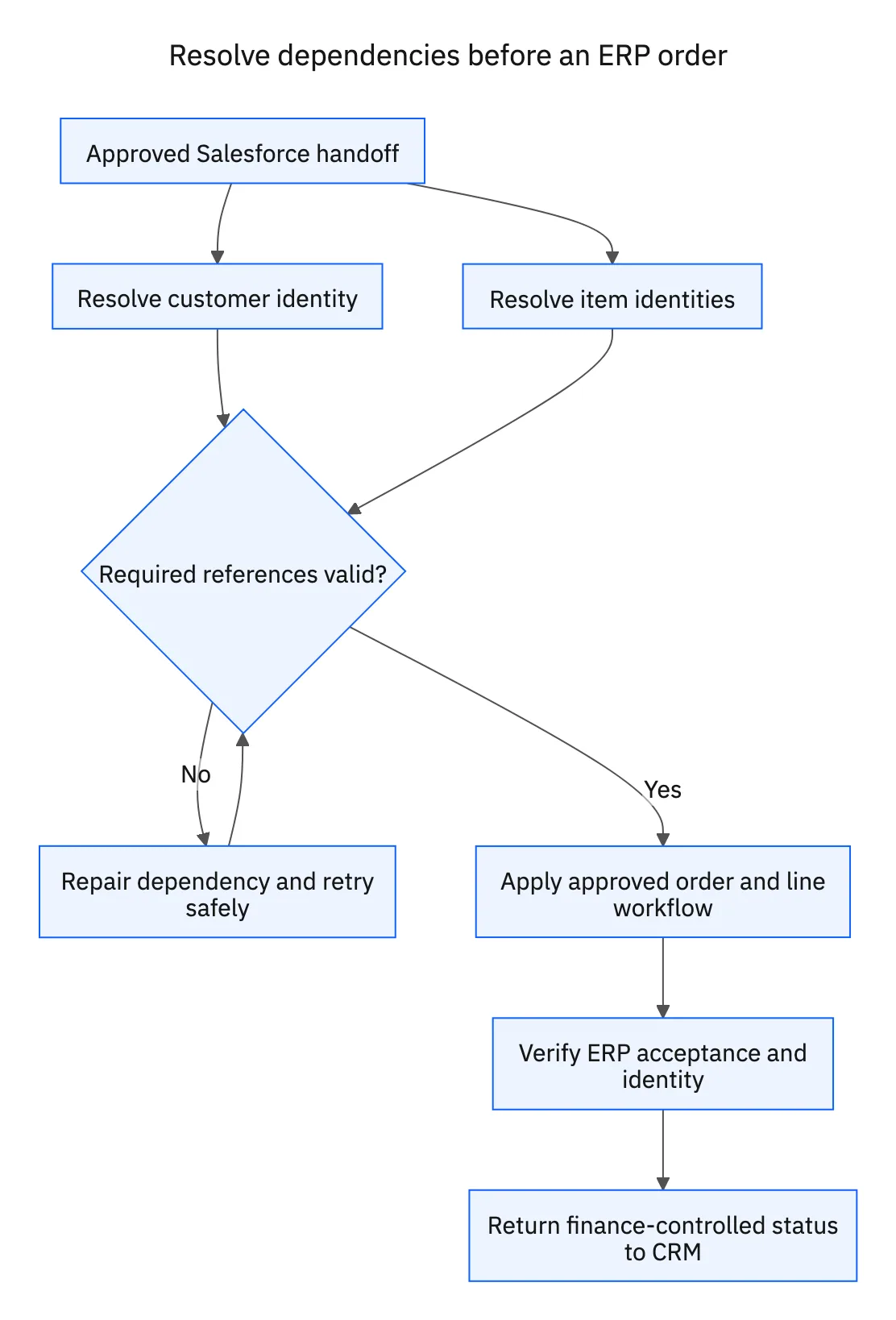
After Integration: A seamless process where opportunities in Salesforce automatically convert to orders in NetSuite, triggering fulfillment, invoicing, and payment tracking without manual intervention.

Measurable Impact: According to recent industry benchmarks, integrated systems reduce order processing time by 66% and decrease order-to-cash cycles by 30%, directly improving cash flow.

2. Enhanced Customer Experience

Before Integration: Customer-facing teams lack visibility into orders, invoices, and fulfillment status, leading to delayed responses and customer frustration.

After Integration: Sales and service representatives have a complete 360-degree view of customer interactions, orders, and financial history, enabling immediate answers to customer inquiries.

Measurable Impact: Organizations report a 27% increase in customer satisfaction scores after implementing integrated CRM-ERP systems.

3. Improved Team Productivity

Before Integration: Staff waste hours on duplicate data entry, manual cross-checking, and switching between systems.

After Integration: Teams work exclusively in their primary system while still accessing data from the connected platform.

Measurable Impact: Studies show productivity gains of 15-20% for sales teams and 20-25% for finance staff after integration.

4. Data-Driven Decision Making

Before Integration: Reports require manual compilation from multiple systems, often leading to outdated or inconsistent information.

After Integration: Real-time dashboards combine sales, financial, and operational data for comprehensive business intelligence.

Measurable Impact: Organizations with integrated systems report 35% faster decision-making and 25% more accurate forecasting.

5. Reduced Error Rates

Before Integration: Manual data entry and process handoffs create opportunities for mistakes.

After Integration: Automated data flow eliminates duplicate entry and ensures consistency across systems.

Measurable Impact: Integrated systems typically reduce data errors by 40% and billing errors by 30%.

Implementation Challenges and Solutions

Despite the clear benefits, NetSuite-Salesforce integration projects come with challenges. Here's how to address the most common hurdles:

1. Data Quality Issues

Challenge: Inconsistent, duplicate, or incomplete data in either system can undermine integration.

Solution:

  • Conduct thorough data cleansing before integration
  • Implement validation rules in both systems
  • Create data governance processes to maintain quality
  • Use matching rules to prevent duplicate creation

2. Complex Business Processes

Challenge: Organizations often have unique workflows that standard integrations don't accommodate.

Solution:

  • Map processes in detail before selecting an integration approach
  • Choose solutions with customization capabilities
  • Consider a phased approach, starting with core processes
  • Involve business process owners in the integration design

3. Performance Considerations

Challenge: Integration can create system performance issues, especially with high data volumes.

Solution:

  • Implement batching for large data transfers
  • Consider asynchronous processing for non-urgent updates
  • Optimize API usage to respect platform limits
  • Schedule bulk operations during off-peak hours

4. Organizational Resistance

Challenge: Teams accustomed to existing processes may resist changes.

Solution:

  • Involve end users early in the integration planning
  • Provide comprehensive training on the integrated systems
  • Communicate clear benefits for each department
  • Celebrate early wins to build momentum

5. Ongoing Maintenance

Challenge: Platform updates can break integrations without proper maintenance.

Solution:

  • Establish a testing protocol for platform updates
  • Implement monitoring and alerting for integration failures
  • Document integration architecture thoroughly
  • Create a dedicated support team or relationship with integration partners

Best Practices for Successful Integration

Based on hundreds of successful implementations, here are the key practices that separate successful integration projects from problematic ones:

1. Start with Clear Business Objectives

Define specific business outcomes for the integration, such as "Reduce order processing time by 50%" or "Decrease DSO by 15%." These objectives should drive technical decisions, not vice versa.

2. Establish Data Governance

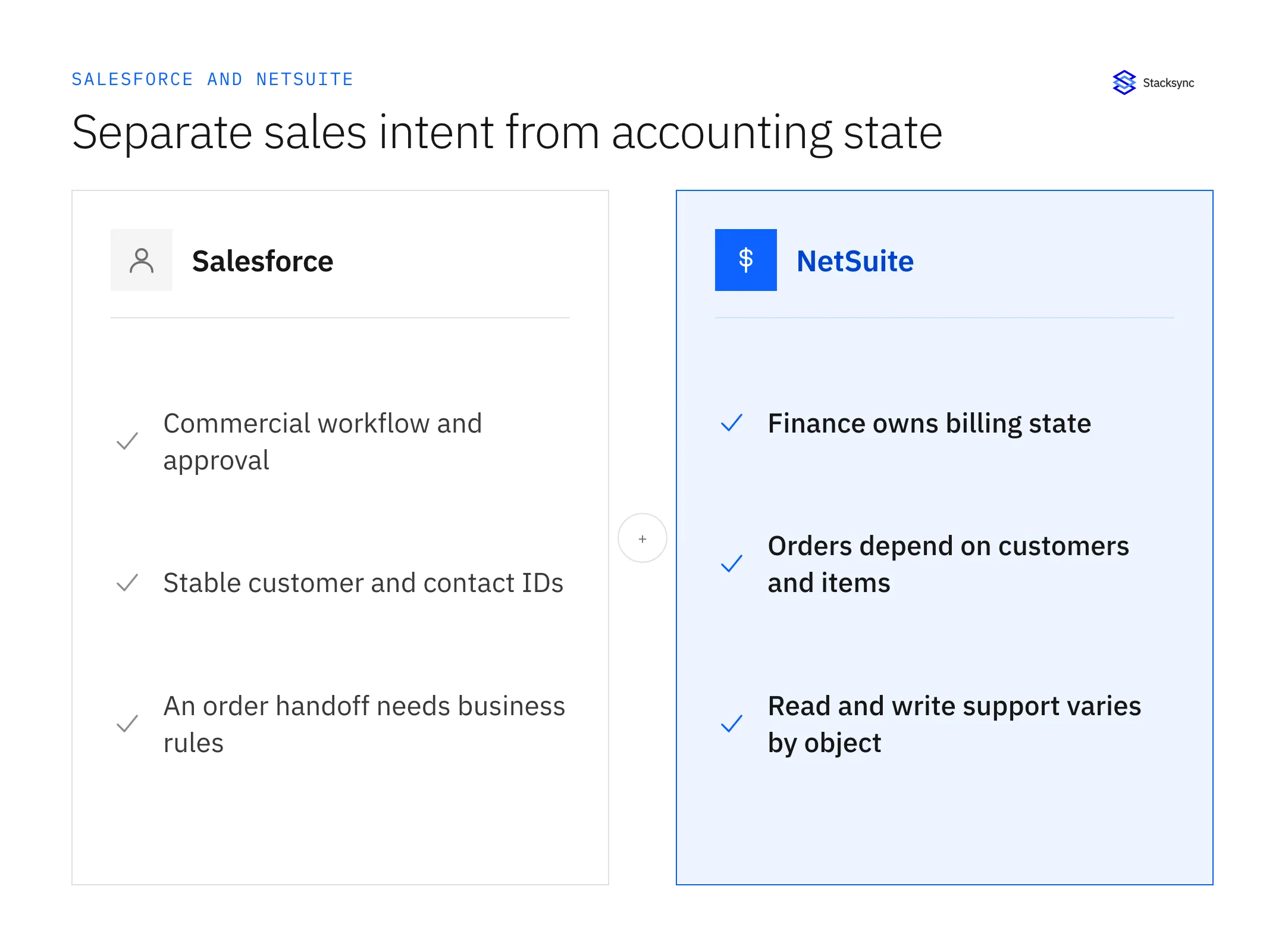
Determine which system is the "source of truth" for each data type. Create clear rules for data creation, updates, and conflict resolution. Document these decisions in a data governance framework.

3. Take a Phased Approach

Rather than attempting a "big bang" integration, implement functionality in phases. A common sequence is:

  1. Account/Contact synchronization
  2. Product catalog
  3. Opportunity to order conversion
  4. Invoice/payment visibility
  5. Advanced scenarios

4. Build a Cross-Functional Team

Successful integrations require input from sales, finance, IT, and operations. Form a project team with representatives from each department to ensure comprehensive requirements gathering.

5. Invest in Proper Testing

Develop a comprehensive testing plan that includes:

  • Unit testing of individual integration points
  • End-to-end process testing
  • Volume testing with realistic data loads
  • User acceptance testing with actual end users
  • Regression testing for platform updates

6. Plan for Change Management

Technical implementation is only half the battle. Create a change management plan that includes:

  • Stakeholder communication strategy
  • Training materials and sessions
  • Process documentation
  • Support procedures
  • Rollout schedule

7. Monitor and Optimize

After go-live, implement monitoring tools to track integration performance, error rates, and business metrics. Use this data to continuously refine and enhance the integration.

Selecting the Right Integration Approach for Your Organization

With multiple integration options available, how do you choose the right one? Consider these factors:

1. Technical Resources

In-house development team? If you have developers familiar with NetSuite and Salesforce, a custom API approach may be feasible. Limited technical staff? Pre-built solutions or iPaaS platforms will be more appropriate.

2. Integration Complexity

Standard processes? Pre-built solutions often handle common integration scenarios effectively. Unique requirements? Custom development provides flexibility for complex or unusual processes.

3. Budget Considerations

Initial vs. ongoing costs: Pre-built solutions typically have higher subscription costs but lower implementation expenses. Custom development has higher upfront costs but potentially lower long-term expenses.

4. Timeline Requirements

Need for speed: Pre-built solutions can be implemented in weeks rather than months. Long-term stability: Custom solutions may take longer to implement but can be more precisely tailored to your needs.

5. Future Scalability

Growth plans: Consider how your integration needs may evolve as your business grows. Additional systems: If you'll need to integrate more systems beyond NetSuite and Salesforce, a broader iPaaS solution might make more sense.

Case Study: Manufacturing Company Transforms Operations with Integration

A mid-sized manufacturing company with 350 employees faced significant challenges with their disconnected Salesforce and NetSuite instances:

Before Integration Challenges:

  • Sales reps lacked visibility into inventory and order status
  • 15% of orders had errors due to manual data entry
  • Order processing took an average of 3 days
  • Finance team spent 20+ hours weekly reconciling system discrepancies
  • Customer complaints about order status inquiries increased by 35%

Integration Approach: The company selected a phased REST API integration approach using middleware to connect their systems. They prioritized:

  1. Bi-directional account/contact sync
  2. Real-time inventory visibility in Salesforce
  3. Automated opportunity-to-order conversion
  4. Invoice and payment synchronization

Results After Six Months:

  • Order processing time reduced by 72% (from 3 days to less than 1 day)
  • Order entry errors decreased by 92%
  • Sales team productivity increased by 18%
  • Finance team reclaimed 15 hours weekly from manual reconciliation
  • Customer satisfaction scores improved by 24%
  • Sales increased by 12% due to improved quote accuracy and speed

The company's initial investment in integration was recouped within 5 months purely from operational savings, not including the benefits of increased sales.

The Path to Unified Operations

In 2026's competitive business environment, the distinction between front-office and back-office operations is increasingly artificial. Customers expect seamless experiences that can only be delivered when your core systems work in harmony.

NetSuite-Salesforce integration isn't merely a technical project—it's a business transformation initiative that breaks down silos, streamlines processes, and creates a unified view of your operations. When implemented thoughtfully, this integration delivers immediate efficiency gains while laying the foundation for sustained growth.

Whether you choose a pre-built solution, middleware platform, or custom API approach, the key is to start with clear business objectives and a commitment to data quality. With proper planning and execution, your integrated systems will become a strategic asset that gives your organization the agility and insight needed to thrive in an ever-changing marketplace.

Ready to Eliminate NetSuite-Salesforce Integration Headaches? Stacksync Delivers Real-Time Sync in Hours, Not Months

If you're tired of complex integration projects that take months to implement and require dedicated developers to maintain, Stacksync offers a fundamentally different approach to NetSuite-Salesforce integration.

Stacksync connects NetSuite and Salesforce with real-time, bi-directional synchronization that works out of the box. Unlike traditional iPaaS solutions that require custom workflows, complex mapping, and ongoing maintenance, Stacksync provides direct database-level integration that automatically handles API rate limits, manages errors gracefully, and keeps your data in perfect sync.

Here's what makes Stacksync the smart choice for NetSuite-Salesforce integration:

Stop wrestling with complex integration platforms that drain your engineering resources. Stacksync eliminates the need for specialized integration developers, reduces maintenance overhead, and frees your team to focus on building products that drive revenue.

See how Stacksync can transform your NetSuite-Salesforce integration in minutes, not months. Book a demo with our team to see real-time synchronization in action, or start your free trial today and experience the difference that database-level integration makes.

→  FAQS
How long does it take to integrate NetSuite and Salesforce?
Integration timelines vary significantly based on the approach chosen. Pre-built integration solutions can be implemented in 2-4 weeks, while custom API-based integrations typically require 2-6 months depending on complexity. Middleware and iPaaS platforms fall somewhere in between, usually taking 4-12 weeks. The fastest implementations use modern integration platforms that provide direct database-level synchronization, enabling setup in hours rather than months. Organizations should factor in time for data cleansing, testing, and user training regardless of the technical approach selected.
What are the main challenges when integrating NetSuite with Salesforce?
The most common challenges include data quality issues from inconsistent or duplicate records across systems, complex business processes that don't fit standard integration templates, and performance concerns with high data volumes. Organizations also face organizational resistance to process changes and ongoing maintenance requirements when platform updates occur. Data mapping complexity increases when business rules differ between systems, requiring careful field mapping and transformation logic. Successful integrations address these challenges through thorough data cleansing, phased implementation, and choosing solutions with robust error handling and monitoring capabilities.
What's the difference between pre-built and custom NetSuite-Salesforce integrations?
Pre-built integrations offer turnkey solutions with minimal configuration, typically implementing standard data flows like account synchronization and opportunity-to-order conversion. These solutions provide faster implementation but may offer limited customization for unique business processes. Custom integrations built using REST APIs offer complete flexibility to match specific workflows but require development resources and ongoing maintenance. Middleware platforms provide a middle ground, offering more customization than pre-built solutions while requiring less development than fully custom approaches. The best choice depends on your technical resources, timeline, budget, and how closely your processes align with standard integration patterns.
How much does NetSuite-Salesforce integration cost?
Integration costs vary widely based on the approach. Pre-built solutions typically charge $500-$2,000 per month in subscription fees plus implementation costs of $5,000-$25,000. Custom API integrations have higher upfront development costs of $50,000-$150,000 but potentially lower long-term expenses. Middleware platforms usually cost $1,000-$5,000 monthly with implementation fees of $10,000-$50,000. Organizations should also factor in ongoing maintenance, which can cost $20,000-$50,000 annually for custom solutions. Modern database-level integration platforms can reduce total cost of ownership by eliminating the need for specialized integration developers and reducing maintenance overhead.
Which data flows are most critical for NetSuite-Salesforce integration?
The most essential data flows include bi-directional customer and account synchronization to ensure consistent information across sales and finance teams, opportunity-to-order conversion that automatically creates NetSuite sales orders from won Salesforce opportunities, and product catalog management that flows pricing and availability from NetSuite to Salesforce. Invoice and payment synchronization from NetSuite to Salesforce enables sales teams to answer customer billing questions, while inventory availability data helps prevent selling out-of-stock items. Customer support case synchronization provides complete customer history across both systems. Organizations typically implement these core flows first, then add advanced scenarios like contract management and revenue recognition based on business priorities.

Syncing data at scale
across all industries.

a blue checkmark icon
14-day trial
a blue checkmark icon
Two-way, Real-time sync
a blue checkmark icon
Workflow automation
a blue checkmark icon
White-glove onboarding
“We’ve been using Stacksync across 4 different projects and can’t imagine working without it.”

Alex Marinov

VP Technology, Acertus Delivers
Vehicle logistics powered by technology