Top 13 Cloud Deployment Platforms Beyond Heroku
Compare the top 13 cloud deployment platforms beyond Heroku, including Kuberns, Render, Railway and AWS, with pricing, features and real-time data sync.
- Author
- Ruben Burdin · Founder & CEO
- Published
- Updated
- Read time
- 14 min read

Organizations seeking modern cloud deployment solutions face a critical challenge: traditional platforms like Heroku create operational bottlenecks through expensive pricing models and limited data synchronization capabilities.
When customer information becomes fragmented across CRM, ERP, and database systems without real-time bi-directional synchronization, development teams waste valuable engineering resources on custom integration maintenance instead of building competitive advantages.
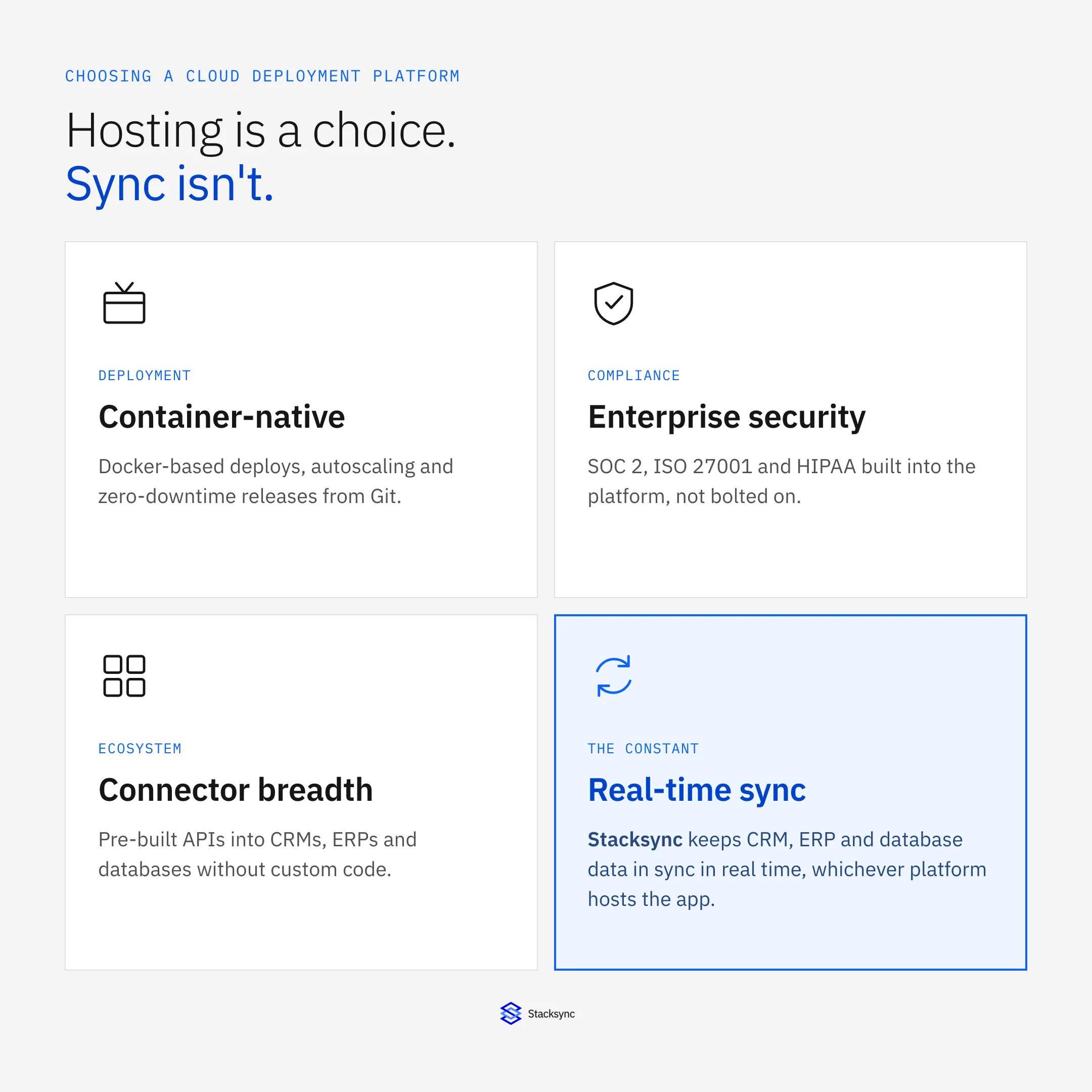
Modern applications require sophisticated data consistency across operational systems. Traditional deployment platforms that create data silos force organizations to build expensive custom integrations, diverting engineering talent from core product development while creating brittle dependencies requiring constant maintenance.
Key operational challenges driving migration from Heroku:
- Escalating costs for data synchronization (Heroku Connect pricing ranging from $5,000 to over $50,000 per month)
- Limited scalability options and customization constraints preventing optimized performance
- Lack of integrated real-time data synchronization requiring expensive custom development
- Eventual consistency rather than guaranteed real-time synchronization across operational systems
6 Key Factors for Selecting Cloud Deployment Platforms
When evaluating deployment platforms, technical teams must consider operational requirements that extend beyond basic hosting capabilities:
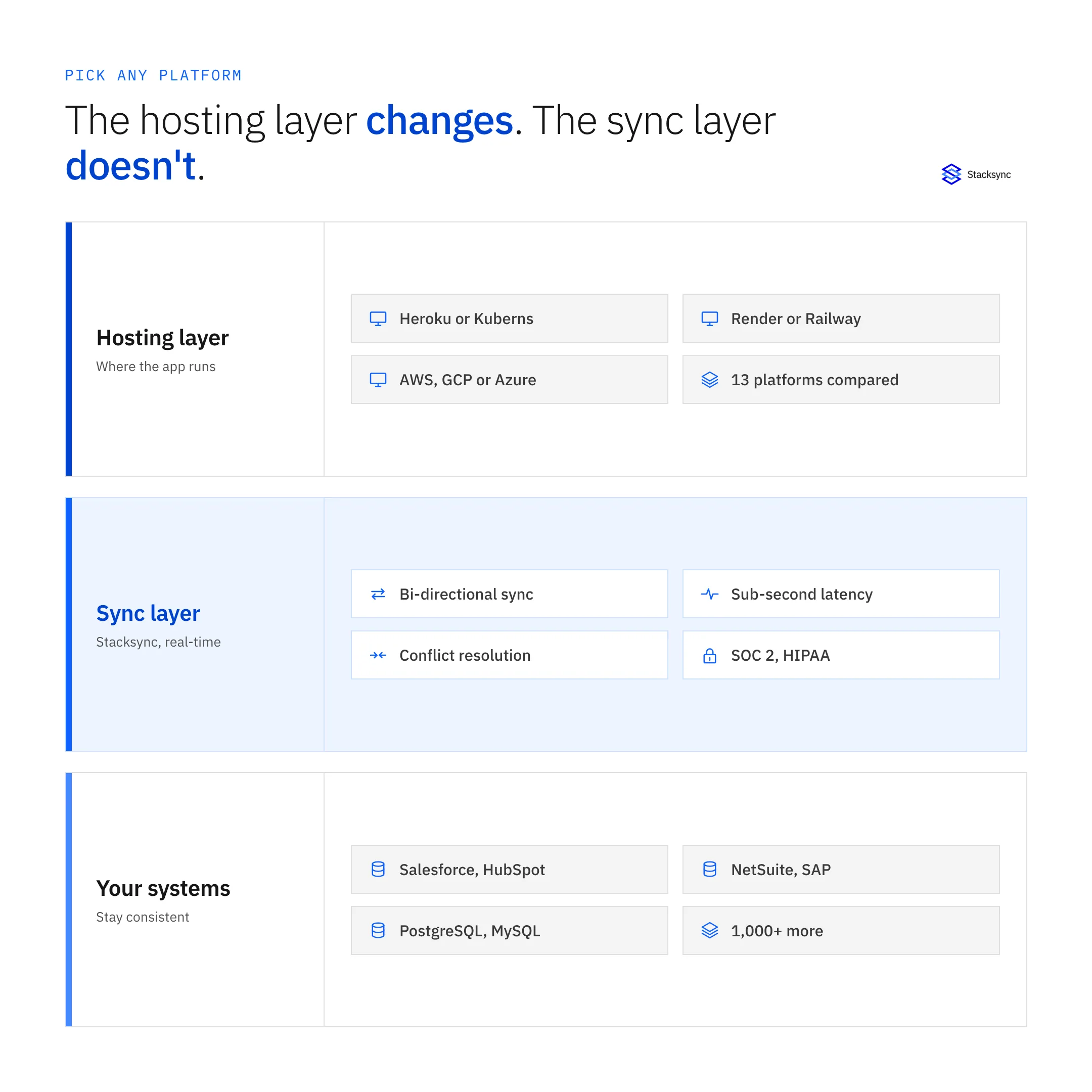
1. Real-Time Data Synchronization Architecture
Modern applications require operational data consistency across deployment environments. Traditional platforms create synchronization delays where changes might not appear immediately, especially during busy periods, requiring manual data extraction and consolidation pipelines. Solutions providing true bi-directional synchronization eliminate engineering resources spent on custom integration maintenance.
2. Performance and Scalability Economics
Teams evaluate factors such as pricing (Heroku can be costly at scale), data and region requirements, available addons or services, and the learning curve. Organizations require platforms that handle complex workloads and traffic patterns cost-effectively while maintaining operational reliability.
3. Enterprise Security and Compliance Framework
Organizations handling sensitive operational data require comprehensive security including encryption, access controls, and compliance certifications (SOC 2, GDPR, HIPAA) built into the platform architecture. Platforms with certifications like SOC 2, ISO 27001, or HIPAA compliance are essential when handling sensitive data.
4. Integration Ecosystem and Connector Breadth
Platforms must provide well-documented APIs and integration capabilities connecting with existing operational systems, databases, and third-party services without extensive custom development. A platform's pre-built connector library directly impacts implementation time and integration quality.
5. Operational Monitoring and Error Handling
Sophisticated applications require comprehensive monitoring, alerting, and automated error recovery capabilities maintaining operational reliability and performance across synchronized systems.
6. Cost Structure and Pricing Transparency
Organizations seek transparent, pay-as-you-go pricing providing predictable costs and scalability, unlike opaque, contract-based models tied to specific infrastructure costs. Transparent pricing models without hidden fees and predictable scaling costs are essential for operational budgeting.
13 Leading Cloud Deployment Platforms
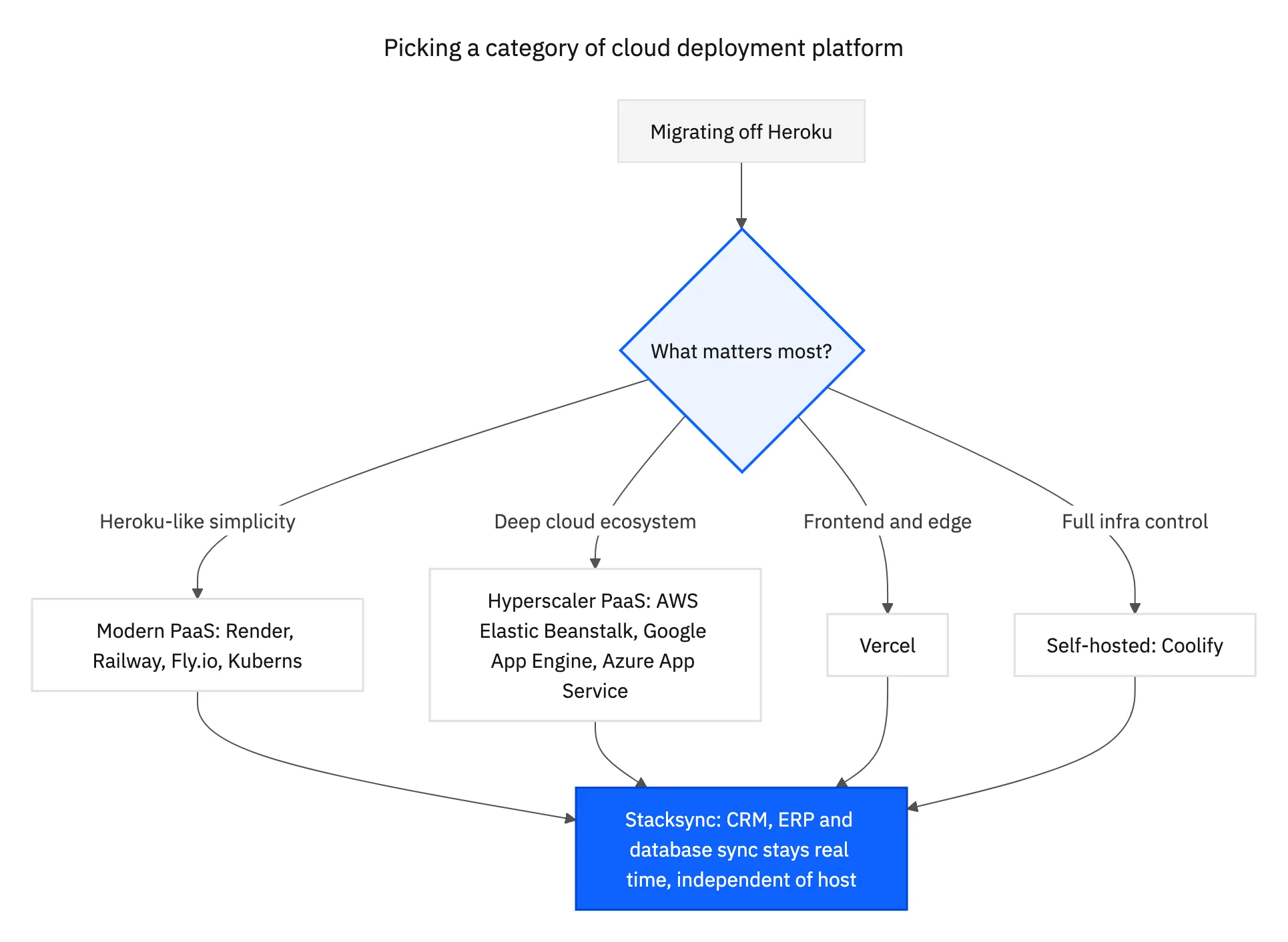
These 13 platforms span four broad categories: modern Heroku-style PaaS, hyperscaler-native PaaS, frontend-optimized platforms, and self-hosted infrastructure. Start with the category that matches your team's priorities, then compare the specific platforms inside it.
1. Stacksync - Real-Time Data Synchronization Platform
For organizations requiring operational data consistency across deployment environments, Stacksync delivers true bi-directional synchronization between CRMs, ERPs, databases, and operational systems. Stacksync is a better, cheaper and more enterprise-ready "Heroku Connect" with so many more connectors.
Key technical capabilities:
- Engineered specifically for real-time, bi-directional synchronization between operational systems with sustained real-time performance maintaining low latency even at high volumes
- Architecture processing up to 1 million Salesforce records per minute and handling millions of events daily with consistent sub-second performance
- True bi-directional sync built specifically for two-way synchronization with field-level change detection and database-centric approach
- Enterprise-grade security standards, including SOC 2, GDPR, and HIPAA compliance
Operational benefits:
- Pay only for the number of records synchronized with only monthly active rows counted, avoiding charges for massive databases with archive data
- Documented customer examples show delivering $30,000+ annual savings compared to Heroku Connect, with additional savings from reduced engineering overhead
- Eliminates engineering resources spent on custom integration maintenance
- Provides guaranteed data consistency across operational systems
Pricing: Tiered subscription based on records synced (starts at $1,000/month for 50k records), with volume discounts at scale. Pricing model is much more transparent and flexible than Heroku Connect's with no hidden costs or fees.
Ideal for: Mid-market organizations (50-500 employees) requiring operational data consistency across CRM, ERP, and database systems with guaranteed real-time synchronization needs.
2. DigitalOcean App Platform - Developer-Friendly PaaS
DigitalOcean App Platform provides a developer-friendly PaaS offering designed to simplify app deployment and management with focus on ease of use and predictable scaling costs.
Key features:
- Supports popular languages and frameworks such as Node.js, Python, Django, Go, PHP, and static sites
- Smart autoscaling configured to budget constraints with horizontal and vertical scaling
- Secure connections to third-party databases and APIs with dedicated IP whitelisting
- GitHub and GitLab integration for automated deployments
Pricing: Free starter plan supports up to three static sites; paid plans start at $5/month with predictable scaling costs.
Ideal for: Development teams seeking simplified container deployment without Kubernetes complexity.
3. Render - Modern PaaS with Git Integration
Render provides a user-friendly alternative to Heroku with a simplified deployment process and support for various programming languages and frameworks, emphasizing developer productivity.
Key features:
- Automatic deployments from Git repositories with zero-downtime rollouts
- Built-in SSL certificates and global CDN for performance optimization
- Support for Docker containers and static site hosting
- Integrated database services and persistent storage options
Pricing: Free tier for static sites and limited web services, with paid plans starting at $7-19/month for web services.
Ideal for: Small to medium-sized applications, static websites, and projects requiring quick setup with minimal configuration.
4. Fly.io - Global Edge Deployment
Fly.io deploys applications closer to users through a global network of servers using micro-VMs for strong isolation and rapid deployment capabilities.
Key features:
- Global anycast networking for reduced latency and improved performance
- Automatic scaling based on geographic demand patterns
- Strong security isolation through micro-VM architecture
- Support for custom runtime configurations
Pricing: Generous free tier with up to 3 shared-CPU VMs; usage-based pricing starting at approximately $2/month per VM.
Ideal for: Applications requiring global distribution and low-latency performance for geographically distributed users.
5. Railway - Developer-Focused Deployment
Railway emphasizes developer experience through simplified deployment workflows and integrated database services, targeting rapid prototyping and applications with flexible resource requirements.
Key features:
- One-click deployment from GitHub repositories
- Integrated PostgreSQL, MySQL, and Redis services
- Automatic preview environments for pull requests
- Built-in metrics and logging dashboards
Pricing: Usage-based model with free tier; pricing scales based on resource consumption.
Ideal for: Rapid prototyping, small development teams, and applications requiring integrated database services.
6. Kuberns - Agentic AI-Powered Deployment
Kuberns is an application deployment platform that uses agentic AI to automate infrastructure setup and ongoing operations. Developers connect a GitHub repository, and the platform detects the application stack, configures the build, and deploys it on managed AWS infrastructure.
Key features:
- Agentic AI-assisted deployment with automatic stack and runtime detection
- GitHub-based deployments with built-in CI/CD and zero-downtime rollouts
- Automated infrastructure provisioning and application autoscaling on managed AWS
- Built-in monitoring, logs, health checks, alerts, and deployment tracking
- Support for full-stack applications, APIs, background workers, and multi-service architectures
Pricing: Usage-based pricing tied to active infrastructure resources, with no per-user pricing as teams grow. CI/CD, monitoring, and core operational features are included, and introductory credits are available for teams evaluating the platform.
Ideal for: Startups and development teams that want production-ready deployment automation without hiring a dedicated infrastructure team.
Hyperscaler Alternatives
Major cloud providers offer PaaS solutions with deep ecosystem integration, though organizations should evaluate potential vendor lock-in considerations:
7. AWS Elastic Beanstalk - Enterprise Integration
AWS Elastic Beanstalk provides managed application deployment within the broader AWS ecosystem, offering deep integration with enterprise services and advanced scaling capabilities.
Key features:
- Integration with AWS services including RDS, S3, and CloudWatch
- Automatic capacity provisioning and load balancing
- Support for multiple deployment strategies and rollback capabilities
- Advanced monitoring and logging through CloudWatch integration
Pricing: No additional fees for Elastic Beanstalk itself; users pay only for underlying AWS resources consumed.
Ideal for: Organizations already invested in AWS infrastructure requiring deep cloud service integration.
8. Google App Engine - Serverless Application Platform
Google App Engine delivers fully managed serverless deployment with automatic scaling and integration into Google Cloud's data and AI services.
Key features:
- Automatic scaling from zero to thousands of instances
- Version management for testing and gradual rollouts
- Integration with Google Cloud's data analytics and machine learning services
- Support for multiple runtime environments and custom containers
Pricing: Free tier available; pricing based on instance hours, requests, and data transfer with pay-per-use model.
Ideal for: Applications requiring serverless architecture with integration to Google Cloud's data and AI capabilities.
9. Microsoft Azure App Service - Microsoft Enterprise Integration
Microsoft Azure App Service provides enterprise-grade deployment capabilities with deep integration into Microsoft's productivity and development ecosystem.
Key features:
- Integration with Azure Active Directory for enterprise authentication
- Support for .NET, Java, Node.js, Python, and PHP applications
- Advanced deployment slots for staging and production management
- Enterprise compliance and security certifications
Pricing: Pay-as-you-go model with reserved instance options; pricing varies by region and resource consumption.
Ideal for: Enterprise organizations using Microsoft technologies requiring integrated authentication and compliance features.
Other Deployment Alternatives
10. Northflank - Kubernetes-Based BYOC Platform
Northflank combines application hosting, managed databases, and CI/CD in a single platform built on Kubernetes, with the option to run on Northflank's cloud or bring your own cloud account (AWS, GCP, Azure, or bare metal).
Key features:
- Git-based CI/CD with build caching and preview environments for pull requests
- CPU and memory-based autoscaling from 0.1 to 32 vCPU per service, with GPU support
- Bring-your-own-cloud deployment to AWS, GCP, Azure, or self-hosted Kubernetes
- Managed PostgreSQL, MySQL, MongoDB, and Redis with high-availability replicas
- Real-time log streaming, metrics, and alerting via Slack, Discord, or webhooks
Pricing: Free Sandbox tier for testing; paid compute plans start at $12/month, with usage-based add-ons for CPU, memory, and network egress. Enterprise plans add invoice billing and dedicated support.
Ideal for: Engineering teams that want Kubernetes-grade control and BYOC flexibility without hand-writing Kubernetes manifests.
11. Vercel - Frontend-Optimized Deployment
Vercel specializes in frontend application deployment with advanced edge computing capabilities and serverless function integration.
Key features:
- Global edge network optimized for frontend performance
- Serverless functions for backend API development
- Advanced preview deployments for collaboration
- Integration with popular frontend frameworks
Pricing: Free tier for personal projects; Pro plans starting around $20/month for team collaboration features.
Ideal for: Frontend-heavy applications, JAMstack architectures, and teams prioritizing edge performance.
12. Coolify - Open-Source Self-Hosted Platform
Coolify is an open-source platform supporting a wide range of programming languages and frameworks for deploying static websites, APIs, and databases, integrating with Git platforms like GitHub and GitLab for push-to-deploy.
Key features:
- Git platform integration with automated Let's Encrypt SSL certificate setup and storage of settings on users' servers, ensuring data control and minimizing vendor lock-in
- Automatic database backups, CI/CD webhook support, collaborative project sharing, and monitoring capabilities
- Complete control over infrastructure and data sovereignty
- Plugin ecosystem for extensibility
Pricing: Free and open-source with users paying only for infrastructure costs associated with their deployment environment.
Ideal for: Organizations requiring complete infrastructure control with self-hosting capabilities and data sovereignty requirements.
13. Sitedropper - Agent-Ready App Deployment
Sitedropper helps developers deploy local and AI-built web projects without first configuring their own cloud infrastructure. Upload a ZIP through the dashboard, or use a coding agent connected through MCP to start and follow a deployment.
Key features:
- ZIP-based deployment for static sites and supported Node.js and Python applications, with existing Dockerfiles supported
- MCP integration for coding-agent deployments and a REST API for scripted workflows
- Generated project URLs, deployment progress, and build logs
- Draft-by-default projects, with visibility options for reviewing and sharing
Pricing: Free plan includes up to three projects and 30 deployments per month; paid plans start at $4.99/month.
Ideal for: Developers and small teams deploying MVPs, AI-built apps, or client previews without taking on cloud-infrastructure setup. It is not a replacement for platforms offering persistent application databases or background workers.

Addressing Heroku Connect Pricing Challenges
Heroku Connect's pricing is bundled with Salesforce based on the number of rows synced across all mappings, with costs ranging from $5,000 to over $50,000 per month depending on Salesforce instance size. Organizations pay for every record regardless of change frequency, plus require a Heroku Enterprise license.
Heroku Connect limitations driving migration:
- Limited scope connecting only Salesforce and Heroku Postgres, offering no flexibility to integrate with other databases or applications
- Sync performance limitations with polling-based mechanism that does not offer real-time performance, resulting in eventual rather than guaranteed consistency
- High and opaque costs, with organizations reporting significant savings after migrating to alternatives built specifically for data synchronization
Cost-effective alternatives for Heroku Connect replacement:
- Stacksync: Much more affordable, accessible to small and medium-sized businesses with very easy setup accomplished in minutes through no-code configuration
- Transparent pricing: Tiered model primarily driven by unique records synced, decoupling cost from update frequency
- Broader compatibility: Over 1,000+ pre-built connectors supporting CRMs (Salesforce, HubSpot), ERPs (NetSuite, SAP), databases (PostgreSQL, MySQL), and more
The Operational Impact: ETL vs ELT vs Real-Time Integration
Traditional deployment platforms focus solely on application hosting, creating operational gaps requiring expensive custom integration development. The fundamental distinction lies in data synchronization approaches and their impact on operational efficiency.
Traditional ETL/ELT Limitations:
- Batch processing moves data on schedule (hourly/daily) which is acceptable for analytics but creates critical delays for operational systems
- One-way sync (ETL/Reverse ETL) designed to move data from source to destination, often for analytics or reporting
- Batch processing creates latency, hindering real-time decision-making and operational delays
- Complex transformation logic requiring specialized development resources and ongoing maintenance overhead
Real-Time Bi-Directional Synchronization Benefits:
- Real-time synchronization propagates changes within seconds, ensuring CRM, ERP, and databases are always consistent
- True bi-directional synchronization ensures changes in any connected system are instantly and reliably reflected in all others, essential for maintaining data integrity across interactive, operational platforms
- Changes made in any connected system are instantly propagated to all others, maintaining data consistency in real time, particularly valuable for operational use cases
- Field-level change detection triggering actions based on specific field changes with database-centric approach allowing developers to interact with business systems through familiar database interfaces
Enterprise adoption trends: real-time data synchronization has become a baseline expectation for keeping information accurate and current across systems. For engineering, data, and RevOps teams that depend on real-time data consistency, focused platforms deliver true bi-directional sync with low latency, automatic scaling, and automated reliability, addressing the shortcomings of traditional integration tools directly.
Quantified Operational Benefits:
- Cut the hours spent on manual data entry and updates, remove human error from data precision and reliability, and support faster, better-informed decisions
- Teams avoid spending valuable resources managing API rate limits, error handling, and conflict resolution instead of building core product features
- Engineering time savings up to 90% reduction in time spent on integration maintenance with documented customer examples showing $30,000+ annual savings
The hosting decision and the data consistency decision do not have to be solved by the same platform. A modern deployment platform handles scalable, reliable hosting; Stacksync handles keeping CRM, ERP, and database data consistent across the stack, whichever of the 13 platforms above ends up running the app.
Ready to eliminate deployment bottlenecks?
Stacksync's real-time bi-directional synchronization keeps CRM, ERP, and database systems consistent with enterprise-grade security and compliance, without the engineering overhead of traditional integration maintenance.

FAQ
Frequently asked questions










Related articles