Supabase Multi-Tenancy CRM Integration Guide | Per-Tenant Sync
Build secure multi-tenant SaaS on Supabase with per-tenant CRM integrations using Stacksync's isolated sync architecture. Schema isolation, RLS policies, and real-time bidirectional sync.
- Author
- Ruben Burdin · Founder & CEO
- Published
- Updated
- Read time
- 8 min read
Multi-tenant SaaS applications built on Supabase face a critical challenge: how do you integrate each tenant with their own CRM instance while maintaining strict data isolation? This guide explores how to architect per-tenant CRM integrations using Supabase Row-Level Security and Stacksync's isolated sync capabilities.
Understanding Multi-Tenancy in Supabase
Supabase enables multi-tenancy through PostgreSQL's Row-Level Security (RLS) policies. In a multi-tenant architecture, a single application serves multiple customers with isolated data and configurations. Each tenant operates within the same infrastructure but cannot access other tenants' information.
Supabase supports two primary multi-tenancy patterns:
Shared Database with Tenant ID Column
All tenants share the same tables with a tenant_id column segregating data. RLS policies enforce automatic filtering based on the authenticated user's tenant context.
Schema-Per-Tenant Model
Each tenant receives a dedicated PostgreSQL schema within the same database instance. This approach provides stronger logical separation while maintaining shared infrastructure for cost efficiency.
The choice between these patterns depends on compliance requirements, customization needs, and performance considerations.
The Per-Tenant CRM Integration Challenge
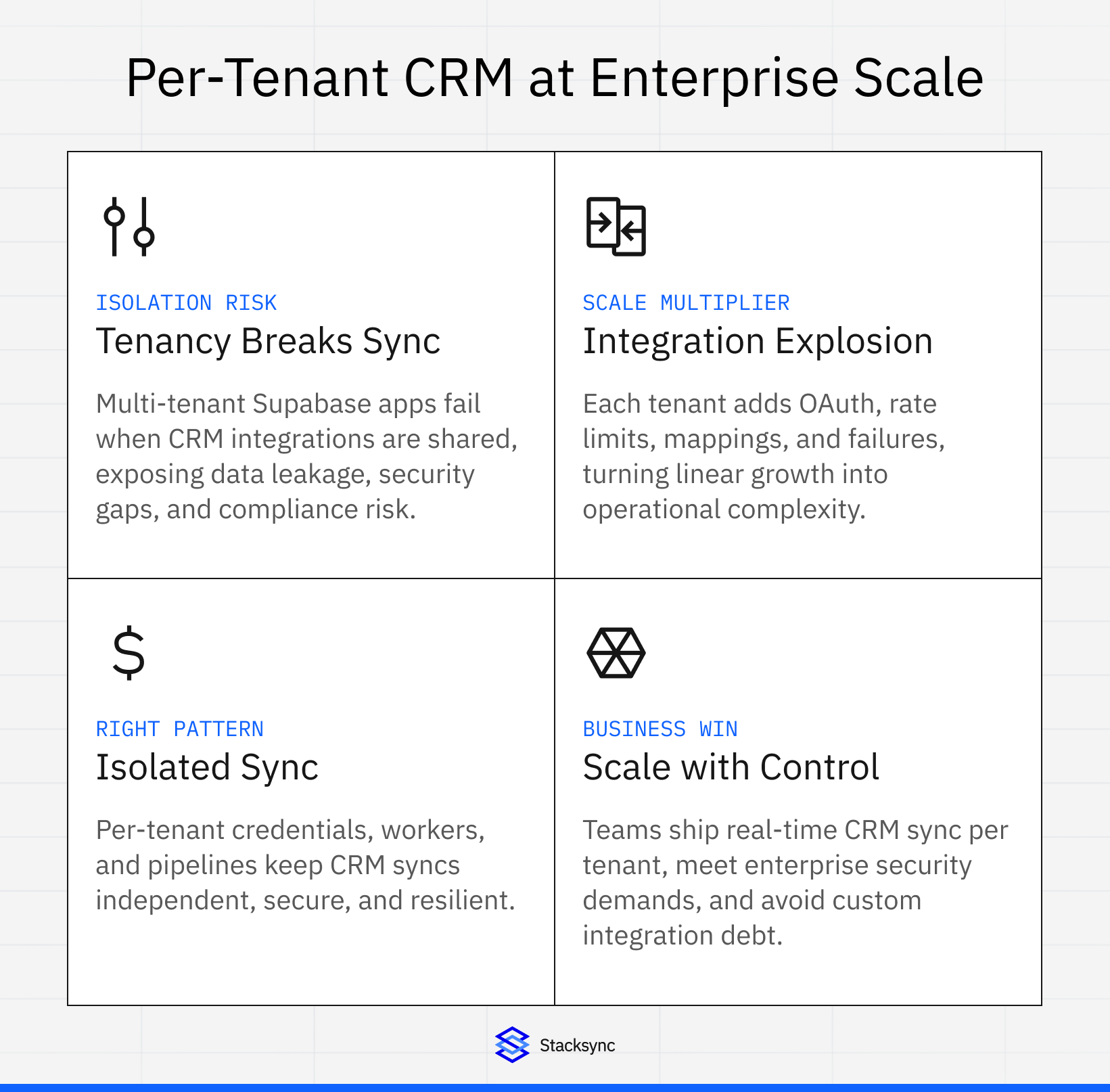
B2B SaaS applications often need each tenant to sync with their own external CRM instance. Consider these scenarios:
A project management tool where Tenant A syncs with their Salesforce instance, while Tenant B integrates with their HubSpot account. A customer support platform where each tenant maintains their own CRM data without cross-contamination risk. An analytics dashboard that pulls customer data from each tenant's unique CRM configuration.
Traditional integration approaches create significant challenges:
Data Leakage Risks
Without proper isolation, one tenant's CRM data could accidentally sync to another tenant's database. A single misconfigured tenant_id filter becomes a security incident.
Credential Management Complexity
Storing and managing unique OAuth tokens for hundreds of tenant-specific CRM connections requires sophisticated secret management infrastructure.
Rate Limit Multiplexing
Each CRM provider enforces API rate limits. Managing these limits across multiple tenant integrations while preventing noisy neighbor problems demands careful orchestration.
Sync State Tracking
Maintaining separate sync states, error logs, and retry queues for each tenant integration increases operational complexity.
Architecting Per-Tenant Isolation with Stacksync
Stacksync provides isolated sync architecture designed specifically for multi-tenant SaaS applications using Supabase. Each tenant receives a dedicated sync pipeline with independent credentials, error handling, and monitoring.
The embedded two-way sync page covers this per-customer pattern for Postgres and warehouses in general, including the two write paths, failed writes and pricing for embedded use.
Isolated Sync Architecture Pattern
Stacksync creates separate sync instances per tenant, each operating independently. Each tenant schema contains CRM-synced tables with unique identifiers and sync timestamps.
Stacksync maintains isolated connections. Tenant A connects their Supabase schema to Salesforce Org ID 12345, while Tenant B links their schema to HubSpot Portal 67890. Each sync runs independently with no shared state between tenants.
Real-Time Bi-Directional Synchronization
Stacksync enables real-time, bi-directional data flow between Supabase and enterprise CRMs. Changes propagate in milliseconds rather than batch intervals.
When a contact updates in Tenant A's Salesforce, the change appears in their Supabase schema within seconds. When Tenant B's application modifies a HubSpot deal through Supabase, the update syncs immediately to their HubSpot portal.
This real-time capability eliminates data staleness issues common with traditional ETL approaches.
Security and Compliance for Multi-Tenant Environments
Stacksync implements enterprise-grade security aligned with multi-tenancy requirements:
Credential Isolation: Each tenant's CRM credentials are encrypted and stored separately. A compromise in Tenant A's credentials cannot affect Tenant B's data.
Compliance Certifications: SOC 2 Type II, GDPR, HIPAA BAA, ISO 27001, and CCPA compliance ensure multi-tenant applications meet regulatory requirements across industries.
Encryption and Data Handling: Data encrypts in transit without persistent storage. Stacksync processes synchronization events without retaining tenant data on its infrastructure.
Role-Based Access Control: Granular permissions control which team members manage specific tenant integrations within your application.
Implementation Patterns for Supabase Multi-Tenant CRM Integration
Pattern 1: Schema-Per-Tenant with Dedicated CRM Instances
This pattern works best for B2B SaaS with strict data isolation requirements. The architecture creates dedicated Supabase schemas during tenant onboarding and configures isolated Stacksync connections for each tenant.
Use Case:
Financial services SaaS where each client requires isolated databases. Healthcare applications with HIPAA compliance demands. Legal tech platforms managing sensitive case data.
Benefits:
Maximum data isolation with physical schema separation. Simplified tenant-specific backup and recovery. Clear compliance audit trails per tenant.
Pattern 2: Shared Schema with RLS-Enforced Isolation
Suitable for applications with hundreds or thousands of smaller tenants. This approach uses shared contacts tables with RLS policies for tenant isolation, while Stacksync automatically injects tenant context during synchronization.
Use Case:
SaaS tools with predictable data models across tenants. Applications requiring cross-tenant analytics. Platforms optimizing for cost efficiency at scale.
Benefits:
Simplified database management with single schema. Cost-effective for large tenant counts. Enables aggregate analytics across tenants.
Pattern 3: Hybrid Approach for Enterprise Tiers
Combine schema-per-tenant for enterprise clients with shared schema for standard tiers. The system determines tenant strategy based on subscription plan, allocating dedicated schemas and enhanced SLAs for enterprise customers.
Use Case:
Freemium SaaS with enterprise upgrade path. Applications with tiered data sovereignty requirements. Platforms balancing cost and enterprise needs.
Configuration and Setup Guide
Step 1: Prepare Supabase Multi-Tenant Structure
Create a function to generate tenant schemas with appropriate table structures. Each tenant schema includes contacts tables with CRM identifiers, email addresses, and sync timestamps.
Step 2: Configure Stacksync Per-Tenant Connections
Initialize Stacksync with tenant-specific configuration that creates connections between CRM providers and designated Supabase schemas. Configure bi-directional sync with field mappings that translate CRM data structures to Supabase tables.
Step 3: Implement Tenant Isolation Monitoring
Monitor per-tenant sync health by tracking records synced, last sync timestamps, error counts, and average latency. Set up alerts for sync failures that notify tenant administrators of issues affecting their specific integration.
Performance Optimization for Multi-Tenant Sync
Connection Pooling Strategy
Stacksync manages connection pools per tenant to optimize database performance. Configure minimum and maximum connections with appropriate timeout settings and per-tenant isolation.
Rate Limit Management
Each CRM provider enforces API rate limits:
HubSpot allows 100 requests per 10 seconds per portal. Salesforce permits 15,000 API calls per 24 hours per org. NetSuite limits to 1,000 requests per hour per account.
Stacksync automatically throttles requests and queues operations to respect these limits while maximizing throughput.
Scaling Considerations
As tenant count grows, consider these optimization strategies:
Database Partitioning: Use PostgreSQL table partitioning for shared-schema approaches with high tenant counts.
Async Processing: Configure Stacksync workflows to handle high-volume sync operations asynchronously through managed Kafka queues.
Regional Distribution: Distribute tenants across processing regions to reduce latency and improve performance for global applications.
Security Best Practices
Credential Management
Store per-tenant CRM credentials using Supabase Vault or external secret managers. Encrypt credentials and reference them securely in Stacksync configurations.
Access Control
Implement tenant-aware RBAC policies. Grant schema access only to tenant service accounts and revoke cross-tenant access to prevent unauthorized data access.
Audit Logging
Track all sync operations per tenant. Stacksync provides comprehensive audit logs showing sync events, timestamps, and affected records for each tenant.

Common Pitfalls and Solutions
Pitfall 1: Cross-Tenant Data Leakage
Problem: Misconfigured tenant_id filters allow one tenant to access another's CRM data.
Solution: Implement defense-in-depth with RLS policies, application-level checks, and Stacksync's isolated sync architecture.
Pitfall 2: Credential Rotation Challenges
Problem: Expired OAuth tokens break sync for specific tenants without clear error messaging.
Solution: Configure Stacksync alerts for authentication failures and implement automated credential refresh flows.
Pitfall 3: Uneven Resource Consumption
Problem: One high-volume tenant monopolizes sync resources, impacting other tenants.
Solution: Use Stacksync's per-tenant rate limiting and resource allocation controls.
Choosing the Right Integration Approach
Select your integration strategy based on these factors:
Use Stacksync Isolated Sync When:
You need enterprise-grade reliability and security. Your application serves 10+ tenants with unique CRM instances. Compliance requires proven SOC 2, HIPAA certifications. Engineering resources focus on core product, not integration maintenance.
Build Custom Integration When:
You have fewer than 5 tenants with simple sync requirements. Your use case requires highly specialized transformation logic. You have dedicated integration engineering resources available.
Hybrid Approach When:
Standard tiers use Stacksync for managed integration. Enterprise tiers receive custom-built sync for unique requirements.
Bridging Multi-Tenancy and Enterprise CRM Integration
Building secure multi-tenant SaaS applications on Supabase requires careful architectural decisions. Per-tenant CRM integration adds another layer of complexity around credential management, data isolation, and sync orchestration.
Stacksync's isolated sync architecture provides the infrastructure to maintain strict tenant boundaries while enabling real-time bi-directional CRM synchronization. By handling the operational complexity of per-tenant integrations, development teams can focus on building differentiated product features rather than maintaining integration infrastructure.
Whether you choose schema-per-tenant isolation for maximum security or shared-schema with RLS for cost efficiency, Stacksync adapts to your multi-tenancy strategy. The platform's compliance certifications, security controls, and proven scalability make it suitable for regulated industries requiring enterprise-grade data handling.
Multi-tenant architecture represents a strategic advantage for B2B SaaS companies. When combined with seamless per-tenant CRM integration through Stacksync, your application can deliver the customization and isolation enterprise customers demand while maintaining the operational efficiency that makes SaaS businesses scalable.
Ready to implement per-tenant CRM integration for your Supabase application? Stacksyncprovides the infrastructure to sync HubSpot, Salesforce, and 1,000+ other systems with tenant-isolated, real-time synchronization. Schedule a demo to discuss your specific multi-tenancy requirements and discover how Stacksync eliminates integration complexity while maintaining enterprise-grade security and compliance.
FAQ
Frequently asked questions










Explore these integrations and topics
- connectorSupabase integrations
- platformCRM synchronization
- platformDatabase synchronization
- CRM synchronization guidesConnect customer records across sales, marketing, and operational systems.
- Database synchronization guidesWork through database change capture, application writes, and reliable record reconciliation.
Related articles