






















Shopify NetSuite Integration: Orders, Deposits, Refunds and Promotions
Shopify NetSuite integration: post each order as a sales order, deposit, fulfillment and invoice, and handle discounts, refunds, inventory and testing.
- Author
- Ruben Burdin · Founder & CEO
- Published
- Updated
- Read time
- 18 min read

Shopify NetSuite integration, answered first
A Shopify NetSuite integration turns each Shopify order into the NetSuite records your controller expects: a sales order, a customer deposit for the payment, an item fulfillment when the 3PL ships, an invoice, a deposit application and a bank deposit. You get it right by deciding that transaction chain, the customer model and the GL routing for discounts, tax and refunds before you map a single field. The main options are the Oracle NetSuite Connector (formerly FarApp), the Celigo Shopify-NetSuite app, a custom build or a sync platform such as Stacksync; compare them on direction and GL control.
When teams skip that step, the problems surface after go-live: they find that all revenue lands in undeposited funds, that a return rewrites a closed month, or that a missing item ID stops orders in the middle of peak season. This guide walks through each decision using what finance teams, NetSuite partners and our own implementations have shown us, and it marks which parts use standard connector objects and which are custom workflows you confirm for your configuration.
| Decision | Common choice | Where this guide covers it |
|---|---|---|
| Connector choice | Oracle NetSuite Connector (formerly FarApp), Celigo Shopify-NetSuite app, a custom build or a sync platform such as Stacksync, compared on direction and GL control | Best Shopify NetSuite connectors compared |
| Transaction chain | Sales order, customer deposit, item fulfillment, invoice, deposit application, bank deposit | The NetSuite transaction chain |
| Customer model | One channel customer per store, with the Shopify order number and link on each transaction | Channel customer or one per shopper |
| Order errors | Create missing customers and items before the order syncs; retry from the Issues dashboard | Stop order sync errors |
| Inventory | NetSuite as the system of record, availability pushed to Shopify | Inventory from NetSuite to Shopify |
| Discounts | One line per promotion, each routed to its own GL account | Discounts and promotions |
| Refunds | Reverse the deposit before fulfillment; credit memo or reserve entry after invoicing | Refunds, cancellations and bundles |
| Testing | Production Shopify orders routed one way into the NetSuite sandbox | Test with real orders |
| Amazon | Read-only from Seller Central into NetSuite, reconciled on a schedule | Amazon Seller Central |
Shopify NetSuite integration at a glance
For the pair overview, see the NetSuite and Shopify integration page. For the commercial order-to-cash scope beyond Shopify, see order-to-cash automation.
The NetSuite transaction chain for a Shopify order
Shopify captures payment at checkout, but you earn the revenue when goods ship. The chain below keeps those two facts apart. Cash sits on a customer deposit until the 3PL confirms shipment, and the invoice only exists once there is something to bill.
- 011. Sales orderCreated from the Shopify order. It can skip approval and land in Pending Fulfillment so the 3PL sees it right away.
- 022. Customer depositRecords the Shopify payment against the sales order, so the cash is booked before anything ships.
- 033. Item fulfillmentCreated when the 3PL or your warehouse ships. The order moves to Pending Billing.
- 044. InvoiceCreated from the fulfilled sales order. Revenue, discounts, shipping and tax post here.
- 055. Deposit applicationApplies the customer deposit to the invoice and closes the receivable.
- 066. Bank depositGroups the payments in each Shopify payout so the bank statement reconciles. Payouts are not a listed Shopify connector object, so decide during scoping where the payout data comes from.
Cash sale or invoice?
A cash sale is one NetSuite record that books payment and revenue together. It fits stores that ship from their own stock the same day and don't need a deposit trail. An invoice chain fits when a 3PL ships later, when orders can be cancelled before shipment, or when finance wants deposits and revenue in separate periods. The payment method on the sales order usually decides which path an order takes.
This chain covers money coming in from shoppers. Payments going out to suppliers and 3PLs run through accounts payable in NetSuite. Finance teams can use an AP automation platform such as Corpay to capture invoices, route approvals and pay by virtual card, ACH or check, with payment status written back to NetSuite.
Check the object list before you commit. The Stacksync NetSuite connector documentation lists Sales Order, Customer Deposit, Item Fulfillment, Invoice, Deposit Application, Deposit, Journal Entry, Credit Memo and Customer Refund as supported. Cash Sale, Cash Refund and Return Authorization are not on that list, so a cash-sale design needs to be confirmed for your account during scoping.
Channel customer or one NetSuite customer per shopper
You do not need to create every Shopify shopper as a NetSuite customer. Many brands post web orders to one channel customer per store, such as "Shopify US Web", and keep the shopper details on the transaction itself. That keeps the customer list small, avoids duplicate records from guest checkouts, and matches how finance reports the channel.
| Question | Channel customer | Customer per shopper |
|---|---|---|
| Customer list size | One record per store or channel | Grows with every new email address |
| Duplicates from guest checkout | None to merge | Needs matching rules for email, phone and address |
| Shopper history in NetSuite | On the transaction fields only | Full history on the customer record |
| Best fit | DTC orders that finance reports by channel | B2B or wholesale buyers who get terms, credit limits or statements |
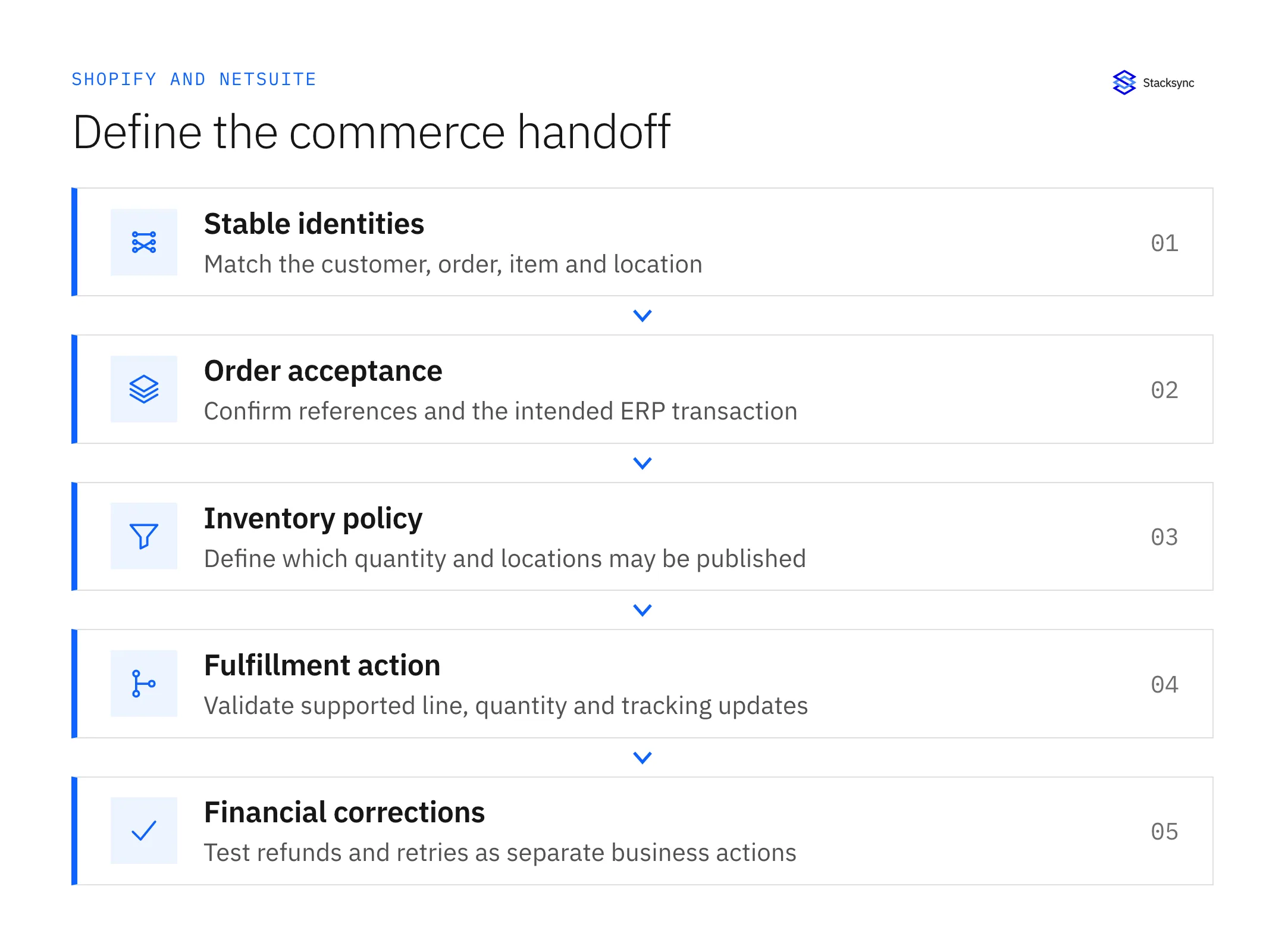
Two fields make the channel model work. First, carry the ship-to name and address on each sales order, because the 3PL reads them from there and not from the customer. Second, store the Shopify order number and a link back to the Shopify order on the sales order and invoice, so anyone in finance or support can jump from NetSuite to the source order in one click.
If you sell wholesale through Shopify B2B as well, keep those buyers as real customers and route only DTC orders to the channel customer. Decide the rule in writing, then test a guest checkout that shares an email with a wholesale contact.
Stop order sync errors between Shopify and NetSuite
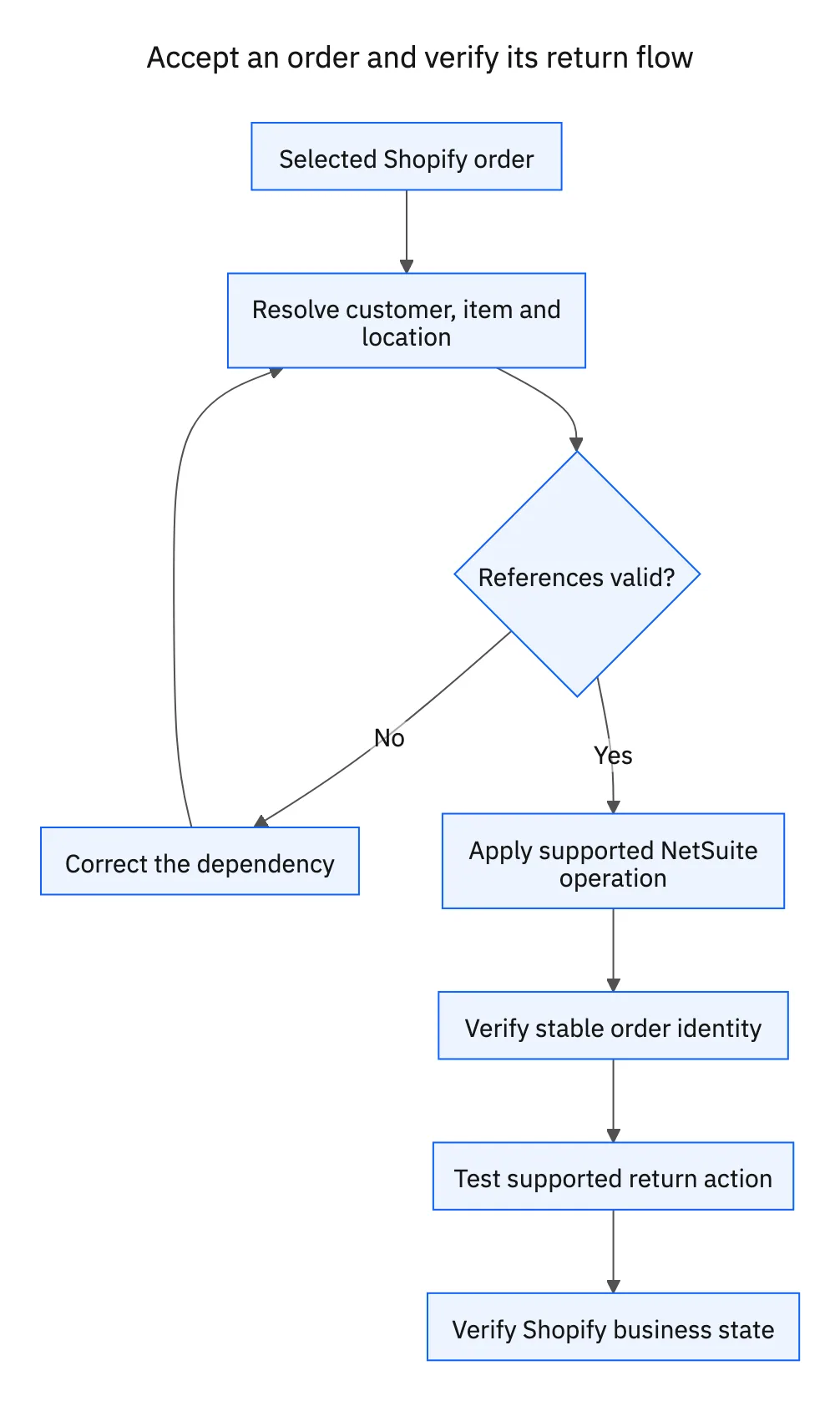
When buyers ask why their NetSuite sync keeps dropping Shopify orders, the cause is usually a missing dependency. The order references a customer, item, location or tax code that NetSuite does not have yet, so NetSuite rejects the sales order. A common symptom is an "id not found" error (NetSuite reports it as NLSchemaBeanException) on an order that looks fine in Shopify.
The fix is to create dependencies before the order syncs. A workflow runs ahead of the order sync, creates or matches the missing record in NetSuite, and only then lets the sales order through.
Fix the records that still fail
Some orders will still fail: a SKU that was renamed, a closed accounting period, a script on the sales order that rejects a value. In Stacksync, those records show up in the Issues dashboard with the field and value that failed. You can retry (it reads the latest source values and writes again), revert (it writes the destination values back to the source) or ignore the issue, and the documentation covers resolving issues in bulk. Retry works on current values, so it does not replay an old event. The retry and replay guide explains when to use each.
| Case | What a correct result looks like |
|---|---|
| Same order delivered twice | One NetSuite sales order and no second deposit |
| Missing customer or item | The dependency is created first, or the order fails visibly with the missing ID |
| Unknown location | No silent assignment to the wrong warehouse |
| Partial fulfillment | Correct lines and quantities, with the rest still open |
| Cancellation before shipment | Sales order closed and deposit refunded, with no invoice |
| Refund after shipment | The agreed refund records, tested twice for duplicates |
| NetSuite unavailable for an hour | Orders queue and post once NetSuite is back, with no gaps |
Run these cases before go-live
Before you retry anything that creates a transaction, look the order up in NetSuite by its Shopify order number. A timeout can arrive after NetSuite already accepted the record.
Real-time inventory from NetSuite to Shopify
For inventory, make NetSuite the system of record and push availability to Shopify. NetSuite knows receipts, transfers, 3PL adjustments and committed quantities; Shopify only knows what it sold. When both systems can edit stock counts, you get two versions of the truth and no way to tell which one is right.
- Pick the number. Decide whether Shopify gets on-hand, available or available minus a safety buffer, and write it down per location.
- Map locations one to one. Map each NetSuite location to a Shopify location. Summing every warehouse into one store figure hides stock that a given channel cannot ship.
- Handle kits and bundles. If you sell kits, compute kit availability from component stock in NetSuite, then send the kit quantity to the Shopify variant.
- Limit the item master. You do not have to sync the full product catalog. Some teams sync only quantities and keep product content in Shopify.
Stacksync's Shopify connector lists Products, Product Variants, Product Media, Orders, Customers and Abandoned Checkouts. It is not a per-operation matrix for inventory levels or locations, and NetSuite Location writes are marked coming soon. Treat inventory push as a workflow you confirm for your stores and locations during scoping. If you use the Oracle connector instead, its inventory tracking documentation says tracking must be configured before it can send an item's inventory.
No sync alone prevents overselling. Concurrent checkouts, reservations and fulfillment decisions all move the sellable number. Measure the time from a NetSuite stock change to the value a shopper sees, under peak order volume, and set your safety buffer from that measurement.
Discounts and promotions: one line per code, one GL account per type
Post each Shopify discount as its own line on the NetSuite sales order and invoice, with the discount code on the line. Then route each discount type to its own GL account: a free-shipping code, a loyalty discount and a wholesale promotion should not share one contra-revenue account. Tax gets its own line too, so the total your tax engine calculated lands on one tax item.
This is where buyers told us app-based connectors fall short. A team on the Celigo Shopify-NetSuite app said its settings allowed one discount type, so every promotion posted to the same account. A per-line design gives finance the split without a reclass.
New codes and unknown codes
Brands that issue thousands of unique discount codes cannot map each one by hand. A custom workflow can create a matching NetSuite promotion the first time a new code appears, then post the order against it. Promotion Code is not in the documented NetSuite object list, so treat this as a build you confirm during scoping, not a standard mapping.
You also need a rule for a code NetSuite does not recognize. One option is to let the sales order move to Pending Fulfillment, so the warehouse still ships, and hold the invoice until someone assigns the code. This hold can also block invoicing on refunds. The other option keeps the check out of NetSuite and runs it as an exception report outside the ERP. Pick the control that fits your close, and test a refund against a held order before you rely on it.
Refunds, cancellations, cross-month returns and bundles
Refunds cause more month-end rework than any other flow, because the right NetSuite records depend on where the order sits in the chain when the refund arrives.
| When the refund happens | Records to post | Notes |
|---|---|---|
| Cancelled before fulfillment | Close the sales order and refund the customer deposit | No invoice and no credit memo. |
| Refunded after invoicing | Credit memo plus customer refund | The standard path. It reverses revenue, tax and shipping on the credit memo lines. |
| Refunded after invoicing, reserve booked | Journal entry against the returns reserve plus customer refund | Only for merchants who already book a month-end returns reserve. Shipping and sales tax need a separate true-up. |
| Return of a prior-month order | Post in the current open period | Keeps closed months unchanged. Confirm with your controller before go-live. |
The reserve option exists to stop double counting. If finance already books an estimated returns reserve each month, a credit memo on top of it would reduce revenue twice. Posting the refund against the reserve avoids that. The reserve entry does not reverse shipping or sales tax on its own, so treat it as an option your controller signs off on and test it on real refunds first.
Cross-month returns were the reason one retail team we spoke with dropped its previous NetSuite integration: it sent all revenue to undeposited funds, and returns of last month's orders changed numbers in a closed period. Posting returns in the current period is the pattern we recommend for that case; test it against your own close calendar.
Bundles and standalone selling price
Some brands sell one Shopify SKU that combines a product with a service or subscription component. Under ASC 606, revenue splits across the parts by standalone selling price (SSP): the product portion recognizes at shipment and the service portion over its term. SSP runs in NetSuite; the integration does not calculate it. The integration passes clean order lines and triggers the invoice, and your NetSuite revenue setup or a script allocates revenue from there. Keeping the logic in NetSuite means your revenue team owns it and your auditors can read it.
Test with real orders routed one way into the NetSuite sandbox
Shopify offers development and sandbox stores, but they rarely hold the discount codes, payment methods, bundles and edge cases your live store produces. The most reliable test we have seen sends real production Shopify orders one way into the NetSuite sandbox. Nothing writes back to Shopify, so shoppers never see the test, and finance reviews postings built from real orders.
- 011. Connect production Shopify to the NetSuite sandboxRead from the live store, write only to the sandbox. Turn off every write back to Shopify.
- 022. Map real orders to test scenariosPick live orders that cover each case: multiple discounts, partial shipment, pre-shipment cancellation, refund after invoice, a bundle, a guest checkout.
- 033. Reconcile a parallel runLet orders flow long enough to cover your common order types and at least one refund, and have finance compare sandbox postings with the current books.
- 044. Switch the destination at cutoverRepoint the same configuration from the sandbox to NetSuite production and confirm the first orders by hand.
- 055. Go live channel by channelStart with one store or channel, watch the Issues dashboard through a full close, then add the next.
Use the production-readiness checklist for the go-live review, and record each test result against the scenario it proves.
Multiple Shopify stores, Shopify Plus and peak season
Brands with several Shopify or Shopify Plus stores often want one shared workflow instead of a copy of the flows per store. Buyers who run app-based connectors described that pain: every fix had to be made once per store. One shared workflow is a good goal, but check four things before you merge stores into it:
- Subsidiaries. Each store may post to a different NetSuite subsidiary, currency and tax setup.
- Item availability. An item sold in one store may not exist, or may not be stocked, for another subsidiary or location.
- Custom fields. Stores often carry different order attributes and metafields that map to different NetSuite fields.
- Customer and order IDs. Prefix IDs by store so order #1001 from two stores never collides.
If a deadline is close, build per-store configurations first and consolidate after go-live.
Peak volume and pricing
Peak season is when a connector that posts orders one API call at a time falls behind. Stacksync puts changes on a queue, so a spike in orders makes the queue longer while each order still gets processed, and a failed event is retried or parked with its context for you to fix. See event queues for how that layer works. Load-test with your own peak-month volume in the sandbox before you rely on any vendor's numbers.
Stacksync prices on active syncs and records in sync, not per order. Starter is $1,000 a month billed annually with 1 active sync and 50K records in sync. Pro is $3,000 with 3 active syncs and 1M records, Managed Pro is $4,200 with the same allowances, and Enterprise is priced by quote with unlimited active syncs. An active sync is one pair of connected apps and can carry as many objects as you need. Each extra Shopify store is its own connection, and so is the NetSuite sandbox while you test, so count connections before you pick a plan. Details are on pricing.

Amazon Seller Central and FBA orders into NetSuite
Brands that sell on Shopify and Amazon usually want both channels in the same NetSuite chain. Plan Amazon as a different kind of flow. The Stacksync Amazon Seller Central connector reads data out of Amazon through SP-API objects and reports, with historical and incremental syncs. It does not write back to Amazon, so refunds, tracking and inventory updates for Amazon stay in Seller Central or another supported tool.
- Separate FBA from merchant-fulfilled orders. FBA orders ship from Amazon's network, so NetSuite should not wait on your 3PL for them.
- Use an Amazon channel customer. The same channel-customer model from Shopify applies, with the Amazon order ID on each transaction.
- Reconcile on a schedule. Amazon settlements arrive in reports, so match orders, fees and refunds to each settlement rather than expecting live postings.
- Rotate credentials. The SP-API client secret expires, so put its renewal on the operations calendar.
The Amazon Seller Central and NetSuite guide covers the read-only setup in detail, and the CPG guide to orders, fees and settlement evidence covers settlement matching. For exceptions that need investigation across both channels, see AI agents for CPG order-to-cash exceptions.
Best Shopify NetSuite connectors compared
The best Shopify NetSuite connector is the one that posts your transaction chain the way your controller wants, across every store you run. Compare options on direction and GL control first. The failure modes below come from buyers we spoke with; confirm each against the current version of the product you evaluate.
| Criterion | Oracle NetSuite Connector (formerly FarApp) | Celigo Shopify-NetSuite app | Custom build | Stacksync |
|---|---|---|---|---|
| Direction | Documented order, inventory and fulfillment flows between Shopify and NetSuite | Prebuilt flows in both directions | Whatever you build and maintain | Two-way sync for Shopify's listed objects; NetSuite read and write access varies by object |
| GL and posting control | Connector settings plus NetSuite mappings | App settings plus edits to the prebuilt flows | Full control, in your code | Field mappings plus workflows for per-line discounts, deposits and refunds |
| What buyers reported | One team described its setup as one-way and handled other flows elsewhere | One discount type in the settings, failures when NetSuite scripts edit the sales order, a copy of the flows per store | Ongoing engineering for API changes, retries and reconciliation | Cash Sale, Promotion Code and inventory-level writes sit outside the documented object lists and need confirming |
| Best fit | Stores whose flows match the connector's documented sync types | Teams already on Celigo with a standard order flow | Rules no platform supports, with engineers to own them | Finance-led posting rules across several stores, channels and apps |
Shopify NetSuite integration options
If you are weighing NetSuite's own integration platform, read NSIP alternatives for real-time sync. If you are moving off Celigo, the Celigo alternative page compares the two directly. Oracle's Shopify connector guide lists the flows its connector supports.
Whichever tool you choose, run the same test orders through each option: two discounts on one order, a pre-shipment cancellation, a cross-month return and a second store. The option that posts all four correctly without manual journal entries is the one to shortlist. Review Stacksync security with your IT team as part of that evaluation.
Apply this to CPG brands selling DTC and wholesale
CPG brands run the same Shopify NetSuite connection across DTC and wholesale, so the customer and product rules need explicit owners. A shopper, a retailer and a distributor can share an email domain and still be three different NetSuite entities.
| Record to reconcile | Owner | Rule to keep |
|---|---|---|
| Shopify order and line | Commerce operations | Store the Shopify order and line IDs, the ordered pack, channel currency and revision. |
| NetSuite sales order | ERP operations | Use the Shopify order number as a stable external reference and validate customer, item, subsidiary and line mapping before creation. |
| Customer crosswalk | Revenue operations | Keep DTC shoppers on the channel customer and wholesale accounts as real customers; never merge them by email alone. |
The consumer packaged goods hub covers the wider operating context, and Shopify NetSuite two-way sync for CPG brands selling DTC and wholesale goes deeper on pack crosswalks and channel identities.
Plan your Shopify NetSuite rollout
Write the decisions down before anyone builds: the transaction chain, the customer model, the GL account for each discount type, the refund path at each stage, the inventory number Shopify gets, and the order in which stores go live. The field mapping workbook gives you a template, and the evaluation worksheet lets you score vendors against the same test orders.
If you want to see how Stacksync handles your chain, book a demo and bring your store list, your NetSuite subsidiaries and two or three orders that give your team trouble today. We will show which parts run on standard objects, which need a workflow, and what remains open.
FAQ
Frequently asked questions










Explore these integrations and topics
- integrationNetSuite and Shopify integration
- connectorNetSuite integrations
- connectorShopify integrations
- platformTwo-way sync
- platformCRM and ERP integration
- platformE-commerce synchronization
- Two-way sync guidesUnderstand two-way sync, record matching, field ownership, and production readiness.
- CRM and ERP integration guidesPlan account, order, invoice, and payment flows between commercial and finance teams.
Related articles





