Remove Duplicate HubSpot Contacts Fast with Stacksync
HubSpot's native duplicate tool is manual and Professional-plan only. Stacksync bulk-merges thousands of duplicate contacts with SQL, automatically.
- Author
- Ruben Burdin · Founder & CEO
- Published
- Updated
- Read time
- 9 min read
Duplicate contacts in HubSpot are more than a minor annoyance; for growing businesses, they represent a significant drain on resources and a direct threat to data integrity. As your database expands, these duplicates inevitably lead to wasted marketing spend, skewed analytics that misinform critical decisions, and a fragmented customer experience that quietly erodes brand trust.
Fortunately, there's a modern, dedicated solution. Stacksync provides a powerful, fast, and efficient platform for HubSpot contact deduplication, ensuring your data remains clean, accurate, and ready for action.
How Do Duplicate Contacts Happen?
Duplicate data is a widespread issue, often stemming from poor data collection practices and a lack of clear data governance [4]. Duplicates typically enter your HubSpot portal through several common channels:
- Manual Data Entry: Simple human errors like typos or creating a new contact instead of searching for an existing one.
- Form Submissions: An existing contact fills out a form using a different email address, such as a personal vs. a work account.
- List Imports: Uploading CSV files from events or other sources without properly checking for existing contacts is a major source of bulk duplicates.
- App Integrations: Syncing data from other applications without a clear deduplication strategy can create a continuous flow of duplicate records. It's critical to implement best practices for clean data when syncing systems to prevent this.
How to Remove Duplicate HubSpot Contacts: The Traditional vs. The Stacksync Way
There are two main approaches to handling duplicates in HubSpot. The traditional method is slow and manual, while the Stacksync method is fast, automated, and built to scale.
Method 1: Using HubSpot’s Native Deduplication Tool
HubSpot includes a built-in "Manage Duplicates" tool that identifies potential duplicates based on email, Record ID, or Company Domain Name. However, this tool comes with significant limitations:
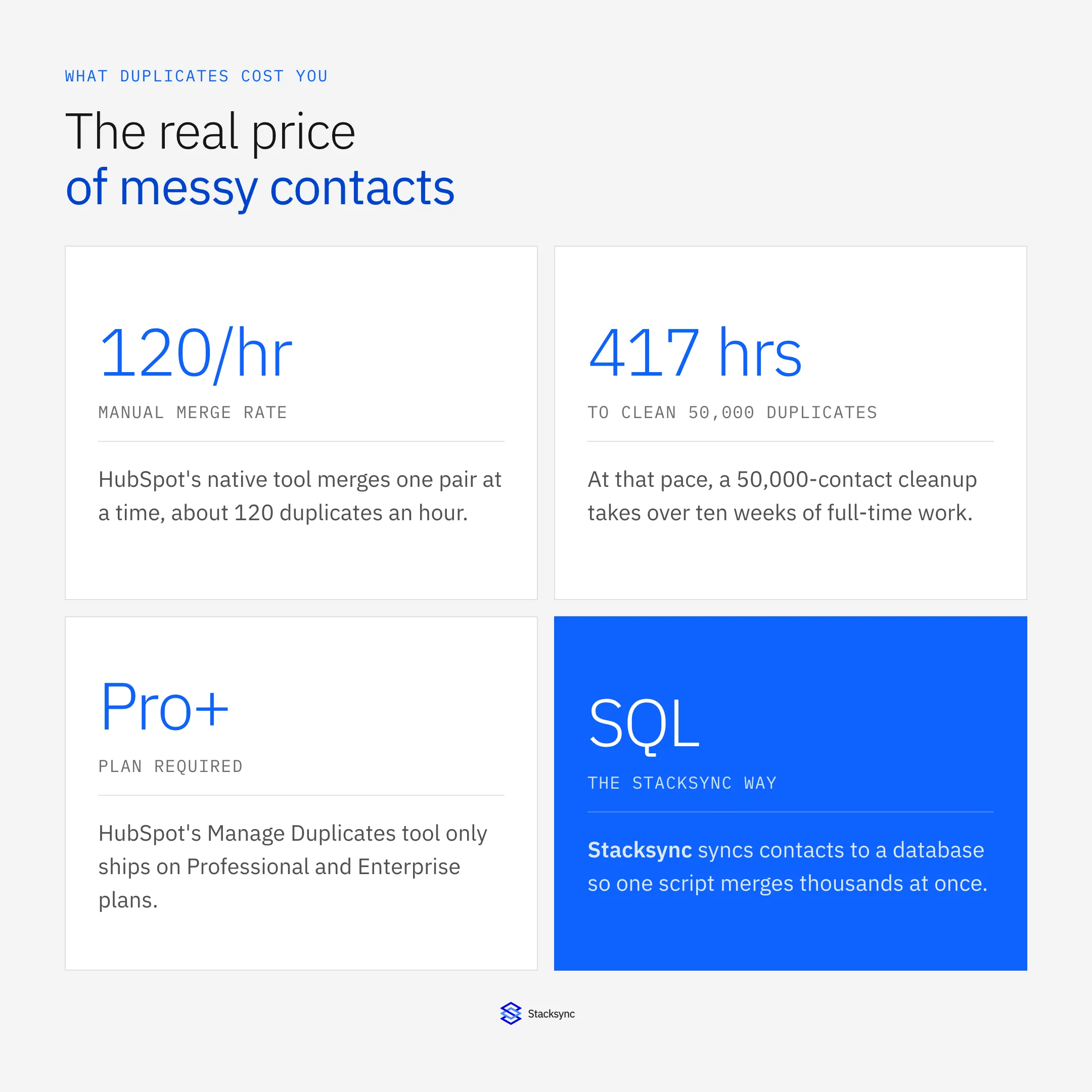
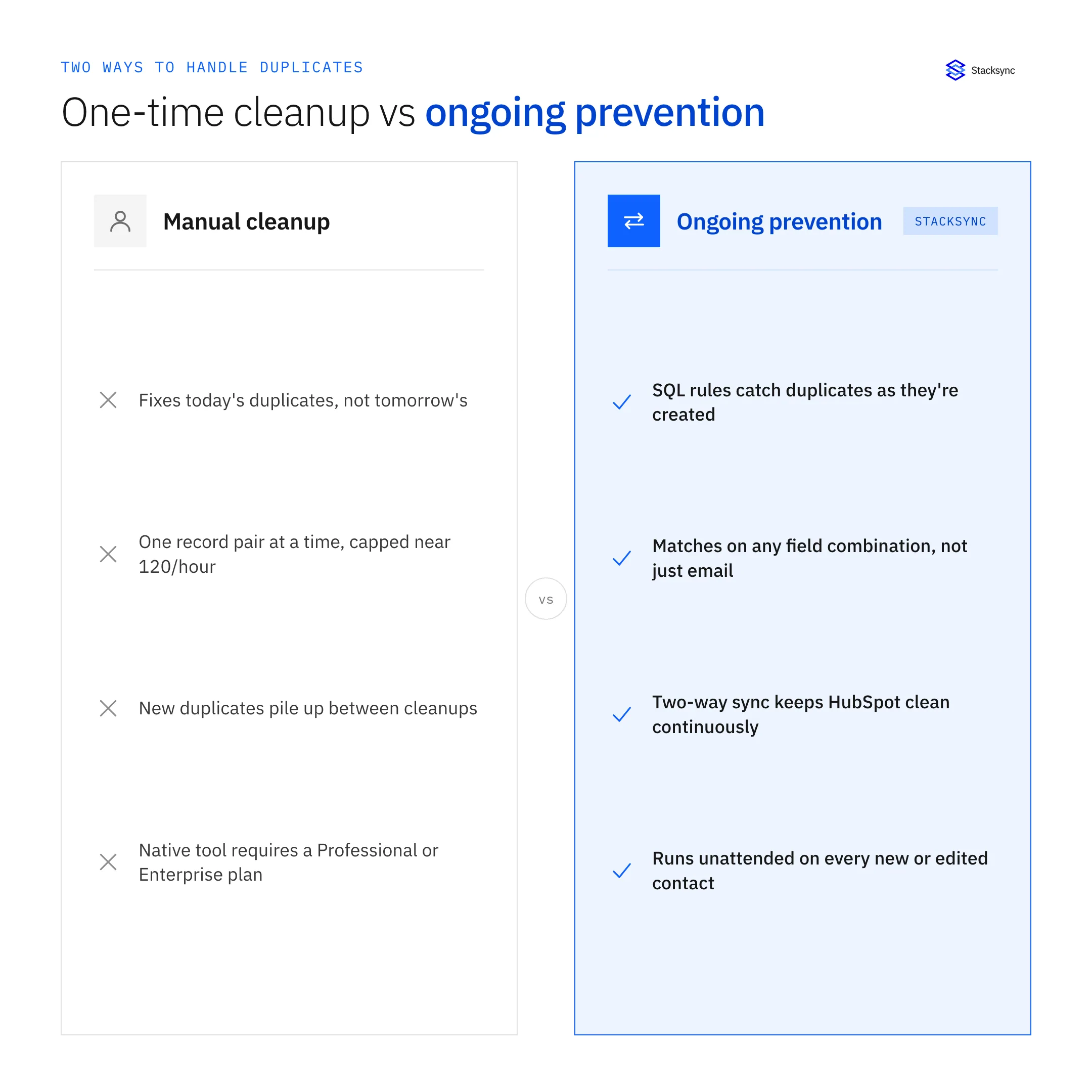
- It's manual: You must review and merge each pair of duplicates one by one, a process that is far too slow and resource-intensive for large databases, at a pace of roughly 120 merges an hour.
- It has limited matching logic: It cannot identify complex duplicates, such as two records for the same person with different email addresses but the same name and phone number.
- It isn't scalable: Merging is restricted to two records at a time, making it impractical for any large-scale cleanup project.
- It's plan-gated: Merging duplicates requires a Professional or Enterprise HubSpot subscription, so teams on Starter or Free plans can't use it at all.
While useful for catching occasional, obvious duplicates, this tool was not designed for comprehensive data cleansing.
Method 2: The Stacksync Method for Bulk Deduplication
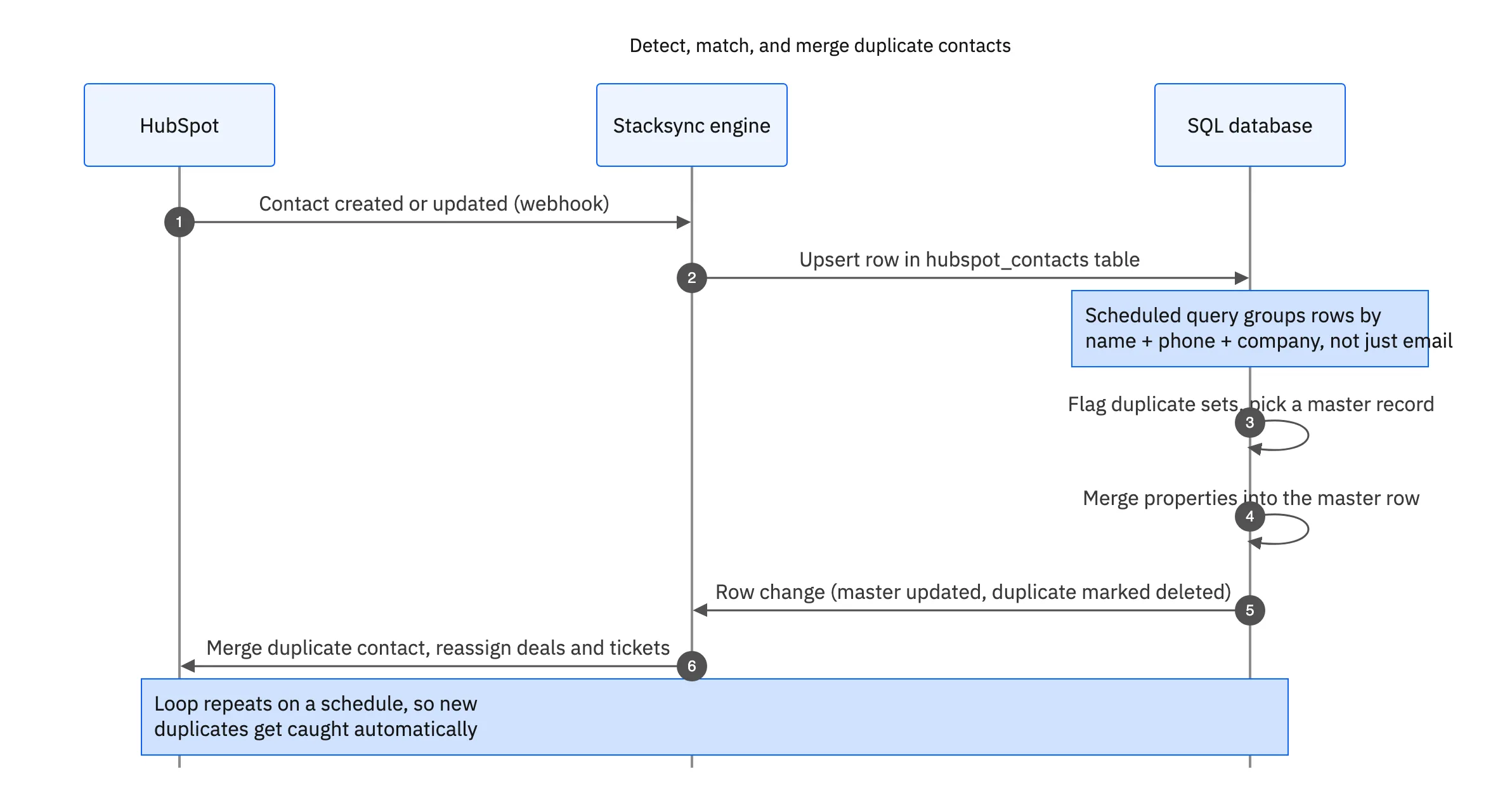
Stacksync offers a modern data sync platform that provides a much more powerful and scalable solution. The concept is straightforward but highly effective: sync your HubSpot data to a SQL database, use SQL to identify all duplicates based on any criteria you define, and let Stacksync’s real-time, two-way sync update HubSpot with the clean, merged data automatically.
A Step-by-Step Guide to HubSpot Contact Deduplication with Stacksync
Step 1: Connect HubSpot to Your Database in Minutes
First, establish a real-time, two-way sync between HubSpot and a SQL database like PostgreSQL or Snowflake. Stacksync's offering on the HubSpot Marketplace provides a no-code connector that lets you authenticate and configure this connection in minutes, with no complex API work needed.
Step 2: Sync Your HubSpot Contact Object
Next, select the objects to synchronize. Stacksync supports all standard and custom objects in HubSpot, including Contacts, Companies, and Deals. Stacksync will then create a table in your database that perfectly mirrors your HubSpot Contact object, populated with all its properties.
Step 3: Use SQL to Find and Flag Duplicates
This is where the real power lies. With your HubSpot data residing in a SQL database, you can write queries to find duplicates based on any combination of fields, something far beyond the capability of HubSpot's native tool.
For instance, you can find contacts with the same first name, last name, and company, even if they have different email addresses, using a simple query:
SELECT first_name, last_name, company, COUNT(*) FROM hubspot_contacts GROUP BY first_name, last_name, company HAVING COUNT(*) > 1;
From there, you can run scripts to define a "master" record for each duplicate set and programmatically merge the properties from the other records into it based on your business rules.
Step 4: Sync the Merged, Clean Data Back to HubSpot
Because Stacksync offers a true two-way sync, any changes you make in the database are automatically synced back to HubSpot in real time. When you run a script to delete a duplicate and update the master record, Stacksync handles the update instantly.
This process effectively merges the duplicates and their history. Stacksync also syncs associations between objects, ensuring that all related deals, tickets, and activities are correctly linked to the single master contact after the merge is complete.

Apply this in fire, life-safety and security integrators: agreement and term and renewal opportunity
Inspection and monitoring contracts need the same disciplined HubSpot contact matching as other customer processes. Preserve the buyer, site, and legal account relationship before connecting renewal context to Acumatica billing accounts; deduplicating a contact must not merge distinct contracts.
| Record to reconcile | Responsible owner | Rule to preserve |
|---|---|---|
| Agreement and term | Contract administration | Identify the service type, effective dates and covered sites. |
| Renewal opportunity | Sales | Track the proposed next term without altering active coverage. |
| Billing account | Finance | Own the responsible payer and approved invoice instructions. |
An exception to plan for: Monitoring renews but inspection scope changes. Keep separate term decisions and avoid applying one approval to both obligations. Acceptance check for the pilot: inspection and monitoring terms remain distinguishable.
The fire, life-safety and security integrators hub connects the broader operating context. These guides develop the specific record mappings and decisions for this application:
Get Started with Faster, Smarter HubSpot Deduplication
Using Stacksync for HubSpot contact deduplication transforms a tedious manual task into a fast, automated, and scalable process. The benefits are clear:
- Speed: Clean thousands of records in the time it takes to manually merge a handful.
- Power: Use the full power of SQL for complex, custom matching logic that HubSpot's native tool simply can't handle.
- Automation: Set up ongoing scripts to catch and merge new duplicates as they appear, keeping your CRM permanently clean.
- Scalability: Easily handle databases with millions of contacts without performance degradation.
Stop letting duplicate contacts undermine your business. Take control of your data quality and get the full value of your HubSpot CRM.
Ready to see it in action? Book a demo with one of our experts or start your free trial to solve your HubSpot data problems today.

FAQ
Frequently asked questions










Related articles