






















HubSpot–PostgreSQL Integration: Schema and Two-Way Sync
Connect HubSpot and PostgreSQL with stable IDs, relationship tables, field ownership, connector prerequisites, and recovery tests for reliable sync.
- Author
- Ruben Burdin · Founder & CEO
- Published
- Updated
- Read time
- 7 min read

Decide whether the database reports on CRM data or changes it
HubSpot–PostgreSQL integration makes CRM records available in database tables for SQL, reporting, and internal applications. Use a one-way flow when PostgreSQL is a reporting copy. Use two-way sync when a database application must write approved changes back to HubSpot, with explicit field ownership and stable record matching.
The key design question is what the database is allowed to change. A dashboard needs fresh data but may never write to the CRM. An internal customer-operations application may update selected fields while HubSpot remains the owner of sales stages and marketing properties. Treat those as different contracts.
This guide covers the method, schema, setup prerequisites, associations, and acceptance tests. See the HubSpot–PostgreSQL integration page for Stacksync’s product overview, and record your field decisions in the mapping workbook.
Choose between export, a managed connector, and custom code
| Method | Useful for | Limit to account for |
|---|---|---|
| CSV export/import | One-time migration, inspection or a controlled snapshot | No ongoing change capture or automatic return path |
| Managed connector such as Stacksync | Ongoing movement of supported records and approved write-back | Account permissions, selected objects, mapping and connector prerequisites |
| Custom HubSpot API and database integration | Special requirements that justify engineering ownership | Pagination, associations, change tracking, quotas, idempotency and recovery |
| Scheduled ETL/ELT | Reporting that accepts a refresh interval | Writing to the reporting table does not imply a supported CRM update |
Select an approach using the expected workflow and operating effort. For custom code, “read contacts into a table” is the beginning of the implementation. A production design also needs to handle merges, association changes, deleted records, API limits, and writes that fail after partial progress.
Design a relational model around stable identities
Keep the HubSpot record ID as a unique external identity, distinct from the database’s generated primary key. That lets you retain stable local references while explicitly identifying the remote CRM record. Do not use email as the only permanent key: a contact can change email, and duplicate-resolution behavior needs its own policy.
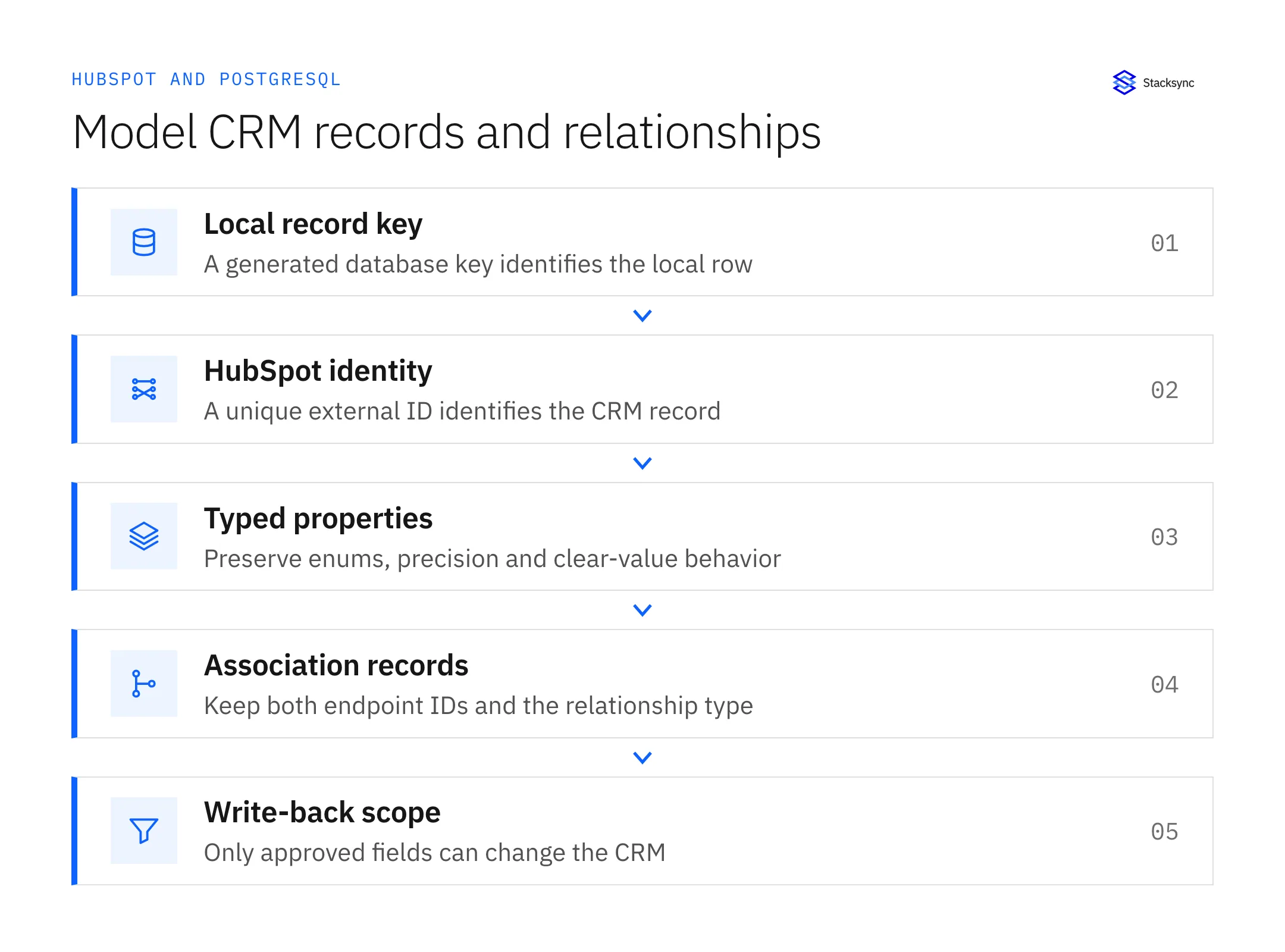
| Table responsibility | Recommended design decision | What to test |
|---|---|---|
| Contact/company/deal records | Generated local key plus unique HubSpot identity | A repeated source record does not create a second row |
| CRM properties | Typed columns for stable fields; explicit treatment for evolving properties | Null, enum and precision behavior matches the field contract |
| Associations | Separate relationship records with both endpoint IDs and label/type | One contact can retain multiple valid relationships |
| Sync observability | Separate source-change and observation timestamps | Lag measures data freshness rather than query time |
| Write-back fields | A deliberate allowlist with named owners | An application cannot overwrite fields outside its scope |
This is a design model. Inspect the schema produced by your selected connector before creating or changing tables.
HubSpot associations are distinct from record properties. Its association APIs represent links and association types between objects. A single company_id column is insufficient when the workflow needs several company relationships or labels. Preserve the structure your application actually uses.
Choose types deliberately: identifiers are identities, monetary values require suitable precision, and a date is not the same as a timestamp. For enumerations, retain the internal value and define the display label separately. If a transformation loses information, do not silently enable the reverse path.
Check Stacksync’s PostgreSQL prerequisites
The PostgreSQL connector documentation requires a single-column, automatically generated primary key on synced tables and appropriate table ownership permissions. The logical-replication connection needs replication rights and wal_level set appropriately. Stacksync also documents a Postgres Heroku connector path using triggers for environments without replication access.
Check the UUID-generation prerequisite as well: the required-permissions guide calls for pgcrypto on PostgreSQL 12 and earlier to provide gen_random_uuid(); PostgreSQL 13 and later include that function. Have the database administrator verify the version and extension availability before setup.
These are real configuration requirements. Verify them with the database administrator before promising a setup time. Managed database services expose replication settings differently; follow the provider’s change procedure and confirm the exact connector mode rather than applying a generic server restart instruction.
- List the tables and schemas in scope and check their keys.
- Confirm the connection role has the required table and capture permissions.
- Select the documented replication or trigger-based connector mode.
- Verify network access and the supported secure connection method.
- Record how schema changes will be reflected in the sync configuration.
The database may support a feature that the selected connector does not use. Keep PostgreSQL engine capability, hosting-provider restrictions, and Stacksync configuration as separate checks. That avoids diagnosing a connector permission failure as a missing database feature.
Connect HubSpot and test one object end to end
- 01In Stacksync, create the HubSpot connection and authorize the intended account using the documented Super Admin flow.
- 02Create the PostgreSQL connection using the prepared credentials and supported connection settings.
- 03Select one representative HubSpot object and its database table. Confirm the source and target IDs before enabling writes.
- 04Map the fields and restrict each direction to the approved scope.
- 05Complete the initial load, then change a source value while the sync is running and inspect the target.
- 06If write-back is required, change one permitted database field and confirm the corresponding HubSpot record updates once.
- 07Add associations and additional objects only after their identities and dependencies are understood.
Use the official HubSpot authorization and PostgreSQL authorization guides for the current screens. Verify connection region compatibility and account access before investigating field-level behavior.
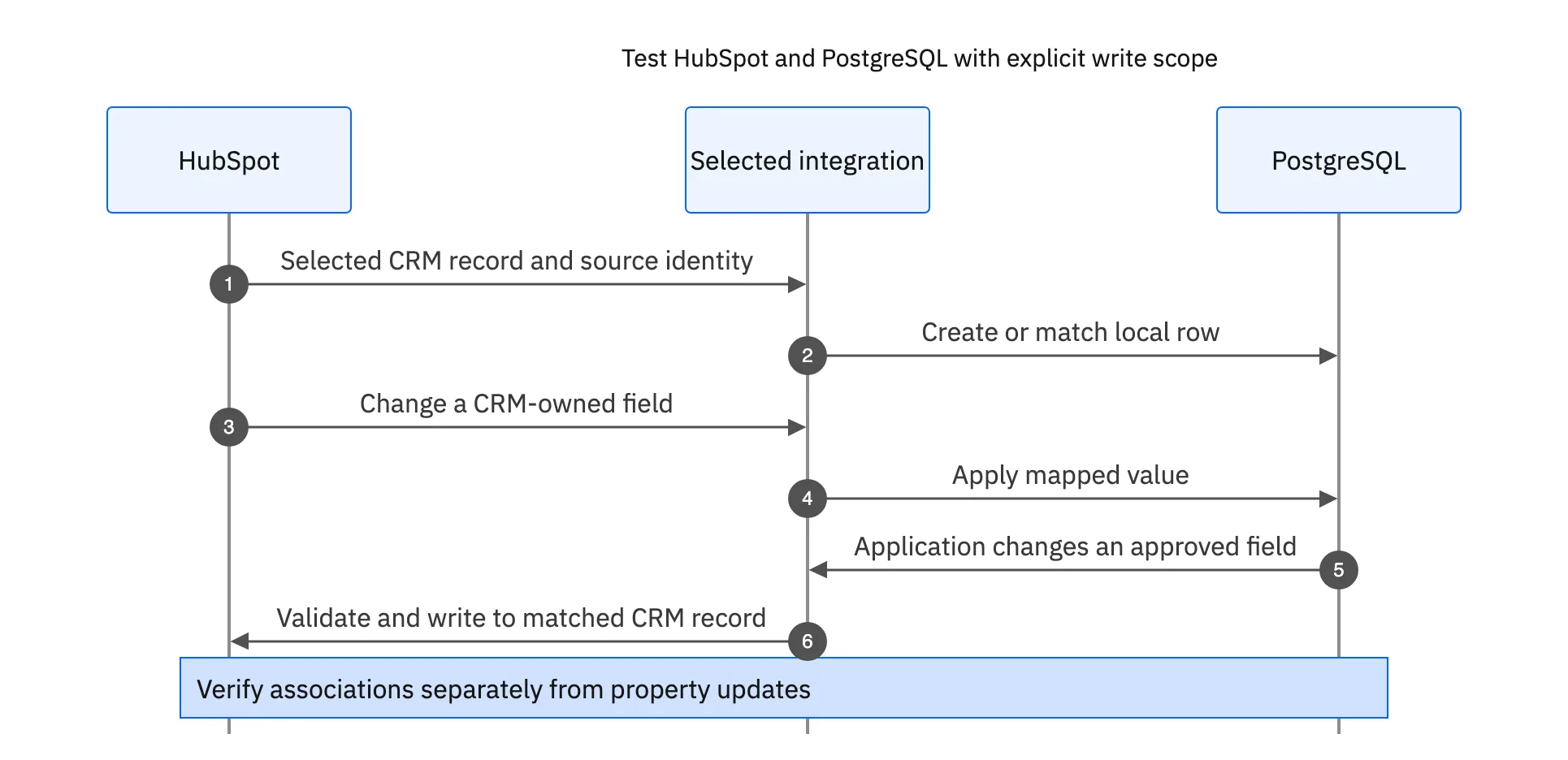
For custom integrations, implement the same checks explicitly. A PostgreSQL INSERT with ON CONFLICT can provide an atomic upsert against a suitable uniqueness constraint. It does not define your cross-system match rule or prevent every downstream business side effect. Test the complete workflow, not only the SQL statement.

Test associations, deletes, and schema changes separately
A contact property changing and a contact becoming associated with a company are different updates. Stacksync’s HubSpot associations documentation describes relationship synchronization. Test adding and removing an association independently of an ordinary field update, and measure its observed freshness.
Write down what deletion means. A source archive might mark the database row inactive; deleting a relationship may remove only the join record. Do not infer that deleting a local row is an approved instruction to delete the HubSpot contact. Keep destructive lifecycle behavior out of scope until the business owner approves and tests it.
Treat a renamed column or changed enum as a configuration change. Stacksync documents a manual sync configuration update procedure. Preserve the old mapping, apply the change deliberately, and rerun the affected acceptance cases.
Verify freshness and correctness together
| Test | Expected evidence |
|---|---|
| Duplicate delivery | One database row and one intended CRM entity |
| Concurrent edits | The documented owner or conflict rule decides the field value |
| One contact linked to two companies | Both relationships remain addressable |
| Invalid field value | A visible rejected record and a tested repair |
| Database outage | Measured backlog recovery without unintended writes |
| Schema or permission change | An alert and a repeatable update procedure |
Measure lag from the original application change to the usable destination value. Separate capture delay, queueing, and rejected writes when diagnosing slow updates. A database query returning quickly says nothing about how recently its CRM data was synchronized.
Use the retry and replay guide for failed writes and the production checklist before launch. If you need to validate your selected objects and database hosting constraints, book a HubSpot–PostgreSQL integration review with the mapping workbook and one representative relationship.
FAQ
Frequently asked questions










Explore these integrations and topics
- integrationHubSpot and PostgreSQL integration
- connectorHubSpot integrations
- connectorPostgreSQL integrations
- platformTwo-way sync
- platformCRM synchronization
- platformDatabase synchronization
- Two-way sync guidesUnderstand two-way sync, record matching, field ownership, and production readiness.
- CRM synchronization guidesConnect customer records across sales, marketing, and operational systems.
Related articles




