HubSpot Workflows: Streamlining Business Operations
HubSpot workflows automate lead nurturing, onboarding and sales tasks. Learn the core workflow types, best practices, and how to reach systems outside HubSpot.
- Author
- Ruben Burdin · Founder & CEO
- Published
- Updated
- Read time
- 8 min read

HubSpot workflows are the automation engine behind most of what a marketing, sales, or service team does without touching a keyboard: routing a new lead, sending a reminder email, updating a deal stage. Used well, they turn manual busywork into rules that run themselves.
HubSpot continues to build out its workflow capabilities with AI-powered actions, deeper customization options, and more intuitive design interfaces. These improvements help teams reduce manual tasks and keep customer-facing processes consistent, whether the workflow touches five contacts or fifty thousand.
What Are HubSpot Workflows?
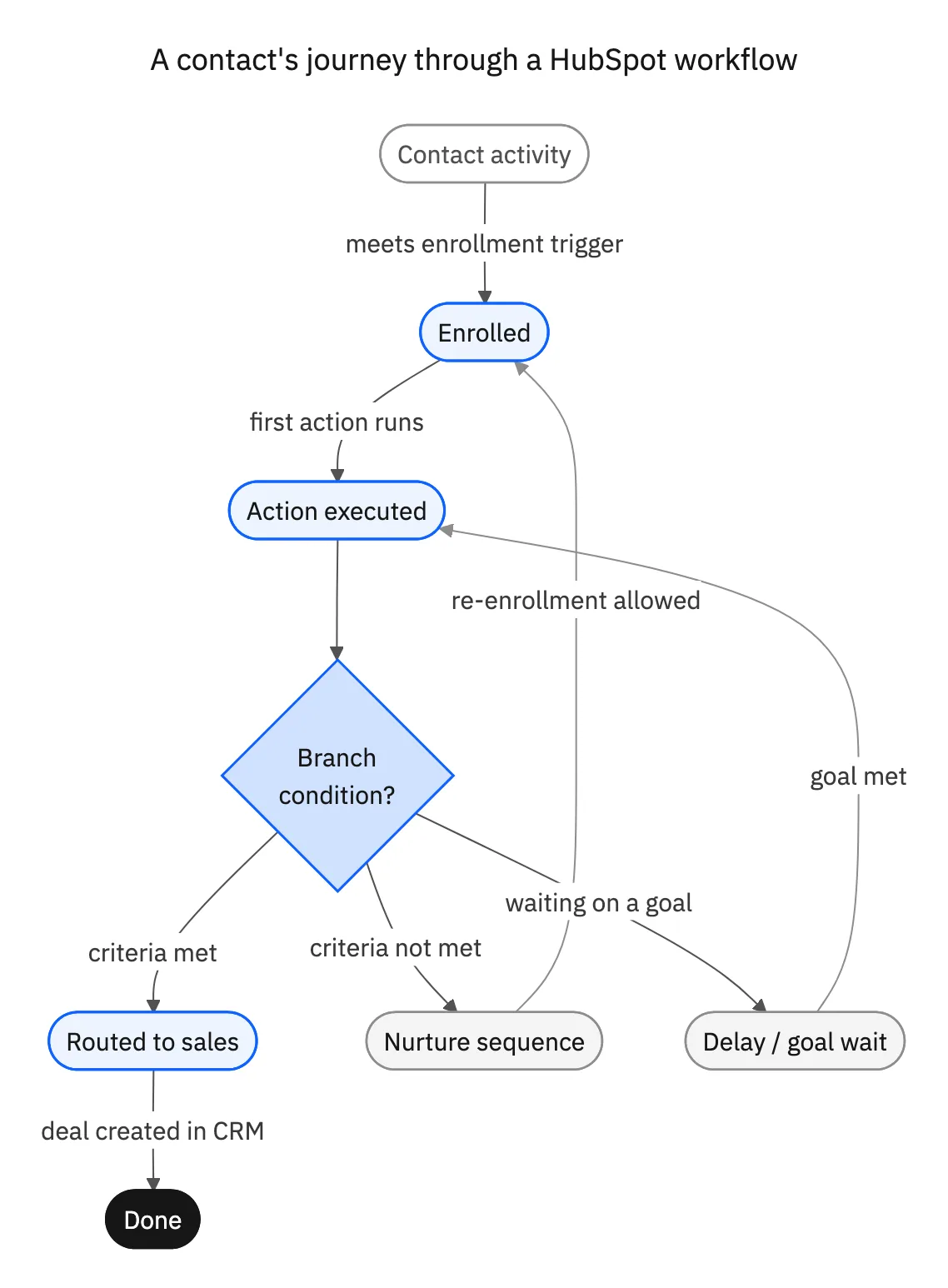
HubSpot workflows are automated sequences of actions triggered by specific conditions or events within your HubSpot portal. They function as the automation engine of your marketing, sales, and service operations, allowing you to create sophisticated processes that run without manual intervention.
Core Components of HubSpot Workflows
At their foundation, HubSpot workflows consist of three primary elements:
- Enrollment Triggers: The conditions that cause contacts, companies, deals, or tickets to enter a workflow
- Actions: The specific tasks that execute automatically once the workflow is triggered
- Logic Branches: Decision points that determine different paths based on specific criteria
Workflows can be applied across various HubSpot objects including contacts, companies, deals, tickets, and custom objects, making them versatile tools for automating nearly any business process.
Essential HubSpot Workflows to Implement
With HubSpot's February 2025 updates introducing significant workflow enhancements, now is the perfect time to evaluate which automated processes could benefit your organization most.
Lead Nurturing and Qualification
Modern lead nurturing requires personalization at a level that is impossible to achieve manually once your contact list grows past a few hundred people. Implementing intelligent lead nurturing workflows allows you to:
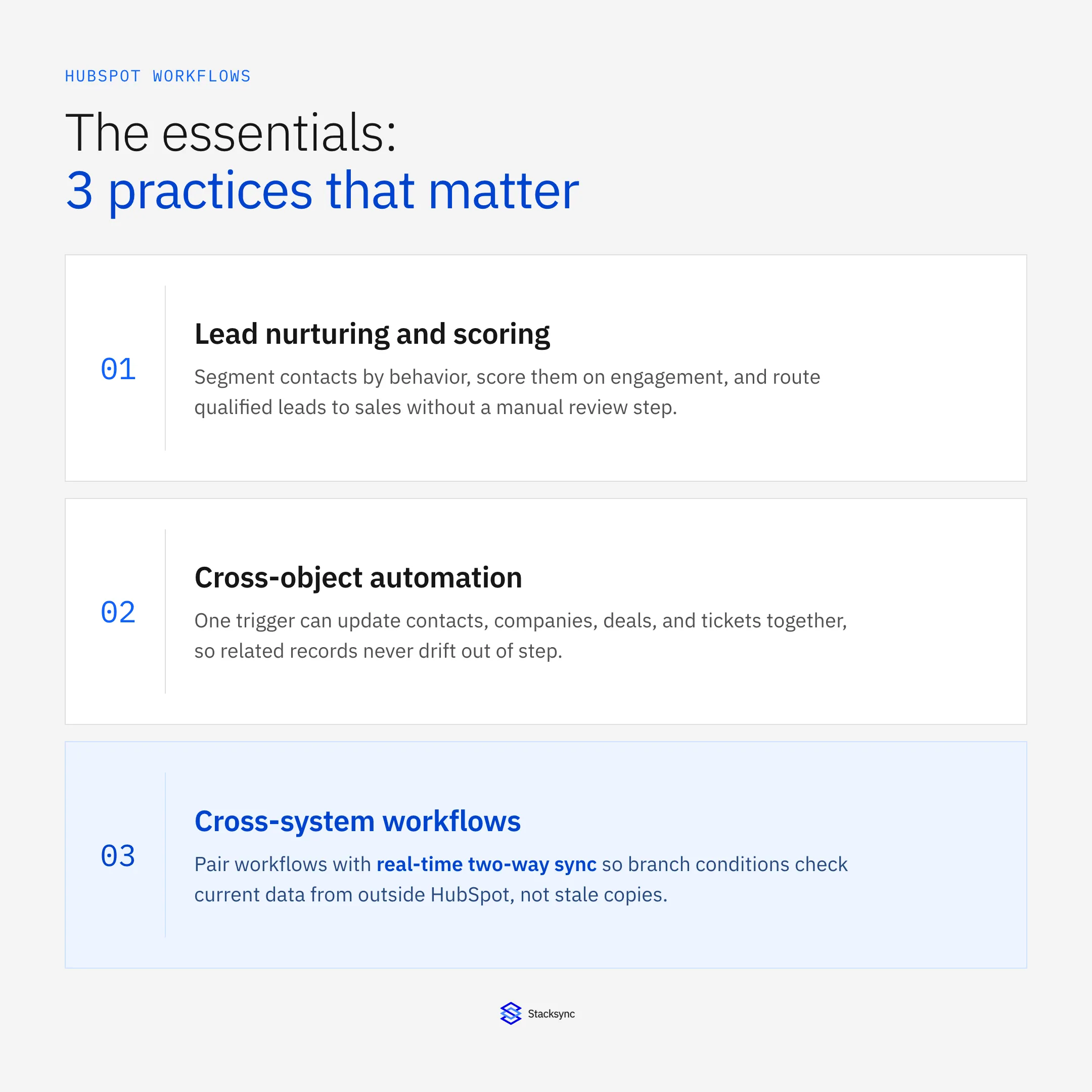
- Automatically segment leads based on behavior, demographics, or engagement level
- Deliver targeted content based on specific interests or actions
- Progressively profile leads by requesting additional information at appropriate intervals
- Score leads based on engagement and automatically route qualified prospects to sales
The recent addition of the "Ask Breeze" workflow action now enables AI-powered insights to be automatically generated and delivered throughout your nurturing sequences, providing more relevant content to prospects[1].
Customer Onboarding Automation
The onboarding experience sets the tone for your entire customer relationship. Automated onboarding workflows help ensure consistency while reducing the manual workload on your customer success team:
- Send personalized welcome emails with relevant resources
- Schedule automatic check-ins at critical milestones
- Trigger internal notifications when customers complete key actions
- Automatically assign customer success managers based on product tier or other criteria
With HubSpot's new ability to embed custom dashboards in the Customer Success Workspace, teams can now monitor onboarding progress more effectively while maintaining workflow automation[1].
Data Management and Cleansing
Data quality directly impacts the effectiveness of your marketing and sales efforts. Data management workflows help maintain clean, accurate information:
- Standardize data formats for phone numbers, addresses, and other fields
- Identify and merge duplicate records
- Enrich contact records with third-party data
- Flag incomplete records for review
The February 2025 release introduced AI-Generated List Descriptions, which automatically interpret your list criteria and help keep list management clear as the list grows, a useful complement to data management workflows[2].
Sales Process Automation
Streamlining your sales process with workflows ensures consistent follow-up and reduces administrative burden:
- Automatically create and assign tasks based on deal stage changes
- Send internal notifications when high-value deals reach critical stages
- Generate and send proposals or contracts when deals reach specific stages
- Update deal stages based on customer actions
The Sales Performance Workspace introduced in February 2025 pairs with these workflows, letting managers track and improve team performance with greater visibility[1].
Advanced Workflow Strategies
Building on HubSpot's latest features, these advanced workflow strategies can take your automation to the next level.
Cross-Object Workflows
With HubSpot's enhanced workflow capabilities, you can now create sophisticated automations that span multiple objects:
- Trigger company record updates based on contact activities
- Create or update deals when specific ticket issues are resolved
- Synchronize information across related records automatically
This approach aligns with the current trend in marketing team structures, which are becoming less siloed with more cross-functional pods organized around customer journeys rather than marketing channels[3].
AI-Enhanced Decision Making
The introduction of the "Ask Breeze" workflow action represents a significant advancement in how workflows can incorporate artificial intelligence:
- Automatically generate content recommendations based on contact behavior
- Create personalized follow-up messages using AI-generated insights
- Analyze engagement patterns to optimize workflow timing
- Identify potential churn risks through behavioral analysis
This capability transforms workflows from simple automation tools into intelligent systems that can adapt and respond to customer behavior with minimal human intervention[1].
Revenue Optimization Workflows
With HubSpot's new line-item revenue reports and custom date and currency properties for forecasting, businesses can implement sophisticated revenue optimization workflows:
- Automatically identify upsell opportunities based on product usage
- Trigger renewal campaigns at optimal timing windows
- Implement dynamic pricing workflows based on customer attributes
- Flag at-risk revenue for proactive intervention
These workflows become even more powerful when combined with the ability to forecast multiple revenue outcomes using custom date and currency properties[1].
Cross-System Workflows: Reaching Outside HubSpot
Most HubSpot workflows only need HubSpot data. But once a workflow has to check an ERP field, a database record, or a support ticket status that lives in another tool, native workflow actions only get you halfway there.
What Native Actions Can and Cannot Do
HubSpot workflows can reach outside the portal in three ways:
- Connected app or integration actions, available in every workflow type, that push data to Salesforce, Slack, a data warehouse, or a custom endpoint
- Webhook and custom code actions that call an external API and parse the response inline
- Multi-account workflows that create or update records in a separate HubSpot portal
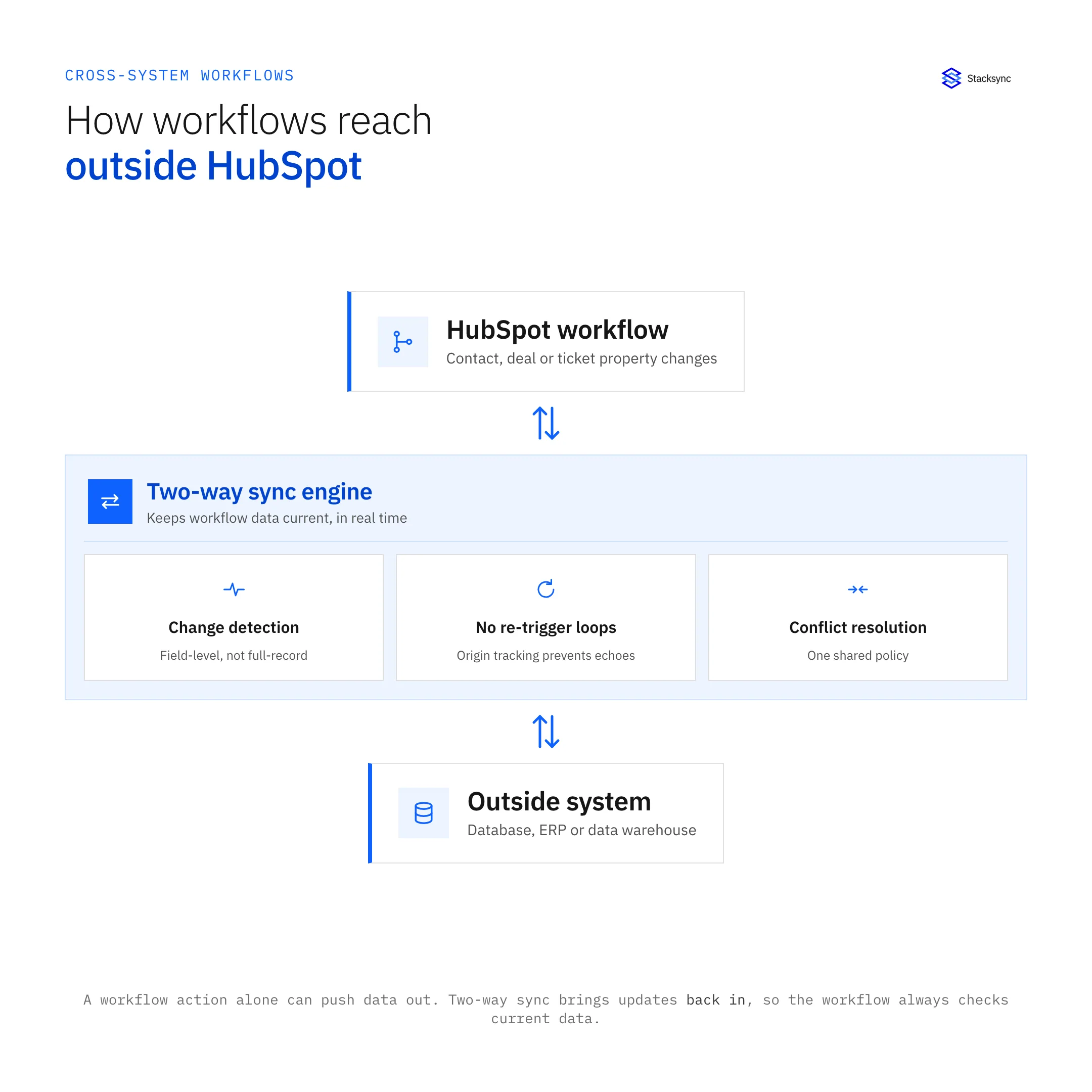
All three are one-directional triggers: they fire once, send data out, and move on. If the record's state changes in that other system afterward, an ERP order ships, an inventory count drops, a support ticket closes, the workflow has no way to know unless something writes that update back into HubSpot.
When a Cross-System Workflow Needs Two-Way Sync
Real-time two-way sync closes that gap: a change made in the connected system writes back into the matching HubSpot property automatically, so the workflow's enrollment and branch criteria are always checking current data instead of whatever HubSpot last knew. This matters most when:
- A branch needs to check a value that lives in another system, an inventory count, a contract status, a custom ERP field
- A change made outside HubSpot should re-trigger or exit a workflow, an order ships, a ticket resolves
- Multiple teams update the same record from different tools and the workflow cannot afford to act on stale data
Building More Efficient Workflows with 2025 Updates
HubSpot's February 2025 updates introduced several features specifically designed to make workflow creation and management more efficient.
Redesigned Workflow Creation Process
The workflow creation interface has been completely redesigned to simplify the building process:
- More intuitive visual interface for mapping workflow steps
- Simplified branching logic for complex decision trees
- Enhanced testing capabilities to validate workflow functionality
- Improved error handling and troubleshooting tools
This redesign makes it significantly easier for teams to build complex workflows without requiring extensive technical expertise[1].
Workflow Performance Optimization
New tools for analyzing workflow performance help identify bottlenecks and opportunities for improvement:
- Detailed analytics on workflow completion rates
- Insights into common exit points or failure points
- Performance comparisons across different workflow versions
- Recommendations for workflow optimization
These capabilities allow teams to continuously refine their automation strategies for maximum effectiveness.
Integration Enhancements
The latest updates also improve how workflows interact with other systems:
- Enhanced API capabilities for triggering external actions
- Better synchronization with third-party platforms
- More flexible data mapping between systems
- Improved error handling for external integrations
These improvements are part of HubSpot's broader focus on API updates and enhanced extensibility announced at the Spring Spotlight 2025[4].
Measuring Workflow Success
To ensure your workflows are delivering value, it's essential to establish clear metrics for success.
Key Performance Indicators
Effective workflow measurement typically focuses on these key metrics:
- Time savings (hours saved through automation)
- Error reduction (decrease in manual data entry errors)
- Process acceleration (reduction in cycle time)
- Consistency improvements (standardization of processes)
- Revenue impact (increased conversion rates or deal velocity)
With HubSpot's new CTA performance measurement capabilities, you can now attribute form submissions directly to specific CTAs, providing clearer insights into workflow effectiveness when automation includes CTA delivery[1].
Continuous Improvement Framework
Implementing a structured approach to workflow optimization ensures ongoing value:
- 01Establish baseline metrics before workflow implementation
- 02Set specific goals for each workflow
- 03Review performance data at regular intervals
- 04Identify underperforming segments
- 05Test modifications to improve results
This framework, combined with HubSpot's new index page report view for faster CRM data analysis, creates a powerful system for ongoing workflow refinement[1].

Future of HubSpot Workflows
Looking ahead, several emerging trends will likely shape the evolution of HubSpot workflows through 2025 and beyond.
Predictive Workflow Triggers
As artificial intelligence capabilities continue to advance, we can expect to see more predictive elements in workflow triggers:
- Automatically enrolling contacts based on predicted behavior
- Initiating processes based on likelihood of conversion
- Triggering interventions when churn risk is detected
- Optimizing timing based on individual engagement patterns
Enhanced Personalization at Scale
The combination of workflow automation and AI will enable even more sophisticated personalization:
- Dynamic content generation tailored to individual preferences
- Personalized journey paths based on behavioral patterns
- Adaptive timing based on individual engagement history
- Multi-channel coordination with consistent personalization
Deeper Cross-Platform Integration
As businesses continue to use multiple specialized systems, workflow integration capabilities will become increasingly important:
- Consistent data synchronization across platforms
- Coordinated processes spanning multiple systems
- Unified customer views across all touchpoints
- Consistent automation regardless of entry point
Conclusion
HubSpot workflows represent a critical tool for businesses looking to scale efficiently while maintaining personalized customer experiences. The platform's February 2025 updates, including AI-powered workflow enhancements, deeper insights, and improved customization, provide significant opportunities to optimize your automation strategy.
By implementing the essential workflows outlined in this article and leveraging HubSpot's latest features, organizations can reduce manual effort, improve consistency, and deliver better customer experiences. As workflow capabilities continue to evolve with more predictive and intelligent features, the businesses that master these automation tools will gain significant competitive advantages in their markets.
The future of business operations lies in intelligent automation, and HubSpot's workflow capabilities are at the forefront of this transformation. Whether you're just beginning your automation journey or looking to enhance existing processes, now is the time to explore how these powerful tools can help your business thrive in 2025 and beyond.
Citations
[1]https://martech.org/the-16-best-hubspot-updates-from-february-2025/
[2]https://community.hubspot.com/t5/Releases-and-Updates/February-2025-Release-Notes/ba-p/1121003

FAQ
Frequently asked questions










Related articles