Heroku Connect Architecture Deep Dive: Limits Revealed
Considering Heroku Connect? This architecture deep dive reveals critical limits in scalability, sync speed, and cost that can impact your application.
- Author
- Ruben Burdin · Founder & CEO
- Published
- Updated
- Read time
- 9 min read
Heroku Connect is a data synchronization add-on designed to replicate data between a Salesforce organization and a Heroku Postgres database. For developers building applications on the Heroku platform, it offers a seemingly straightforward way to get started with Salesforce data integration [4]. However, this convenience comes at a cost. While functional for simple use cases, a surface-level view conceals significant architectural constraints that can cripple applications as they scale.
This deep dive moves beyond the marketing claims to conduct a rigorous analysis of the Heroku Connect architecture. We will uncover the inherent limitations in scalability, speed, and flexibility that make it a risky choice for any business-critical application. Understanding these constraints is essential for any architect or developer aiming to build a reliable and future-proof data stack.
The Core Architecture of Heroku Connect
At its core, Heroku Connect acts as a middleware bridge, mapping Salesforce objects to corresponding tables within a Heroku Postgres database [5]. The mechanism is simple in theory: it polls Salesforce for changes to write to Postgres and, conversely, uses triggers to monitor the Postgres database for changes to write back to Salesforce. As an integrated part of the Heroku platform, it is a common starting point for architects designing applications on the Heroku cloud [3].
This architecture can be visualized as a simple, rigid pipeline:
Salesforce Org <==> Heroku Connect Add-on <==> Heroku Postgres DB
This tight coupling to the Heroku platform is the first and most telling sign of its primary architectural flaw: it is designed for a single, narrow integration path, sacrificing flexibility for platform lock-in.
The Synchronization Process: Polling, Streaming, and CDC
To truly understand Heroku Connect's performance limitations, you must examine how it moves data. The process varies significantly depending on the direction of the sync.
Data Flow from Salesforce to Postgres:
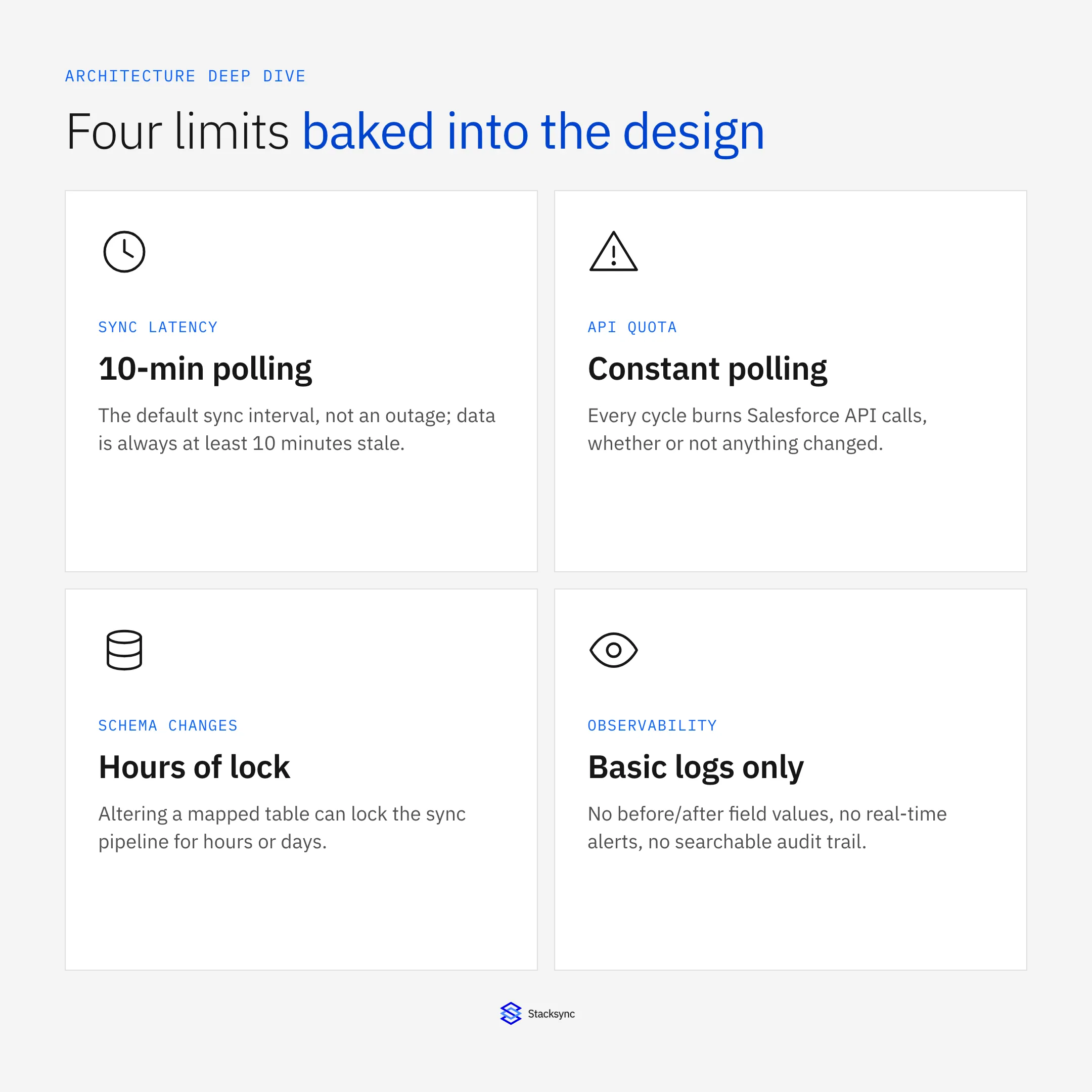
Heroku Connect’s default synchronization method is a basic polling mechanism that checks for changes in Salesforce every 10 minutes. For any modern application requiring real-time data, this latency is an immediate and significant drawback. To mitigate this, Heroku later introduced Accelerated Polling using the Salesforce Streaming API, but this only applies to a limited number of objects.
More recently, Heroku integrated Salesforce Change Data Capture (CDC), which enables more efficient, event-driven updates [7]. While this is an improvement, it does not solve the underlying latency issues for all objects and still operates within Heroku Connect's rigid framework. It's a patch, not a solution for true real-time performance.
Data Flow from Postgres to Salesforce:
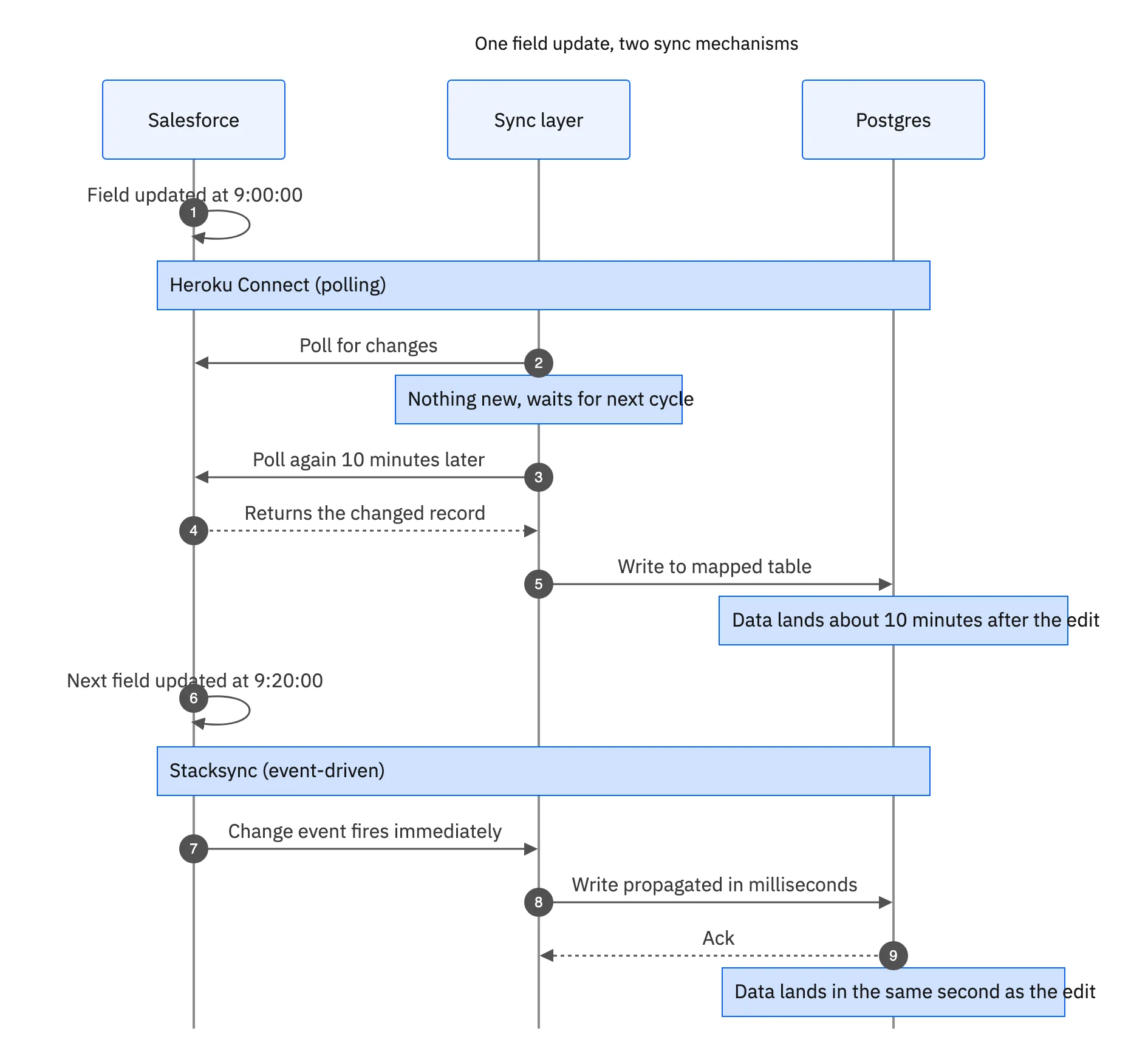
To sync data from Postgres back to Salesforce, Heroku Connect relies on database triggers and shadow tables. When a record is changed in a mapped Postgres table, a trigger captures the event. Heroku Connect then processes this change and attempts to write it back to Salesforce via the API. This process is fraught with operational challenges. Write failures, API limit exceptions, and sync conflicts become complex, manual troubleshooting exercises that drain developer resources [6].
Revealed: The Architectural Limits and Bottlenecks of Heroku Connect
For simple prototypes or internal apps, Heroku Connect may suffice. But when subjected to the demands of a growing, business-critical company, its architectural weaknesses are exposed, often after it is too late.
1. Scalability and Performance Constraints
- Row Count Limits: Heroku Connect plans enforce hard limits on the number of records you can synchronize. This model is fundamentally broken for any organization with large data volumes. As your data grows, costs skyrocket to unsustainable levels, or the service simply stops working, putting your operations at risk.
- API Usage: Heroku documents that the SOAP and Bulk API calls Heroku Connect makes to read from and write to Salesforce don't count against your org's API request limits, so polling costs you latency rather than quota. A replacement that calls the Salesforce API under your org's quota, Stacksync included, needs a usage estimate before cutover.
- Sync Latency: The standard 10-minute polling interval is not real-time. This delay is unacceptable for any use case that relies on immediate data consistency, such as transactional workflows, real-time analytics dashboards, or instant customer notifications.
2. Data Model and Integration Inflexibility
- Limited Two-Way Sync: Heroku Connect's "bidirectional" sync is brittle and unreliable. It struggles with complex object relationships, frequently causes sync loops, and is highly susceptible to data drift, a dangerous state where your databases become silently inconsistent over time [8]. Preventing this requires constant, vigilant management.
- Unsupported Objects & Fields: A common deal-breaker is the fact that Heroku Connect does not support all standard or custom Salesforce objects. If a business-critical object is on its exclusion list, the tool is useless for your needs.
- Point-to-Point Limitation: Heroku Connect is a one-trick pony. It only connects one Salesforce org to one Postgres database [1]. It provides zero flexibility to integrate with other databases (like MySQL or Snowflake), ERPs, or any other application in your stack. This creates disconnected systems, exactly what a sync tool should prevent.
3. Operational and Cost Overheads
- Complex Error Resolution: Troubleshooting sync errors in Heroku Connect is a nightmare. It requires developers to manually dig through cryptic logs in the
_hc_errtable via a command line. The lack of a user-friendly dashboard for issue management creates a significant drain on engineering resources. - Unpredictable and High Costs: The pricing model, based on row count, actively penalizes business growth. As your data accumulates, the cost of Heroku Connect can become prohibitively expensive, making it a poor long-term investment. It's no wonder so many businesses are looking to Replace Heroku Connect: Affordable Real-Time Sync That Scales.
Beyond Heroku Connect: Why a Purpose-Built Solution Is a Better Choice
The slow syncs, scalability ceilings, high API usage, and operational complexity are not just features of Heroku Connect; they are symptoms of a flawed, outdated architecture. Modern businesses require a more reliable approach, leading to the rise of dedicated integration platforms designed specifically to solve these problems [2].
Stacksync stands as the leading example of a next-generation solution, engineered for real-time, scalable, and reliable data synchronization. Unlike Heroku Connect, Stacksync is built to handle the complexity and scale of modern enterprise data stacks. A direct showdown between Heroku Connect and Stacksync reveals the stark architectural differences that lets ops teams.
How Stacksync's Architecture Solves Heroku Connect's Flaws
Stacksync was engineered from the ground up to eliminate the architectural flaws inherent in tools like Heroku Connect. The difference in capability is not incremental; it's transformational.
| Limitation | Heroku Connect | Stacksync |
|---|---|---|
| Sync Speed | 10-minute polling latency that delays data availability | Millisecond-level real-time synchronization |
| Scalability | Hard row limits with rapidly increasing costs | Built to handle millions of records from day one |
| API Usage | Connect's own API calls don't count against the org's request limits, per Heroku | Calls count against the org quota, with smart API rate limits on every plan |
| Two-Way Sync | Limited bidirectional sync that can lead to data drift | True, reliable two-way sync for complex use cases |
| Error Handling | Manual log inspection required to diagnose issues | Visual issue dashboard with one-click retry and revert |
| Flexibility | Restricted to Salesforce-to-Postgres use cases | Connects CRMs, ERPs, databases, and other SaaS tools |
Key Takeaways
Heroku Connect introduces latency, scaling constraints, and operational overhead that become more visible as data volume and complexity grow.
Stacksync removes polling constraints with real-time sync, adaptive API usage, and built-in reliability for high-scale operations.
For teams managing large datasets or complex bidirectional workflows, Stacksync offers a more flexible and future-proof integration foundation.
Schema Design Pitfalls That Break Heroku Connect Syncs
Beyond the architectural limits above, a poorly planned schema is the most common source of avoidable sync failures. The schema name in Heroku Connect cannot be changed after setup without a disruptive reconnection, and objects with dependencies must be mapped in the right order or child records fail with missing foreign-key references.
- Map only what you need: syncing every Salesforce object and field bloats sync time and burns API quota; scope mappings to what the application actually reads or writes.
- Sequence parent objects first: an object like Contact that looks up to Account must have Account mapped and synced before Contact, or the sync fails on the missing reference.
- Watch field types: large text fields, rich text areas, and formula fields commonly cause truncation or type-mismatch errors between Salesforce and Postgres.
- Tune polling frequency per object: the 10-minute default applies to every mapped object regardless of how often it actually changes, so low-volatility objects can be polled less often to save API calls.
Even a perfectly designed schema is still bound by the 10-minute polling floor and the row-based cost model described above. Schema discipline reduces failure rate; it does not remove the underlying architectural ceiling.
The Observability Gap and Audit Logging
Heroku Connect's native logging tells you whether a sync succeeded or failed, but not what changed. There is no built-in way to see the previous value of a field, which user or process triggered a change, or a searchable history of a specific record, which turns basic questions about your own data into a manual investigation.
This shows up most often as silent failures: a sync that stalls or drops a batch without a clear alert, discovered only when someone notices Salesforce and Postgres have drifted apart. A common trigger is the "maximum number of duplicate updates in one batch" error, which is easy to hit at volume and hard to catch without dedicated monitoring.
What a Real Audit Trail Needs to Capture
- The exact record created, updated, or deleted, and which system the change originated from.
- The before and after value for every field that changed, not just a pass/fail status.
- A precise timestamp and the user or process responsible for the change.
Stacksync's Log Explorer gives every sync a searchable, field-level audit trail built on exactly this data: filter by record, date, or status, and trace the full history of a single field change in seconds instead of parsing raw logs. Paired with the Issue Management dashboard's real-time alerts (Slack, email, or other channels) and one-click retry or revert, this is what closes the observability gap for teams running compliance audits or debugging a data mismatch between systems.

Migrating from Heroku Connect to Stacksync
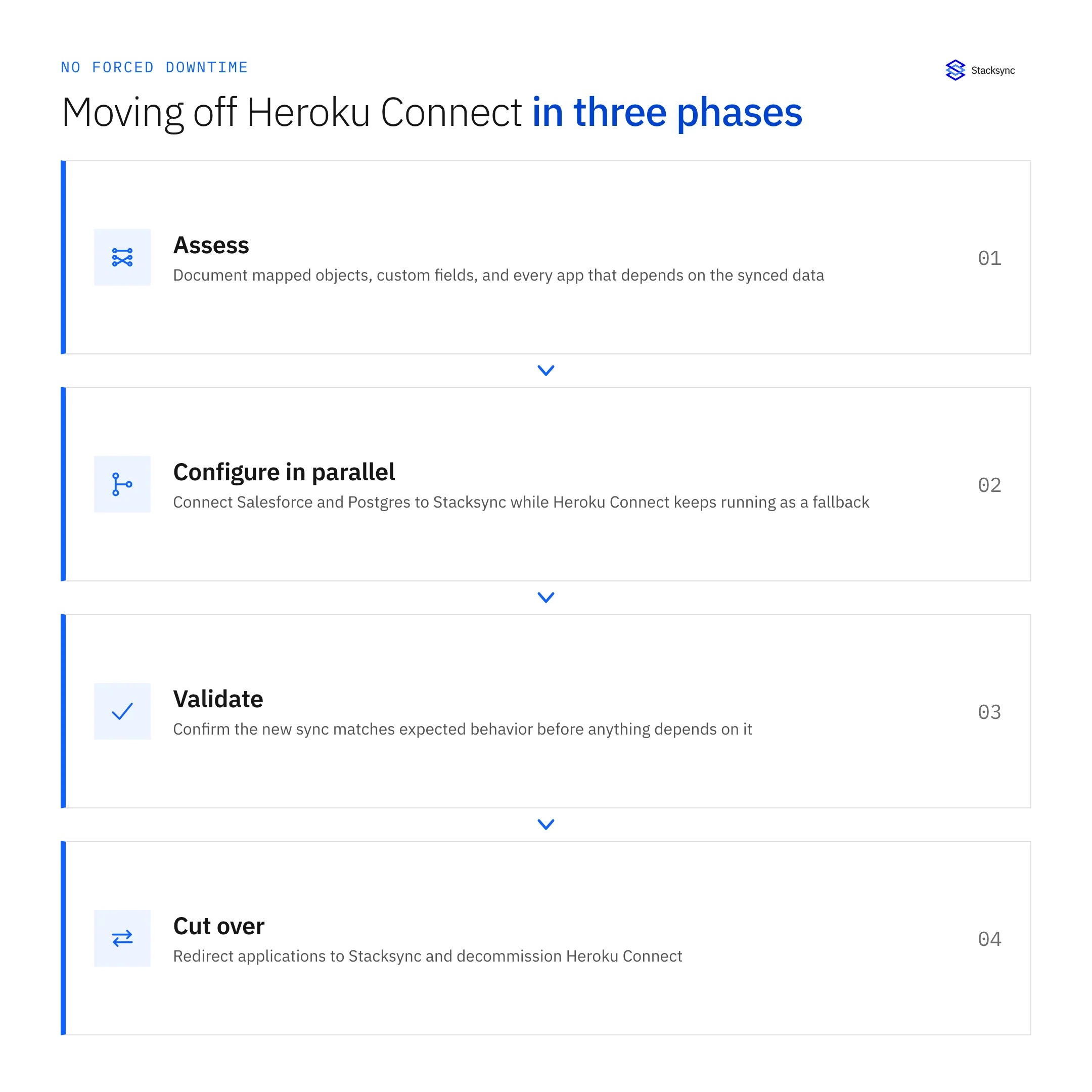
A migration off Heroku Connect runs in the phases below: assess the mappings, run Stacksync in parallel into a second Postgres schema, reconcile the two, then swap the schemas during a short write freeze. The Heroku Connect migration guide covers each phase, from importing your mappings to the cutover runbook.
Making the Right Architectural Decision for Your Data
Heroku Connect is a basic tool suitable for simple, non-critical apps locked within the Heroku ecosystem. For any serious business application that demands real-time data, scalability, and operational reliability, the architectural limits of Heroku Connect make it a dangerous and costly choice.
The delays, hidden costs, and maintenance overhead are liabilities that inhibit growth and waste valuable engineering resources. For modern enterprises that need to power business-critical tools, a dedicated platform like Stacksync is the superior architectural choice. It provides the reliable foundation you need to build a scalable and future-proof data strategy. By understanding the alternatives to Heroku Connect, you can get more out of your data.
Ready to overcome the limits of Heroku Connect? Book a demo with a Stacksync architect today.

FAQ
Frequently asked questions










Related articles