






















The Best AI Data Integration Platforms and Tools in 2026
The 10 best data integration platforms compared on pipelines, real-time sync, and iPaaS features, with a side-by-side table and where each one fits.
- Author
- Ruben Burdin · Founder & CEO
- Published
- Updated
- Read time
- 18 min read

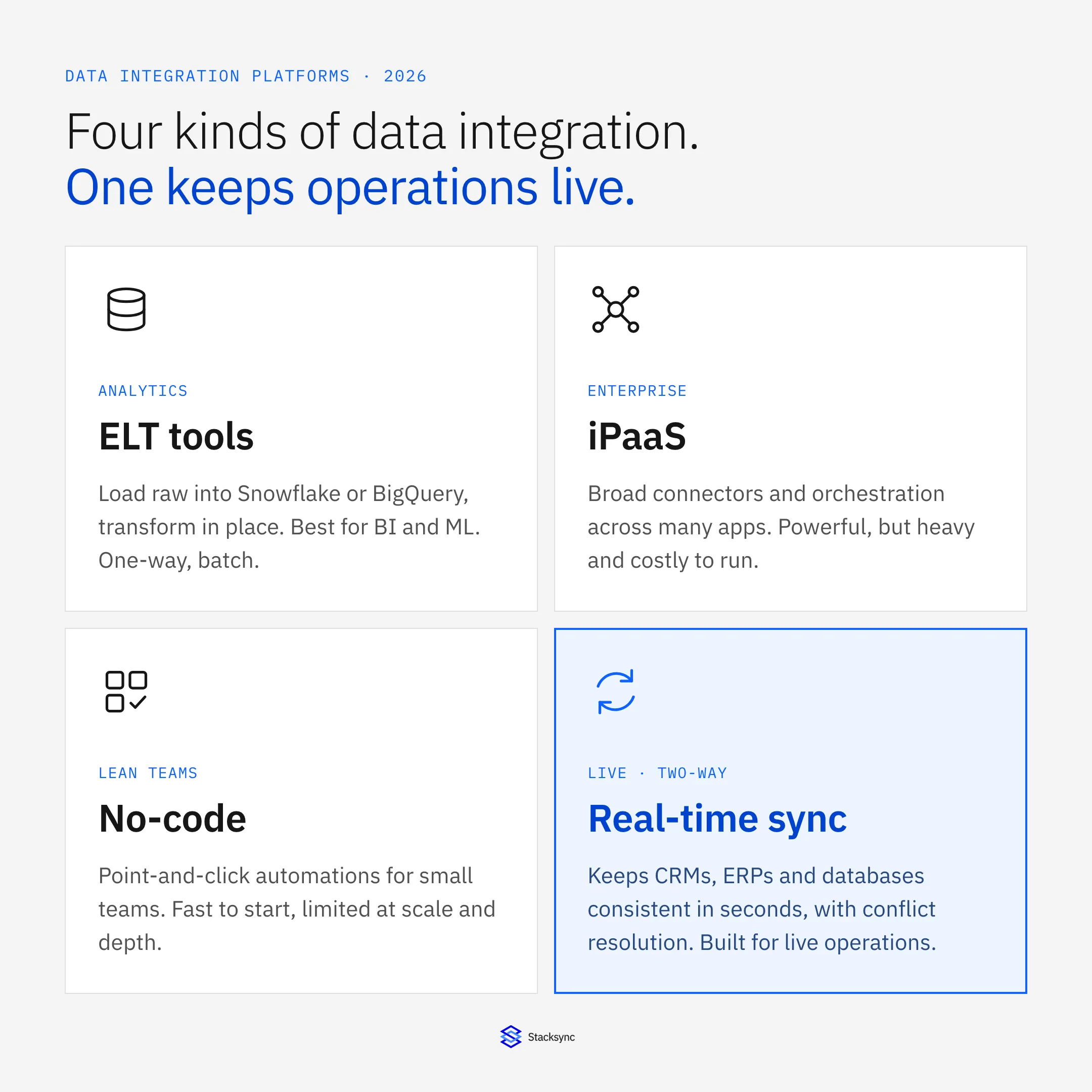
"Data integration platform" is no longer one category. It has split into batch ETL, cloud ELT, change-data-capture (CDC) and streaming engines, reverse ETL, integration platform as a service (iPaaS), and real-time two-way sync. Each one solves a different problem, and picking the wrong model is how teams end up with stale dashboards, runaway bills, or a CRM and ERP that quietly disagree about the same customer.
This guide defines each category, lays out the criteria that actually separate good platforms from marketing claims, compares the leading data integration tools side by side, and walks through how to choose one for your stack. The throughline: most platforms are built to move data into a warehouse for analysis, but the systems your business runs on need data kept consistent in real time, a different job that calls for a different architecture.
Key takeaways
- Data integration platforms fall into five models, ETL, ELT, iPaaS, reverse ETL, and real-time bidirectional sync. Match the model to the workload before you shortlist vendors.
- Analytics integration moves data one-way into a warehouse where latency is acceptable; operational integration keeps live systems (CRM, ERP, databases) mutually consistent, where latency causes real errors.
- The best platforms are judged on connector depth, latency, sync direction, conflict resolution, reliability, security, and a pricing model that does not punish growth, not on connector count alone.
- True bidirectional sync is a stateful engine with built-in conflict resolution, not two one-way pipelines stitched together.
What is a data integration platform?
A data integration platform connects disparate business applications, databases, and services so data flows between them automatically. Instead of writing and maintaining custom code for every point-to-point connection, you get pre-built connectors, visual or SQL-based field mapping, and built-in error handling to synchronize data across your tech stack.
Under that umbrella sit five distinct architectures. Knowing which one a vendor actually ships matters more than any feature list, because they are optimized for different outcomes:
- ETL (Extract, Transform, Load), cleans and reshapes data in a staging layer before loading it into a warehouse. Typically batch, one-way, and governance-friendly.
- ELT (Extract, Load, Transform), loads raw data into the warehouse first, then transforms it in place using the warehouse's own compute. Faster to ingest and the default for cloud analytics.
- iPaaS (integration platform as a service), a cloud suite for building and governing workflows and app-to-app integrations, usually trigger- or task-based with a no-code/low-code builder.
- Reverse ETL, pushes modeled data from the warehouse back into operational apps. It addresses the activation gap but remains one-way and batch-oriented.
- Real-time bidirectional sync, a stateful engine that keeps two or more live systems continuously consistent in both directions, with field-level change detection and automated conflict resolution.
What is AI data integration?
AI data integration is the layer that keeps the data AI systems and agents depend on accurate and current. As teams put copilots and AI agents on top of their CRMs, ERPs, databases, and warehouses, those systems need live, two-way access to operational data, not a nightly export. AI data integration combines the fundamentals in this guide, ETL, ELT, iPaaS, and real-time bidirectional sync, with AI-specific requirements: fresh context, write-back to live systems, governance, and a single layer every agent can reach.
Why AI raises the bar on integration
- Freshness: agents act on the current state of a record, so batch windows and stale copies break the experience.
- Two-way: AI needs to write results back into operational systems, not only read from a warehouse.
- Coverage: one integration layer across every system, including apps with no API, beats a pile of point connectors.
- Governance: clear ownership, conflict resolution, and an audit trail for whatever an agent changes.
That is why this guide weighs real-time, bidirectional sync alongside classic ETL and iPaaS. The right choice depends on whether your AI mainly reads analytics data or acts on live operational systems.
The full comparison, with request counts and write-back controls, is in AI agent data layer: MCP vs a synced database.
How to evaluate a data integration platform
Connector count gets all the headlines, but it is a weak proxy for fit. These are the criteria that actually predict whether a platform will hold up in production:
- 01Connector coverage and depth, not just whether your CRM, ERP, databases, and warehouses are supported, but whether those connectors handle custom objects, custom fields, and complex record associations rather than only the happy path.
- 02Latency and data freshness, the delay your workload can tolerate: sub-second, under a minute, under fifteen minutes, or nightly. Separate real-time CDC and webhooks from scheduled batch and micro-batch.
- 03Sync direction, one-way movement into a warehouse versus true bidirectional sync with conflict resolution. Many tools that claim two-way simply run two one-way jobs.
- 04Conflict resolution, when the same record changes in two systems at once, does the platform resolve it with field-level rules and ownership, or leave you to build that logic yourself?
- 05Reliability and observability, guaranteed delivery, automated retries, dead-letter queues, replay, and dashboards that surface failures before they corrupt downstream data.
- 06Scalability, steady throughput from thousands to millions of records, including peak events like month-end close or a sales spike, without manual re-architecting.
- 07Security and compliance, SOC 2, ISO 27001, HIPAA, and GDPR as needed, plus encryption in transit and at rest, RBAC, SSO, audit logs, and secure connectivity for systems behind a firewall.
- 08Time to value and setup model, no-code, low-code, or code-required, and whether a non-engineer can stand up a reliable sync in days rather than a multi-month project.
- 09Pricing model and total cost of ownership, the billing unit (rows, active rows, tasks, connectors, connections) and how predictably it scales, plus the engineering time you will or won't spend maintaining it.
Data integration platforms compared at a glance
The table below summarizes how the most common data integration platforms differ on the dimensions that drive a buying decision. Use it to narrow a shortlist, then read the individual reviews and pricing notes that follow.
| Platform | Integration style | Sync direction | Deployment | Pricing model | Best for |
|---|---|---|---|---|---|
| Fivetran | Automated ELT | One-way to warehouse | Managed cloud | Usage-based (monthly active rows) | Analytics / warehouse loading |
| Airbyte | Open-source ELT/ETL | One-way to warehouse | Self-hosted or cloud | Open-source or usage-based cloud | Engineering teams wanting custom connectors |
| Workato | iPaaS / workflow automation | Workflow triggers (not stateful two-way) | Managed cloud | Recipe / task-based | Business-user workflow automation |
| Boomi | Low-code iPaaS | One-way & point-to-point | Cloud + hybrid/on-prem | Per-connector / enterprise | Hybrid enterprise app integration |
| MuleSoft | API-led iPaaS | APIs + event-driven | Cloud + hybrid/on-prem | Enterprise / custom | Large enterprises building an API network |
| Informatica | Enterprise ETL/ELT + governance | One-way (batch) | Cloud, on-prem, hybrid | Enterprise / custom | Regulated enterprises needing governance |
| Zapier | No-code automation | Trigger → action (one-way) | Managed cloud | Per-task / freemium | Lightweight SMB automation |
| Stacksync | Real-time bidirectional sync | True two-way (system ↔ system) | Managed cloud (VPC peering, SSH) | Usage-based, tiered (from ~$1k/mo) | Operational consistency across CRM/ERP/DB |
Treat the table as a starting point, not a verdict. "Best" depends entirely on whether your goal is feeding a warehouse, orchestrating workflows, or keeping live systems in lockstep.
The 12 best data integration platforms and tools in 2026
The platforms below cover the full spectrum, warehouse-bound ELT, enterprise iPaaS, open-source pipelines, and real-time operational sync. Each entry notes where it shines and where it does not, so you can map it to the workload in front of you.
1. Stacksync, real-time, bidirectional operational sync
Stacksync is dedicated to keep operational systems continuously consistent, not to load a warehouse. It runs true two-way sync between CRMs, ERPs, and databases with sub-second CDC, field-level change detection, and built-in conflict resolution, across 1,000+ connectors. Setup is no-code with a pro-code configuration option, and it carries SOC 2, ISO 27001, and HIPAA compliance. Best for: mid-market and enterprise teams that need a CRM, ERP, and database to agree in real time. Limitation: it is not a warehouse-loading ELT tool for pure analytics.
2. Fivetran, automated ELT for analytics
Fivetran is a fully managed ELT service that replicates data one-way from sources into warehouses like Snowflake, BigQuery, and Redshift, with automated schema handling, CDC, and dbt support. Pricing is usage-based on monthly active rows. Best for: analytics teams centralizing data with minimal pipeline maintenance. Limitation: not designed for operational, bidirectional sync, and consumption pricing can climb as volume grows.
3. Airbyte, open-source ELT
Airbyte offers open-source ELT with a large community connector catalog and a framework for building your own. You can self-host for control and data residency or use the managed cloud. Best for: engineering teams that want low licensing cost, custom connectors, and infrastructure ownership. Limitation: pipelines are one-way to the warehouse, self-hosting requires DevOps, and there is no native conflict-aware two-way sync.
4. Workato, iPaaS with workflow automation
Workato pairs app integration with recipe-based workflow automation, making it strong for multi-step business processes triggered by events. Best for: business-led automation across SaaS apps. Limitation: recipe and task-based pricing aligns better with automation than with continuous high-volume sync, and reliable two-way data consistency has to be hand-built.
5. MuleSoft, API-led enterprise integration
MuleSoft's Anypoint Platform, now part of Salesforce, centers on API-led connectivity: reusable APIs, lifecycle management, governance, and hybrid deployment. Best for: large enterprises building a reusable API network with a dedicated integration team. Limitation: a steep learning curve and heavy implementation, and standing up real-time two-way sync becomes a sizable engineering project.
6. Boomi, low-code iPaaS
Boomi is a low-code iPaaS with a visual builder, a broad connector library, and hybrid connectivity across cloud and on-prem systems under unified management. Best for: enterprises integrating mixed, hybrid application landscapes. Limitation: per-connection licensing adds up, and it is geared toward general integration rather than specialized low-latency sync.
7. Informatica, enterprise ETL with governance
Informatica delivers large-scale ETL/ELT alongside data quality, cataloging, lineage, and master data management, across cloud, on-prem, and hybrid deployments. Best for: regulated enterprises that need deep governance and complex transformations. Limitation: complex and resource-intensive, batch-oriented, and overkill for mid-market operational sync.
8. Talend, data quality and governance
Talend (now part of Qlik) is a full-stack integration suite with strong data-quality tooling, an open-source Studio, and a commercial cloud, supporting batch and near-real-time processing. Best for: governance-heavy environments where data quality is paramount. Limitation: a steeper learning curve and no turnkey operational two-way sync.
9. Matillion, ELT for cloud warehouses
Matillion pushes transformations down into cloud warehouses like Snowflake, BigQuery, and Redshift, with both visual and SQL-based transforms. Best for: warehouse-centric analytics teams that want fast, in-warehouse transformation. Limitation: firmly analytics- and warehouse-focused, not an operational sync tool.
10. Stitch, simple ELT for lean teams
Stitch is a straightforward ELT platform with quick setup and automated schema handling, popular with startups and small data teams. Best for: lean teams that need fast, low-fuss analytics ingestion. Limitation: limited transformation and governance depth, and pipelines are one-way.
11. Estuary, streaming CDC and ELT
Estuary Flow combines streaming and batch in one framework with replay and time-travel, moving real-time data into warehouses and lakes via CDC. Best for: teams that need real-time analytics ingestion. Limitation: its stream-to-analytics focus is not the same as conflict-aware two-way sync between live operational apps.
12. Zapier, no-code automation for SMBs
Zapier connects thousands of apps with simple trigger-and-action automations that anyone can set up in minutes. Best for: small teams automating lightweight cross-app tasks. Limitation: it is not built for high-volume, stateful, bidirectional data sync.
Stacksync: real-time, bidirectional data integration that keeps operational systems in sync
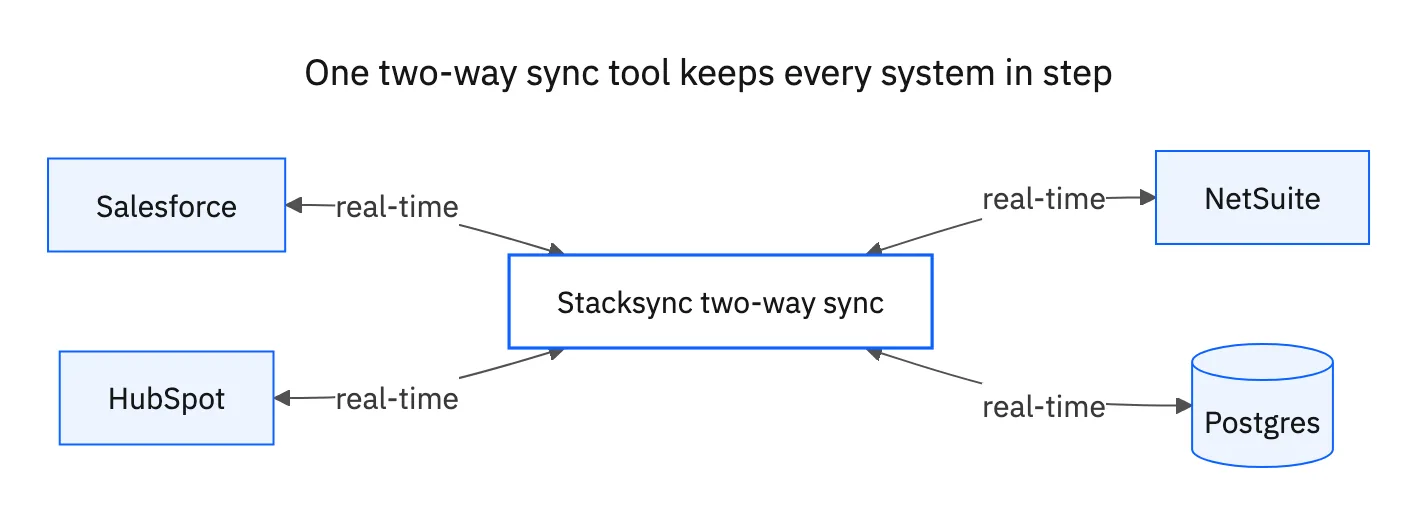
There is a gap between analytics ETL and process-focused iPaaS: keeping two or more critical live systems consistent in real time. ETL/ELT is one-way into a warehouse; iPaaS orchestrates workflows but leaves conflict handling to you. Stacksync is built specifically for that gap, real-time two-way sync that maintains a single, consistent state across your operational systems.
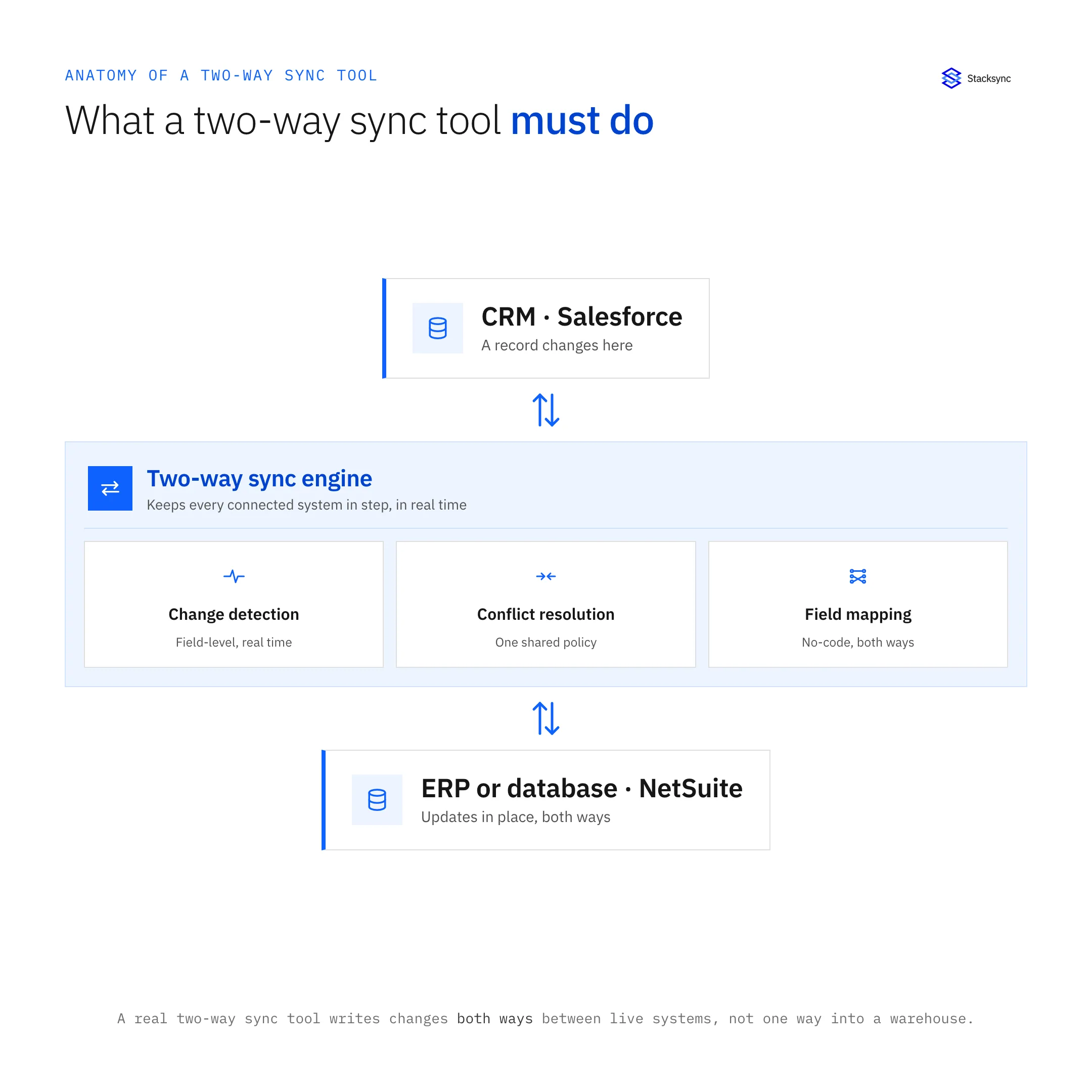
- True bidirectional sync, not two one-way pipes, a single stateful engine with field-level change detection and automated conflict resolution, so simultaneous edits in two systems do not overwrite each other.
- Sub-second, event-driven propagation, CDC and webhooks push changes as they happen instead of waiting for the next scheduled batch.
- 1,000+ operational connectors, CRMs, ERPs, databases, and SaaS apps across the connector catalog, with support for custom objects and fields.
- No-code plus pro-code, stand up a sync without engineering, or manage it as configuration-as-code for version control and CI/CD, with built-in workflow automation for event-driven processes.
- Enterprise security, SOC 2, ISO 27001, and HIPAA compliance, with VPC peering, SSH tunneling, and RBAC for systems behind a firewall.
- Usage-based, tiered pricing, plans that start at roughly $1,000/month and scale with how much you actually sync.
Best for: teams whose operations break when data drifts, a closed-won deal in the CRM that has to create an invoice in the ERP, inventory that must reflect instantly in e-commerce to prevent overselling, or a support tool that needs the same record state as the production database.
Building customer integrations into your own SaaS or AI product? Embedded two-way sync runs one Stacksync sync per customer between that customer's CRM or ERP and a database your product owns.
Batch ETL/ELT vs real-time bidirectional sync
The most consequential architectural choice is not which vendor, but which model. ETL/ELT, generic iPaaS, and operational sync are built for genuinely different jobs, and forcing one to do another's work is where projects stall.
| ETL / ELT (analytics) | Generic iPaaS (workflow) | Real-time bidirectional sync (operational) | |
|---|---|---|---|
| Primary job | Load a warehouse for BI/AI | Automate multi-step app workflows | Keep live systems mutually consistent |
| Direction | One-way (source → warehouse) | Trigger → action, point-to-point | True two-way (system ↔ system) |
| Latency | Minutes to hours (batch) | Seconds to minutes (event-based) | Sub-second to seconds |
| Conflict resolution | Not applicable | Hand-built per workflow | Built-in, field-level |
| Data model | Source → destination | Stateless A-to-B | Stateful system-to-system |
| Best-fit user | Data / analytics engineer | Business / ops user | Software + data engineer |
A useful rule of thumb: if the outcome is a dashboard, favor ETL/ELT. If the outcome is operational consistency across live apps, you need bidirectional sync. Most mature stacks run both, ELT to feed analytics and AI, and real-time sync to keep the operational systems aligned.
No-code, low-code, and developer-first tools
Setup model determines who owns integration in your org and how fast it moves. The market splits roughly into three camps, and several platforms blend them.
- No-code (Zapier, and reporting tools like Coupler), fastest for business users and simple automations, but limited for complex, high-volume, or stateful work.
- Low-code (Boomi, Workato, Jitterbit), visual builders with room for custom logic; a fit when ops and IT collaborate on workflows.
- Developer-first (Airbyte, custom code), maximum control and extensibility, at the cost of engineering time to build and maintain.
- Hybrid (Stacksync), no-code setup for speed, with a pro-code, configuration-as-code path so engineering can version, review, and automate the same syncs.
Matching a platform to your stack: connectors and coverage
A high connector count is meaningless if the connectors you actually need are shallow. Evaluate depth, not just breadth: can the platform handle your custom objects, custom fields, and the API rate limits and pagination quirks of each system? Stacksync's connector catalog covers 1,000+ operational systems, and the same depth questions apply to any vendor you shortlist.
- CRMs, Salesforce, HubSpot, and others, including custom objects, picklists, and record associations.
- ERPs, NetSuite, SAP, Microsoft Dynamics, and finance systems where governor and rate limits are common failure points.
- Databases, PostgreSQL, MySQL, SQL Server, Oracle, including legacy and on-prem instances behind a firewall.
- Warehouses, Snowflake, BigQuery, Redshift, and Databricks for the analytics side of the stack.
- SaaS apps, e-commerce, support, and marketing tools that need the same record state as your systems of record.

Data integration pricing models compared
Pricing model matters as much as sticker price, because the billing unit determines how cost behaves as you grow. The common models:
- Consumption / monthly active rows (Fivetran), scales with data volume; flexible, but bills can spike unpredictably as usage climbs.
- Per-connector / per-connection (Boomi), predictable per connection, but the total grows with every system you add.
- Per-task or recipe-based (Zapier, Workato), fits automation workloads; less suited to continuous high-volume sync where task counts explode.
- Enterprise / custom (MuleSoft, Informatica), negotiated contracts with significant implementation cost.
- Open-source (Airbyte self-hosted), no license fee, but you absorb the infrastructure and DevOps cost.
- Usage-based, tiered (Stacksync), plans starting around $1,000/month that scale with what you sync.
Enterprise requirements: security, compliance, and governance
Any platform moving customer, financial, or health data across systems is part of your attack surface. Beyond features, scrutinize how the vendor handles and protects data in motion.
- Certifications, SOC 2 Type II and ISO 27001 as a baseline, with HIPAA (and a BAA) and GDPR where your data demands it.
- Encryption, in transit (TLS) and at rest, and ideally a platform that does not persist your data longer than the sync requires.
- Access control, RBAC, SSO, and MFA, with row- or field-level permissions for sensitive data.
- Audit and observability, detailed, exportable audit logs and monitoring that proves what synced, when, and to where.
- Secure connectivity, VPC peering, SSH tunneling, VPN, and IP allowlisting so systems behind a firewall sync without being exposed to the public internet.
- Data residency, control over where data is processed to meet sovereignty requirements.
Common data integration pitfalls (and how to avoid them)
Most failed integration projects fail the same handful of ways. Knowing the patterns is the cheapest insurance you can buy.
- Operational data drift, using batch ETL for live workflows guarantees a gap between when something happens and when every system knows. Match latency to the use case.
- Fake bidirectional sync, two one-way pipelines create race conditions and silent overwrites. Insist on a stateful engine with conflict resolution.
- Silent failures, a pipeline that stops without alerting compounds into drift that takes weeks to reconcile. Require monitoring, retries, and replay.
- Runaway costs, consumption models that scale with success. Model TCO at projected volume, not today's.
- Vendor and cloud lock-in, orchestrators tied to one cloud, or sync limited to a single ecosystem, constrain you later.
- Wrong tool for the job, a generic iPaaS forced into real-time sync, or an ELT tool asked to keep apps consistent. Pick the architecture first.
Build vs. buy
Building integration in-house gives maximum control and can look cheaper for one simple, static connection. But custom pipelines are brittle: they break whenever an upstream API or schema changes, and teams routinely sink a large share of engineering capacity into maintenance instead of product. As the number of integrated systems grows, total cost of ownership, once you count engineering time, tends to favor buying a dedicated platform that handles auth, pagination, rate limits, retries, and conflict resolution for you.
For a deeper walkthrough of what goes wrong and how to prevent it, see our guide to the 7 common data integration pitfalls and how to avoid them.
How to choose the right data integration platform
Rather than starting from a vendor list, start from the outcome and work toward the architecture. This sequence keeps the decision grounded:
- 01Define the outcomeAre you feeding a warehouse for analytics, orchestrating multi-step workflows, or keeping live systems consistent? The answer points to ELT, iPaaS, or bidirectional sync before you compare any brands.
- 02Map the systems and dataList the systems to connect, the objects and fields that matter, the direction data must flow, and the latency each workload can tolerate.
- 03Audit your engineering capacityDecide build vs. buy honestly by measuring how much engineering time you can spare for integration upkeep over the next year.
- 04Pilot one critical object pairProve it on a single high-value pair, for example Accounts to Customers, with field ownership and conflict rules locked down before expanding.
- 05Validate reliability and TCOTest under representative volume, confirm monitoring, retries, and replay work, and project cost at 12–24 months of growth.
- 06Expand deliberatelyRoll out additional objects and systems once the pilot is stable, keeping conflict rules and ownership consistent as you scale.

FAQ
Frequently asked questions










Related articles





