How to Detect Silent Failures in MuleSoft API Flows
Silent failures in MuleSoft API flows cause data inconsistencies without triggering alerts. Learn detection strategies using reconciliation, checksums, and monitoring.
- Author
- Ruben Burdin · Founder & CEO
- Published
- Updated
- Read time
- 10 min read
Silent failures in MuleSoft API flows occur when integration workflows complete without errors yet fail to synchronize data correctly. These failures manifest as missing records, incomplete field updates, or stale information across systems. Detection requires reconciliation processes, data validation checks, and business metric monitoring rather than relying solely on technical error logs.
What Silent Failures Look Like
Integration workflows that execute successfully according to technical metrics while failing to achieve business outcomes represent the most challenging operational problem in distributed systems.
Missing Records
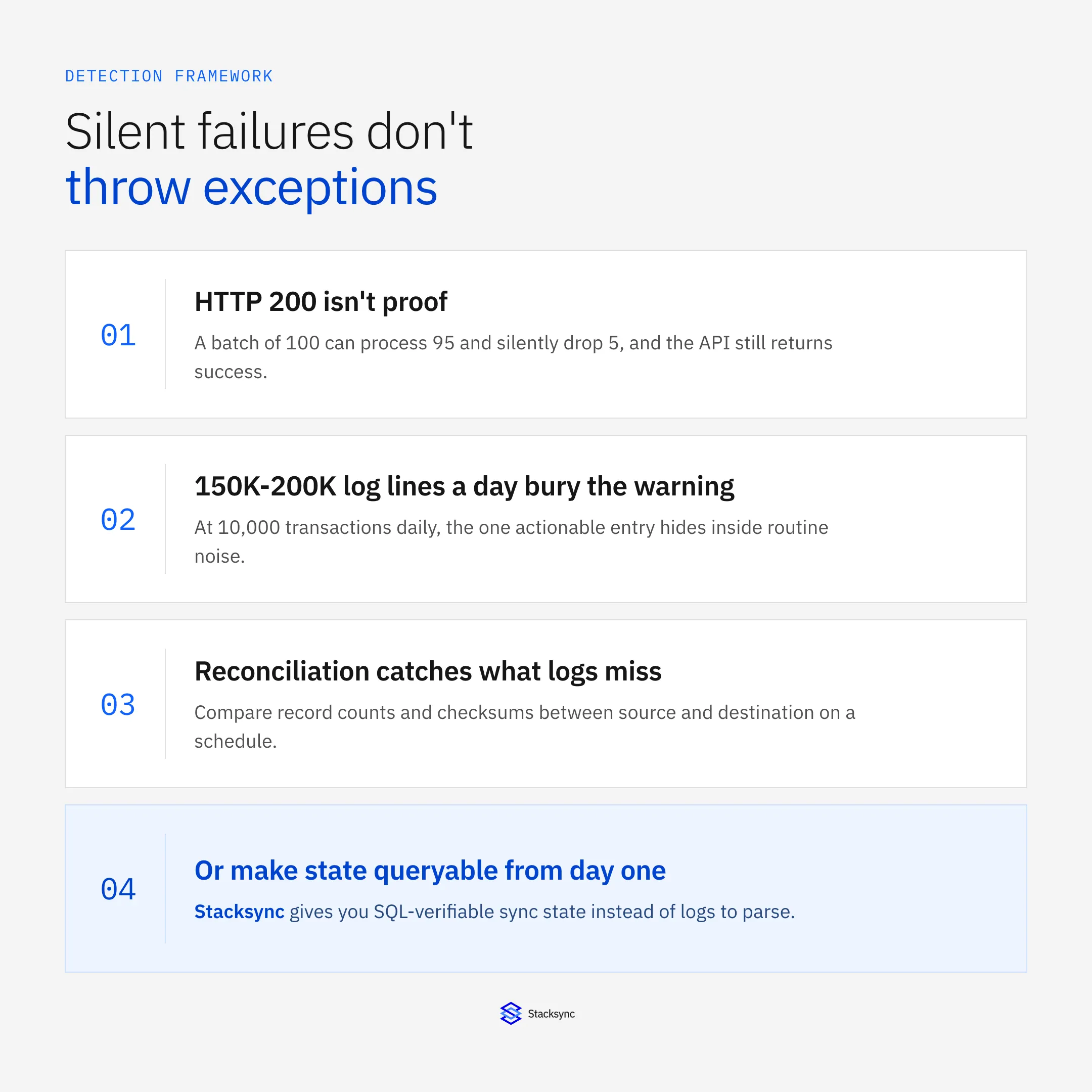
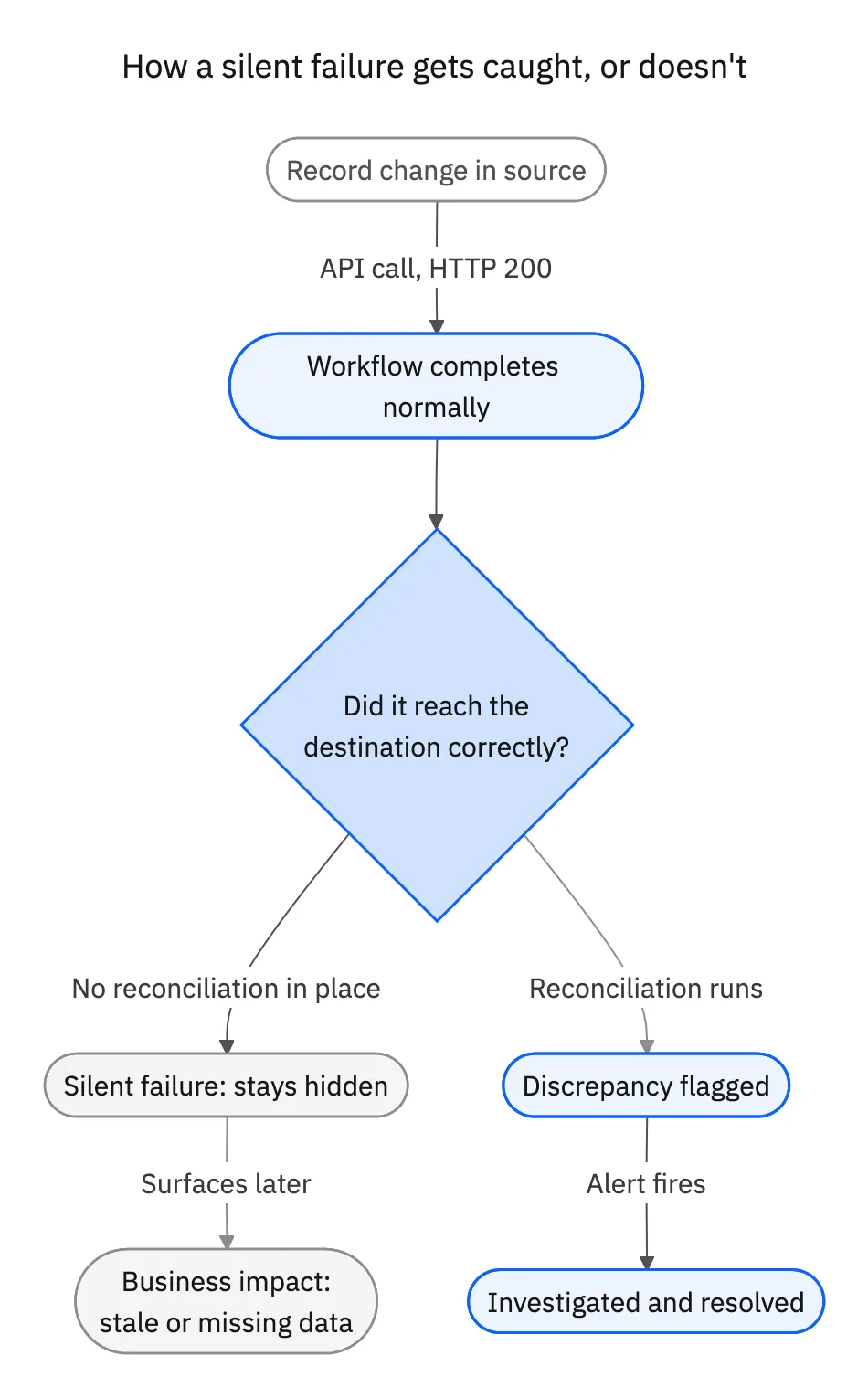
API flows process batches of customer records from Salesforce to a data warehouse. The workflow completes without exceptions, logs show successful execution, but 5% of records never appear in the destination. Technical monitoring confirms API calls returned 200 status codes, yet business users report incomplete data.
This pattern emerges when batch processing encounters edge cases that neither throw exceptions nor halt execution. A transformation function returns null for malformed input, the workflow continues processing remaining records, and the integration completes technically successfully while silently dropping data.
Partial Field Updates
Customer synchronization flows update contact information between CRM and ERP systems. The integration runs nightly, logs indicate success, but certain fields remain outdated. Email addresses sync correctly while phone numbers lag by days. Technical metrics show no errors, yet data consistency degrades over time.
Partial updates occur when field mappings encounter type mismatches, validation failures, or permissions issues that trigger silent fallback behavior. The integration platform logs a warning rather than an error, increments a success counter, and continues processing.
Stale Data Persistence
Inventory levels synchronize from NetSuite to an e-commerce platform every 15 minutes. The integration workflow executes on schedule, monitoring dashboards show green status, but product availability remains incorrect. Orders get placed for out-of-stock items because the synchronization appeared successful while silently failing to update quantities.
Staleness happens when conditional logic skips updates based on timestamps, version numbers, or checksums that become desynchronized between systems. The workflow completes all steps without errors while failing to modify destination data.
Why Standard Monitoring Misses These Failures
Traditional integration monitoring focuses on technical execution success rather than business outcome verification.
HTTP Status Code Limitations
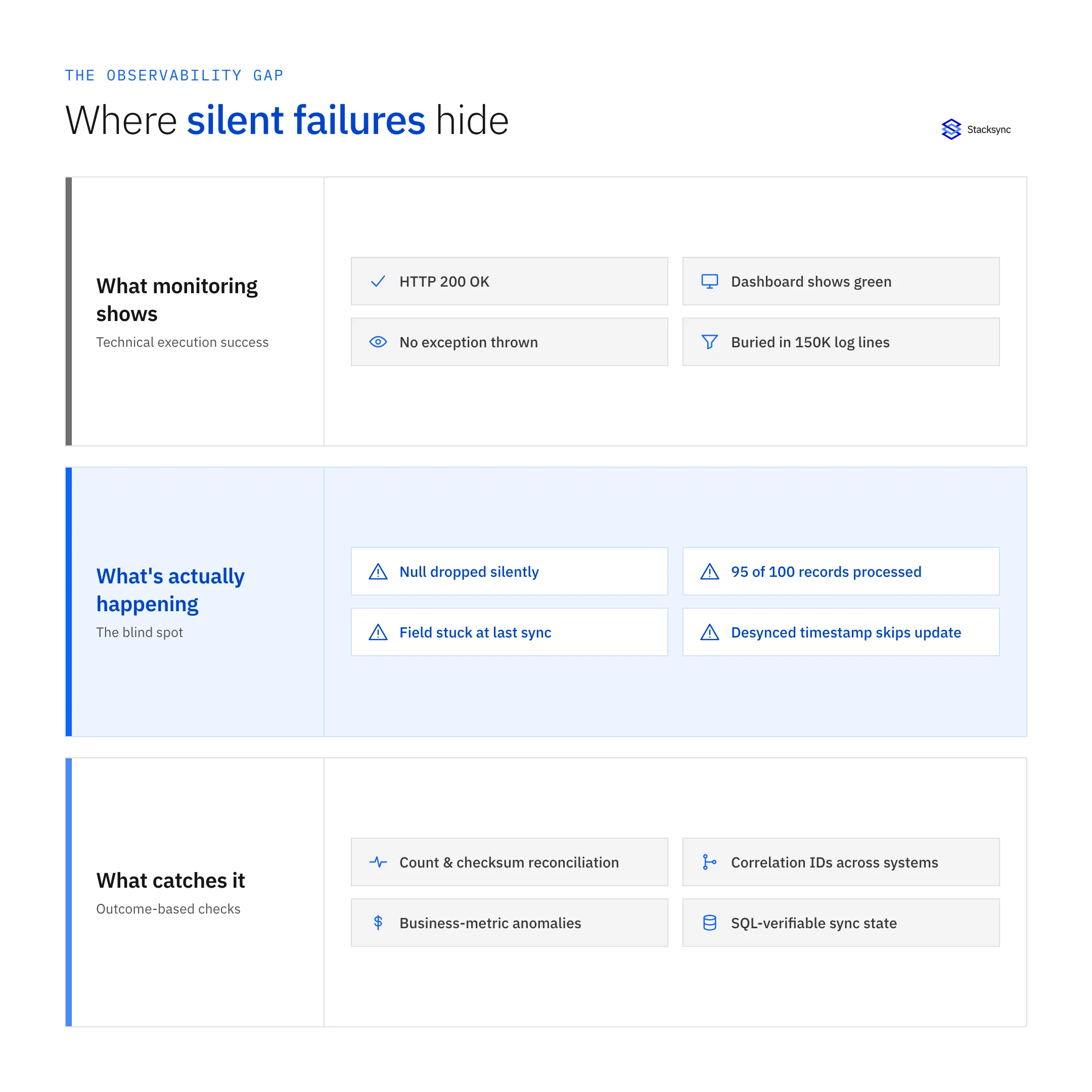
API calls returning 200 OK status codes confirm that requests completed without server errors. They do not validate that the operation achieved its intended business outcome. A customer creation request might return 200 while silently failing validation rules that prevent record insertion.
Systems often return successful status codes for requests that partially complete. An API accepting a batch of 100 records might process 95 successfully, reject 5 due to validation errors, and still return 200 with a success message. Integration platforms counting successful API calls miss the partial failure.
Exception-Based Alerting
Workflows configured to alert on unhandled exceptions remain silent when operations complete within expected code paths despite business logic failures. A null value propagating through transformations triggers no exception if the code handles nulls gracefully.
Database inserts that encounter unique constraint violations might log warnings without throwing exceptions. The workflow continues executing, reports success, and moves to the next iteration while records fail to persist.
Log Volume Obscures Warnings
Warning-level log entries documenting validation failures, type conversion issues, or permission errors get buried within millions of informational messages. Engineers monitoring dashboards see successful execution metrics while critical warnings indicating silent failures remain unexamined.
Organizations processing hundreds of thousands of integration transactions daily generate terabytes of logs annually. Searching for specific warning patterns requires knowing exactly what to look for before problems become visible through business impact.
The scale is concrete: MuleSoft's default INFO-level logging generates 15-20 log entries per workflow, so a single order-processing flow touching three systems at 10,000 orders a day produces 150,000-200,000 log lines. Log aggregation platforms like Splunk, Datadog, and New Relic charge by ingestion volume, and organizations shipping 50 GB of MuleSoft logs a month typically pay $5,000-$15,000 a year to store and index them, before anyone has found a single actionable warning.
Structured Logging, Metrics, and Tracing
Reconciliation and validation catch silent failures after the fact. Fixing the observability layer that created the blind spot in the first place means changing how MuleSoft logs, measures, and traces requests, not just filtering the output.
Severity-Based Logging
Configure flows to log at ERROR level only for conditions that require human intervention: connection timeouts, authentication failures, schema validation errors, and data integrity violations. Route successful API calls and expected business logic paths to DEBUG level instead. This single change reduces production log volume by 90-95% while keeping every actionable issue visible, and it is the cheapest fix on this list.
Correlation IDs and Business Context
Assign a unique correlation ID to each business transaction at its entry point and pass it through every API call, database query, and queue operation downstream. When a failure surfaces, filtering by correlation ID reconstructs the entire transaction across systems instead of searching millions of unrelated entries. Pairing that with business-context fields (customer IDs, order numbers, transaction amounts) lets engineers filter straight to high-value scenarios during an incident.
Metrics Over Log Lines
Track API success rate, P50/P90/P99 latency, and business throughput (orders processed per hour, records synced per minute) as aggregated metrics instead of reviewing individual transaction logs. Alert when success rate drops below a threshold like 99.5%, or when throughput falls to zero, which detects a stalled integration immediately regardless of whether error logs populated at all.
Sampled Distributed Tracing
Trace 1-5% of production traffic rather than every transaction, with intelligent sampling that always captures errors and slow requests. Structuring traces as spans, one per API call, transformation, or query, lets engineers see exactly which step in a workflow failed instead of reconstructing a sequence from chronological logs.
Detection Strategies
Identifying silent failures requires shifting monitoring focus from technical execution to business outcome validation.
Reconciliation Processes
Implement periodic reconciliation comparing record counts, checksums, and critical field values between source and destination systems. Daily reconciliation jobs query both systems independently, identify discrepancies, and alert when variances exceed acceptable thresholds.
Count-based reconciliation provides quick visibility into missing records. Query the source system for records modified in the past 24 hours, query the destination for the same time period, and compare totals. Differences indicate silent failures in the synchronization flow.
Checksum validation catches partial field updates. Calculate hash values for critical data attributes in both systems and compare results. Mismatched checksums reveal records that exist in both locations but contain inconsistent information.
Data Validation Checks
Build validation logic into destination systems that verifies data meets business rules after integration completes. Trigger validation queries that check for anomalous patterns indicating silent failures.
Timestamp validation identifies stale data. If records in the destination system show last-modified dates older than the synchronization interval, data updates failed silently. A 15-minute sync interval should yield maximum staleness of 15 minutes under normal operation.
Referential integrity checks detect missing related records. When order records appear in the warehouse without corresponding customer records, the customer synchronization failed silently while the order integration succeeded.
Business Metric Monitoring
Track business outcomes affected by integration accuracy rather than technical execution metrics. Monitor daily order counts, customer acquisition rates, inventory turnover, and revenue recognition patterns for anomalies indicating data problems.
Sudden drops in business metrics often correlate with silent integration failures. When daily new customer counts drop 20% despite consistent lead generation activity, customer creation integrations likely experience silent failures.
Compare business metrics between systems that should maintain consistency. If Salesforce reports 1,000 opportunities created this week while the data warehouse shows 950, the integration silently dropped 50 records.
Automated Detection Approaches
Manual reconciliation processes scale poorly as integration complexity grows. Automated detection systems provide continuous validation.
Synthetic Transaction Monitoring
Generate test transactions with known attributes at regular intervals. Track these sentinel records through integration workflows to verify end-to-end functionality. Alert when synthetic transactions fail to appear in destination systems within expected timeframes.
Synthetic monitoring detects silent failures before they impact production data. A canary customer record created hourly in the CRM should synchronize to the warehouse within 15 minutes. Missing canaries indicate integration issues requiring investigation.
Continuous Reconciliation
Replace batch reconciliation with continuous streaming validation. As records flow through integrations, calculate checksums and emit validation events to a separate monitoring stream. Compare validation events against actual destination state in real-time.
Continuous approaches reduce detection latency from hours or days to minutes. Silent failures become visible during the synchronization interval rather than discovered during the next day's reconciliation job.
Anomaly Detection on Record Volumes
Apply statistical analysis to integration throughput metrics. Model expected record volumes based on historical patterns and business seasonality. Alert when actual volumes deviate significantly from predictions.
Machine learning models trained on historical data detect subtle patterns indicating silent failures. A gradual 5% decline in daily synchronization volumes over several weeks might indicate growing silent failure rates that escape threshold-based alerting.

Architectural Patterns for Detection
System design choices significantly impact the ability to detect silent failures.
Idempotent Operations with Receipts
Design integrations to generate confirmation receipts for each processed record. Store receipts in a separate tracking system that provides independent verification of completion. Periodically compare receipts against source and destination systems to identify gaps.
Receipt-based approaches create an audit trail independent of the integration workflow itself. Even if the workflow silently fails, the absence of a receipt provides clear evidence that processing did not complete successfully.
Database-Centric Synchronization
Architectures that synchronize data through databases rather than API orchestration make validation significantly simpler. Query the synchronized database directly to verify data presence and correctness rather than parsing logs or monitoring API calls.
Database-centric designs enable SQL-based validation queries that check for expected data patterns. A simple SELECT COUNT statement reveals whether the expected number of customer records synchronized overnight.
Change Data Capture Verification
Systems using change data capture to track source system modifications can compare captured changes against destination updates. Every source change should correspond to a destination update. Gaps in the correlation indicate silent failures.
CDC-based verification provides record-level accountability. Engineers can identify exactly which source records failed to propagate to destination systems rather than detecting aggregate discrepancies through count reconciliation.
Designing Integrations That Expose Silent Failures
Silent failures are rarely a tooling issue in isolation. They are a consequence of architectures where success is defined by execution, not by data correctness. As long as integrations rely on API orchestration and log-based confirmation, teams will keep discovering issues only after business impact appears.
Some organizations reduce this risk by shifting toward database-centric synchronization models, where data state becomes continuously observable and verifiable. In these setups, detection moves from reconstructing events through logs to validating outcomes directly through queries, reconciliation tables, and health indicators built into the data layer itself.
If silent failures are becoming a recurring operational risk, it may be worth exploring platforms like Stacksyncthat treat reconciliation, consistency, and health monitoring as first-class concerns. Not as a full migration upfront, but as a parallel way to make data movement explicit, auditable, and easier to validate.
When failures stop being loud, the solution is not more alerts, but architectures where incorrect data cannot stay hidden. If MuleSoft's cost and scaling limits are also part of the problem, see our breakdown of why MuleSoft fails at scale.

FAQ
Frequently asked questions










Related articles