






















Choosing between Workato and Zapier for Your Business Needs
See why Stacksync beats Workato and Zapier for real-time, bi-directional data sync across CRMs, ERPs, and databases, keeping operations consistent.
- Author
- Ruben Burdin · Founder & CEO
- Published
- Updated
- Read time
- 7 min read

Enterprise organizations deploying specialized CRMs, ERPs, and databases face a critical technical challenge: maintaining real-time data consistency across operational systems where delays directly impact business outcomes. Disconnected systems, where a CRM, an ERP, and a database each hold a different version of the same record, are one of the most common reasons integration projects stall.
Traditional automation platforms create fragmented workflows and batch-oriented processes that cannot deliver the sub-second, bi-directional synchronization that operations depending on live data actually need. Stacksync solves this problem with real-time data synchronization technology built specifically to remove integration complexity while keeping operational data consistent.
What's the difference between Workato, Zapier, and Stacksync?
Connectivity and Integration Depth
Workato provides enterprise-grade workflow automation with deep connector capabilities but requires extensive configuration for complex integrations.
Zapier offers broad application connectivity through trigger-based automations but lacks the depth needed for enterprise operational systems.
Stacksync delivers superior connectivity with 1,000+ pre-built connectors specifically designed for operational systems including Salesforce, NetSuite, HubSpot, PostgreSQL, and major databases. Unlike generic iPaaS platforms, Stacksync supports all enterprise data standards (CSV, HTTP, JSON, XML, YAML) with no custom coding required.
Real-Time Synchronization Capabilities
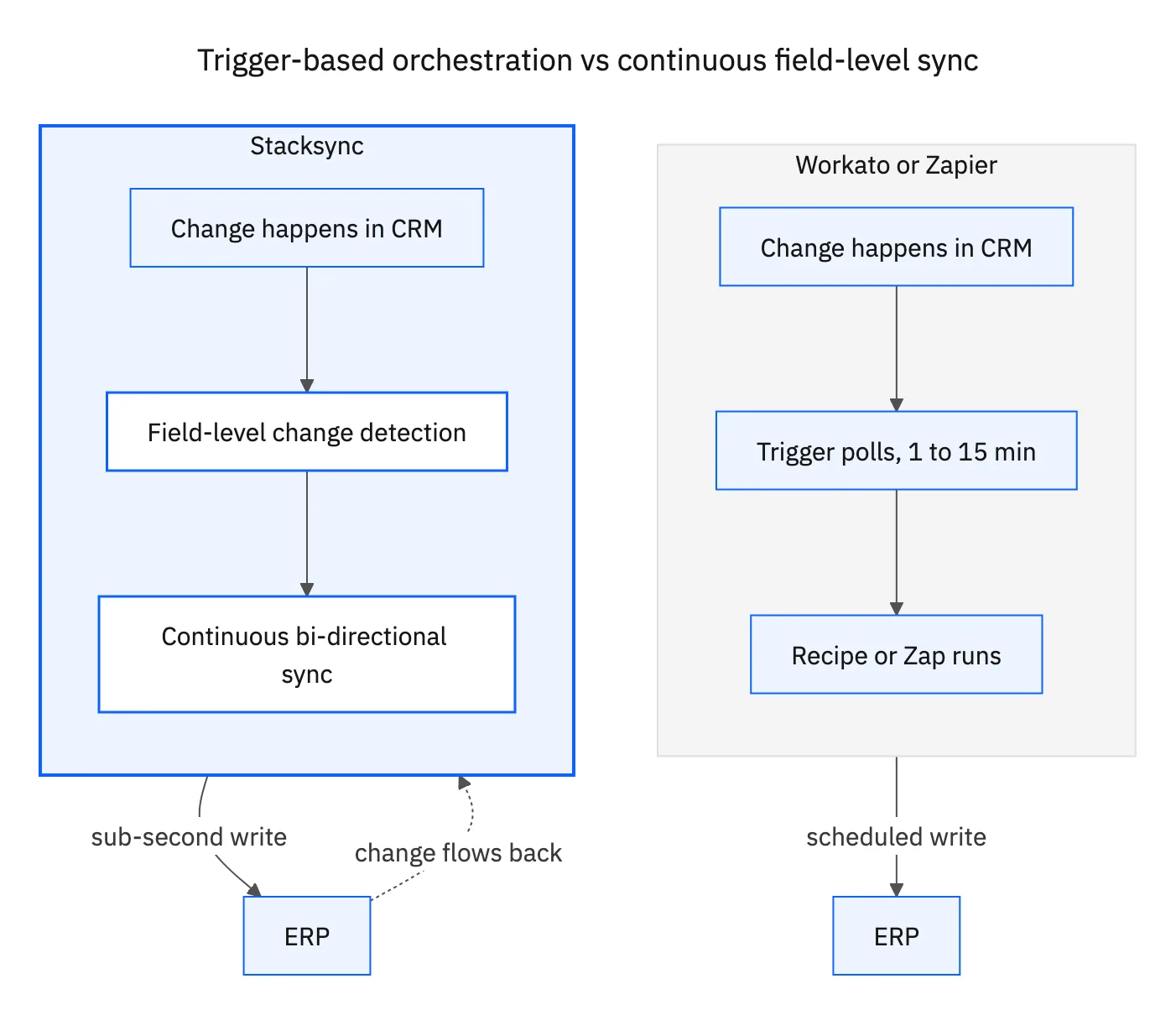
Critical technical limitation: Both Workato and Zapier operate through triggered workflows rather than continuous synchronization, creating data latency that impacts operational efficiency.
Stacksync's technical advantage: True Bi-Directional Flow: Changes in either system automatically propagate to the other, ensuring data consistency regardless of where updates originate. Real-Time Synchronization: Updates happen within seconds or even sub-second latency, not in overnight batches.
This eliminates the fundamental problem of data drift between operational systems, ensuring CRMs, ERPs, and databases maintain perfect consistency.
Business-Critical Automation Reliability
Workato and Zapier limitation: When workflows stop and restart, missed events require manual execution, creating operational risks for business-critical processes.
Stacksync solution: Continuous background monitoring captures all trigger events and executes missed operations automatically upon restart. You need real-time synchronization when business operations depend on immediate data availability. Examples include updating customer support tickets in a CRM from a service desk application, reflecting e-commerce order status in an ERP, or ensuring sales teams have the latest lead information from marketing automation platforms.
Scalability and Performance Architecture
Zapier's constraint: Row-by-row processing creates linear cost increases and performance bottlenecks as data volumes scale.
Workato's challenge: Enterprise workflows become complex to manage and maintain as they grow.
Stacksync's architecture: Field-level change data capture (CDC) and batch processing significantly reduce API calls and processing overhead. Synchronization of huge datasets, such as in large databases or enterprise systems, can be very resource-intensive. The time required for such synchronization may be very long and bandwidth-heavy, especially when it is not optimized to transfer only incremental changes, as Hevo's guide to data synchronization tools notes. Stacksync's field-level CDC and batch processing avoid that cost, scaling cleanly from thousands to millions of records.
Enterprise Security and Compliance
Both platforms offer standard security features but lack the comprehensive compliance certifications required for sensitive operational data.
Stacksync's enterprise-ready security: SOC 2 Type II, GDPR, HIPAA BAA, ISO 27001, and CCPA compliance with end-to-end encryption and zero data retention policies. This addresses security team concerns that often block integration projects.
Customer Support for Business-Critical Operations
Zapier: Email support with 3-4 day response times inadequate for operational system failures.
Workato: Enterprise support available but focused on workflow troubleshooting rather than data synchronization issues.
Stacksync: Immediate in-browser live chat support with dedicated solutions architects for complex operational integrations. When business-critical systems fail, instant specialist response ensures minimal operational impact.
HubSpot Data Hub vs Zapier vs Workato for enterprise data orchestration
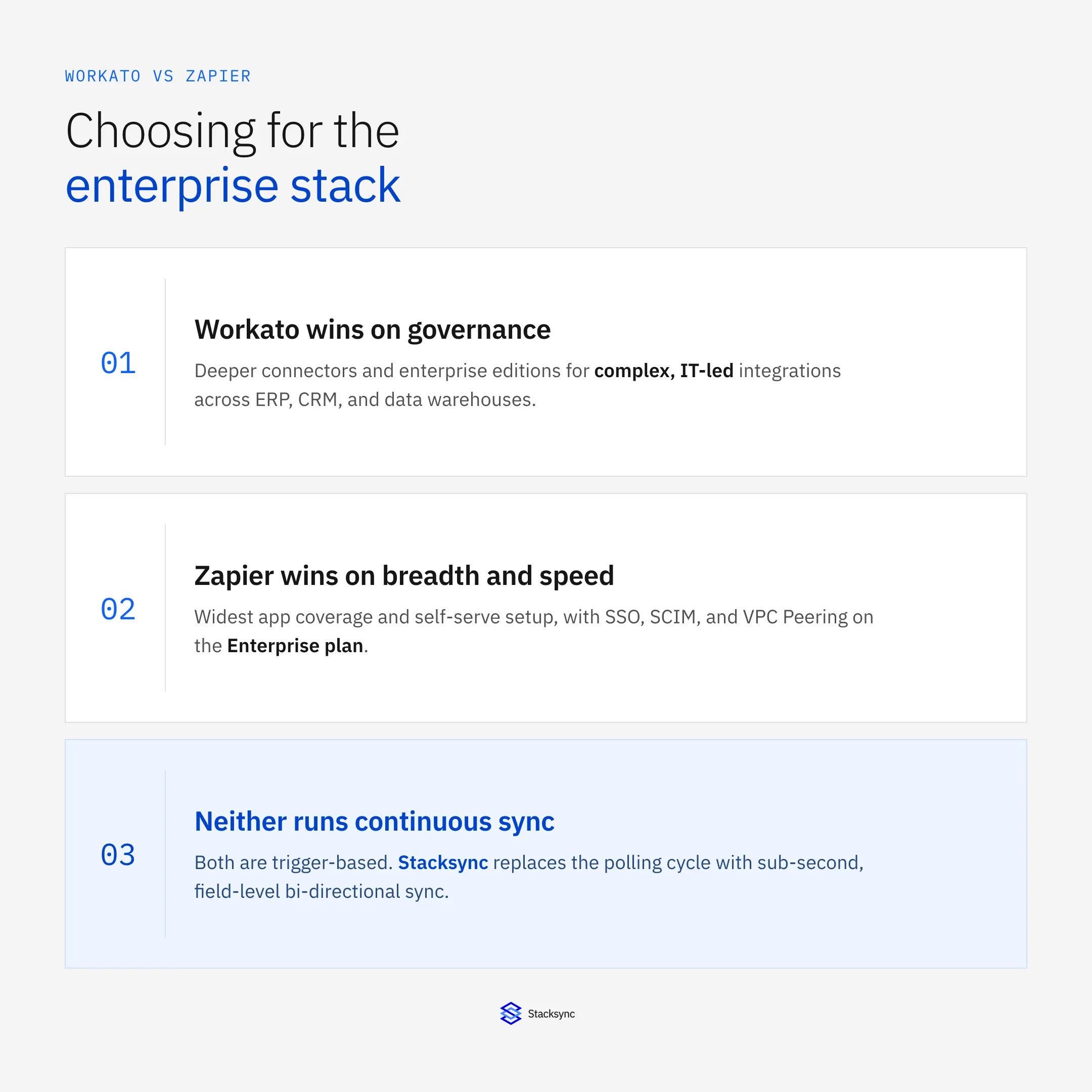
For enterprise data orchestration, the right pick depends on where the workflow needs to live. HubSpot's operations tool (renamed Data Hub in September 2025, after HubSpot moved every Operations Hub customer to the equivalent Data Hub tier with no feature loss) is strongest when orchestration stays inside the HubSpot ecosystem. Zapier covers the widest range of apps and deploys fastest. Workato goes deeper on governance for IT-led, multi-system programs. None of the three run a continuous, field-level sync between systems, which matters once you compare them below.
HubSpot Data Hub: strong inside HubSpot, limited outside it
Data Hub Enterprise runs $2,000/month for one seat and adds advanced datasets, connections to external data warehouses, advanced permissions, custom objects, and single sign-on on top of the Professional tier. Programmable automation, custom JavaScript rules for cleaning and enriching records, is available from Professional up. The catch: Data Hub's bidirectional sync and "100+ integrations" claims are scoped to HubSpot as the hub. It is not built to run continuous, field-level sync between two external systems, such as an ERP and a database, that never touch HubSpot.
Zapier and Workato: workflow orchestration, not continuous sync
Zapier's Enterprise plan adds SSO, SCIM, and domain capture for centralized access, a full audit trail, VPC Peering for private network connections, and action-level permissioning so IT can restrict specific actions per app, on top of SOC 2 Type II, SOC 3, GDPR, and CCPA compliance. Workato prices in a platform edition fee (Standard, Business, Enterprise, or Workato One) plus a usage fee that scales with recipe job volume; Enterprise adds the governance controls most IT teams require for multi-system programs. Both remain trigger-based: a recipe or a Zap fires when an event happens, it does not continuously reconcile state between two systems.
Enterprise pricing at a glance
| Platform | Enterprise tier | Included at Enterprise | Sync model |
|---|---|---|---|
| HubSpot Data Hub | $2,000/mo (1 seat) | Datasets, data warehouse connections, SSO, custom objects | HubSpot-centric bidirectional sync |
| Zapier | Custom, contact sales | SSO, SCIM, domain capture, audit trail, VPC Peering | Trigger-based, polling for most apps |
| Workato | Platform edition + usage fee | Advanced governance, higher usage capacity | Recipe/workflow-triggered |
| Stacksync | Flat from $1,000/mo | Field-level CDC across CRMs, ERPs, databases | Continuous, sub-second bi-directional |
If the orchestration genuinely needs to be system-agnostic and keep a CRM, ERP, and database in permanent agreement, none of the three above were built for that job. That is the gap Stacksync's field-level change data capture closes.
Does Zapier integrate well with enterprise systems and an existing IT-owned tech stack?
Yes, for governance and access control. Zapier's Enterprise plan gives IT centralized control: SSO, SCIM provisioning, and domain capture manage who can connect what, a full audit trail tracks every workflow and data change, VPC Peering lets Zapier reach internal systems without exposing them to the public internet, and action-level permissioning restricts which specific actions inside an app a team can run. It is also SOC 2 Type II, SOC 3, GDPR, and CCPA compliant.
The caveat is architectural, not a governance gap. Those controls sit on top of Zapier's core execution model, which is still trigger-based: most Zap triggers poll a connected app on a schedule that commonly runs every 1 to 15 minutes rather than watching for changes continuously. For workflows touching marketing tools or ticket updates, that delay rarely matters. For an IT-owned stack where a CRM, ERP, or database is the system of record and cannot be allowed to drift out of sync, even briefly, the enterprise security wrapper does not change the underlying latency.
Stacksync answers the same integration question from the sync side rather than the governance side: SOC 2 Type II, ISO 27001, and HIPAA BAA certifications with SSO, SCIM, IP whitelisting, and full audit logging, paired with field-level change data capture so the CRM, ERP, or database it connects never has a window where two systems disagree.
Proven Enterprise Results
Acertus, a vehicle logistics provider, replaced legacy sync tools with Stacksync, saving $30,000+ annually and reducing manual reconciliation by 50%. This demonstrates the measurable operational improvements and cost reduction achievable with synchronization technology designed specifically for operational systems.

Technical Comparison Summary
Comparison: Zapier vs Workato vs Stacksync
| Capability | Zapier | Workato | Stacksync |
|---|---|---|---|
| Sync Type | Trigger-based | Workflow-driven | Continuous bi-directional |
| Latency | Minutes to hours | Workflow-dependent | Sub-second |
| Scalability | Row-by-row | Complex workflows | Field-level CDC + batch |
| Setup | Simple triggers | Complex configuration | No-code sync |
| Enterprise Support | Email only | Dedicated teams | Live chat + architects |
| Operational Focus | Task automation | Process automation | Data consistency |
The Strategic Choice for Operational Excellence
Zapier serves simple task automation needs but cannot handle enterprise data synchronization requirements.
Workato excels at complex workflow automation but lacks real-time synchronization capabilities for operational systems. See our full Workato alternative comparison for the complete breakdown.
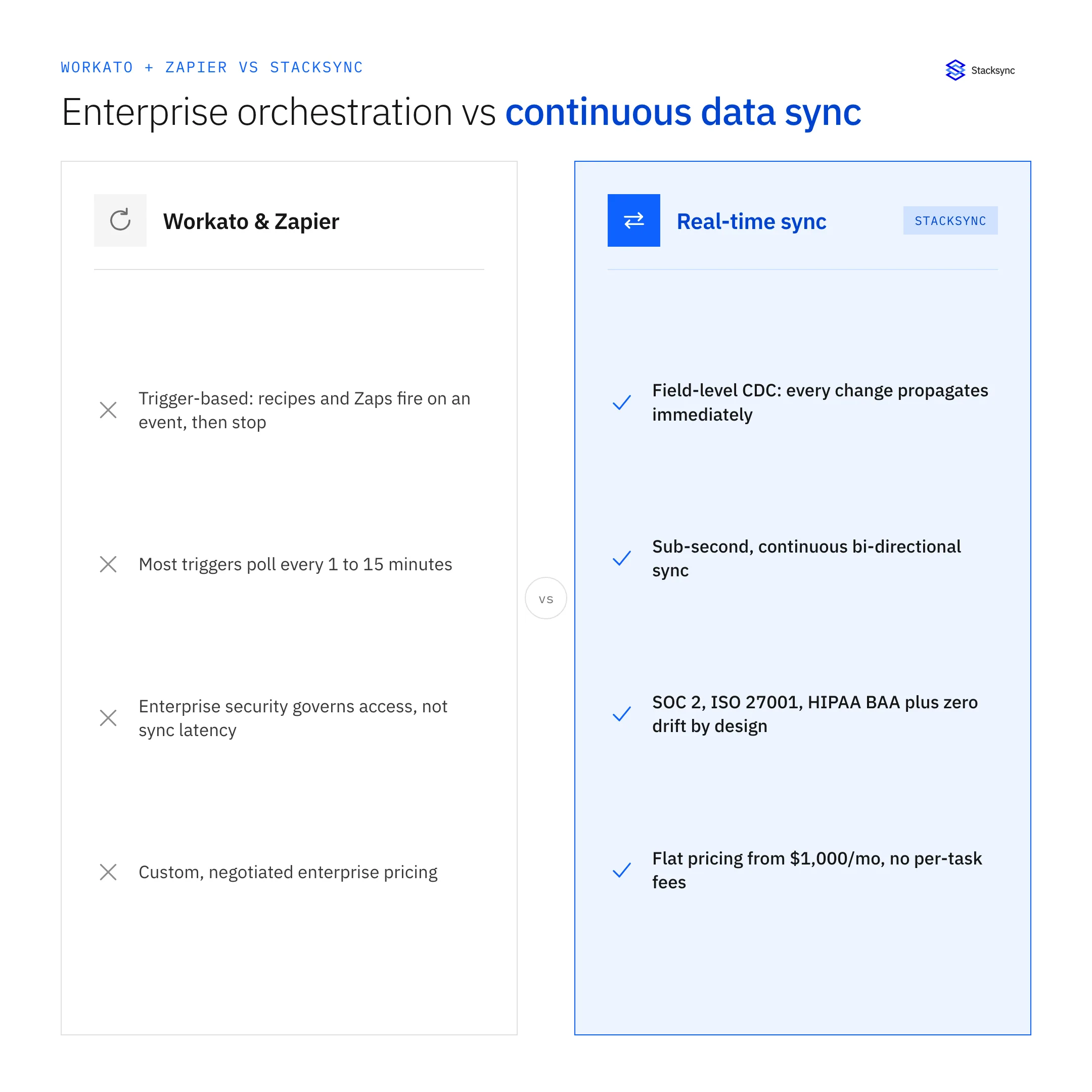
Stacksync is the only platform designed specifically for real-time, bi-directional data synchronization between CRMs, ERPs, and databases. Real-time synchronization is now the baseline expectation for keeping information accurate and current across connected systems.
Organizations requiring operational data consistency, automated data sync between applications, and enterprise-grade reliability choose Stacksync for its proven ability to remove integration complexity while delivering guaranteed real-time synchronization.
Improve your operational efficiency with real-time data synchronization. Start your Stacksync trial and keep your CRM, ERP, and database systems consistently in sync today.

FAQ
Frequently asked questions










Related articles






