Two-Way Sync (Bidirectional Sync): The Complete Guide with Real-World Examples
Two-way (bidirectional) sync keeps systems consistent in real time. Learn how it works, conflict resolution, ETL vs sync, and real-world examples.
- Author
- Ruben Burdin · Founder & CEO
- Published
- September 11, 2025
- Read time
- 19 min read
Most companies don't have a data-collection problem. They have a data-consistency problem. Sales lives in a CRM, finance lives in an ERP, support lives in a help desk, and product lives in an operational database. Each system is the right tool for its job, but the moment the same customer, order, or account exists in more than one of them, the records start to drift apart. Someone updates a phone number in one place, an address in another, and a payment status in a third, and within days no single system can be trusted on its own.
Two-way sync (also called bidirectional sync) is the architecture that solves this. Instead of copying data one direction on a schedule, it keeps two or more systems continuously aligned so a change made in either system shows up in the other within seconds. This guide defines two-way sync precisely, shows how the sync loop actually works, compares it to one-way sync, ETL, replication, and iPaaS, and walks through conflict resolution, real-world examples, the build-versus-buy decision, and how to evaluate a solution.
What Is Two-Way Sync (Bidirectional Sync)?
Two-way sync is a method of automatically keeping data consistent between two connected systems so that both always reflect the latest changes. When a record is created, updated, or deleted in either system, that change is detected and propagated to the other, and vice versa. The defining shift from one-way sync is the question of authority: in one-way sync the source system holds the single authoritative version of the data; in two-way sync both systems are treated as peers, each a valid source of truth for the data they share. That is also what makes two-way sync harder, because two peers can change the same field at the same time.
The three properties that make sync "two-way"
- Bidirectional flow: updates travel in both directions (A ⇄ B), not just source to destination.
- Data consistency: connected records converge to the same state, so every team works from the same facts.
- Automation: changes propagate without manual export, re-keying, or reconciliation.
Every two-way sync is built from the same handful of components: triggers (the events that signal a record changed), field mapping (which field in System A corresponds to which field in System B, for example email → contact_email), a sync engine and transport (the APIs, webhooks, or database connections that actually move the change), and conflict resolution (the rules that decide what happens when both sides edit the same data). Get those four right and you have reliable bidirectional sync; get any one wrong and records quietly diverge.
How Two-Way Sync Works: The Sync Loop
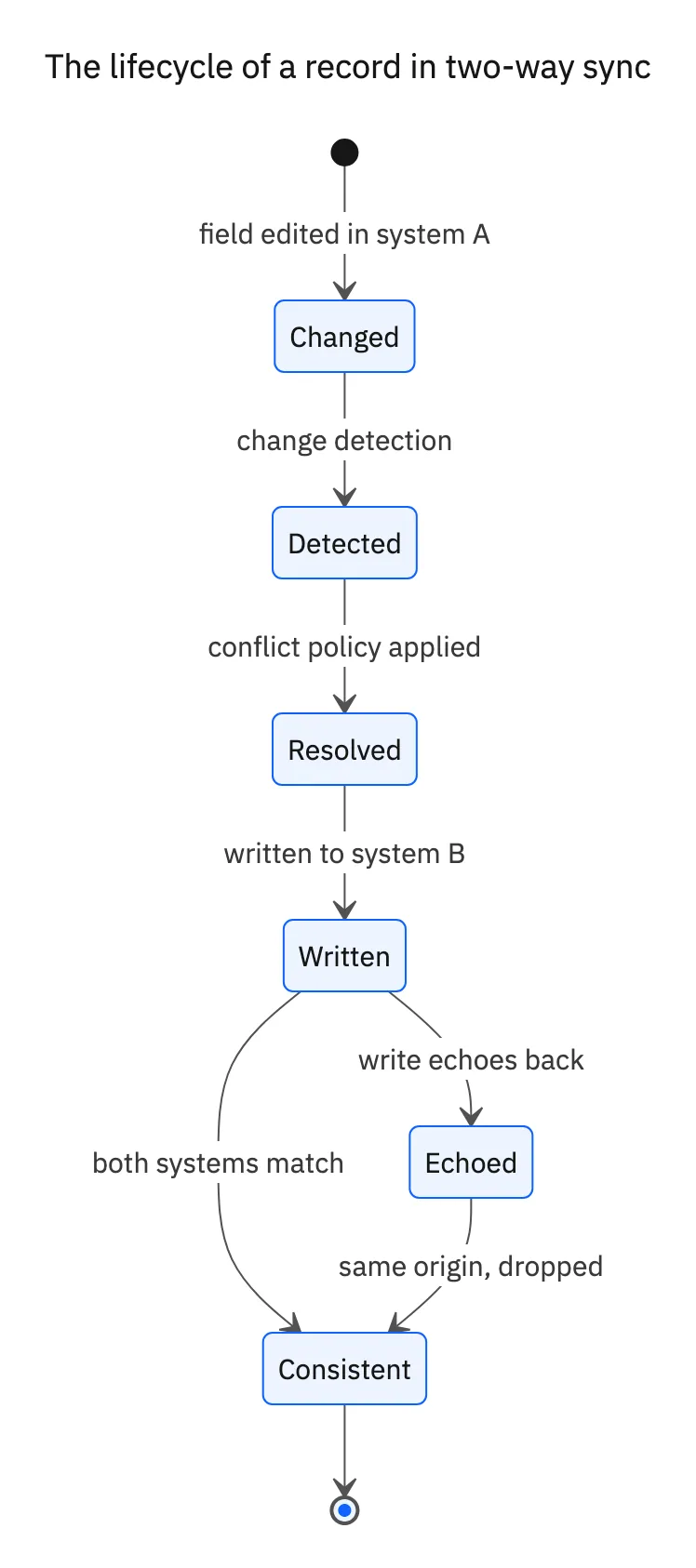
Bidirectional synchronization runs as a continuous loop. Each side is watched for changes; when a change appears, it is mapped into the other system's data model, checked against conflict rules, and applied. The same loop runs in the opposite direction at the same time, which is why both systems can be edited freely.
- 01Detect the change. The engine notices a record was created, updated, or deleted using timestamps, event listeners/webhooks, database logs, or change data capture (CDC).
- 02Map the data. The changed fields are translated into the target system's schema, including any format or structure transformations (splitting a full name into first/last, converting date formats, normalizing picklists).
- 03Resolve conflicts. If the same record changed on both sides since the last sync, the configured rule decides which value wins, or whether to merge field by field.
- 04Apply the update. The validated change is written to the other system, the result is logged, and the source of the change is tagged so the write doesn't echo back as a new change.
How systems detect changes
- Webhooks / event triggers: the source pushes a notification the instant data changes. Lowest latency, but only works on systems that emit events.
- API polling: the engine checks the source at a set interval (every few minutes). Works with almost any system, but adds delay and consumes API calls.
- Database logs / CDC: change data capture reads the database's change log to detect row- and field-level edits in real time without modifying the source schema.
- Timestamps and checksums: comparing last-modified timestamps or a checksum of the data reveals what changed since the last run.
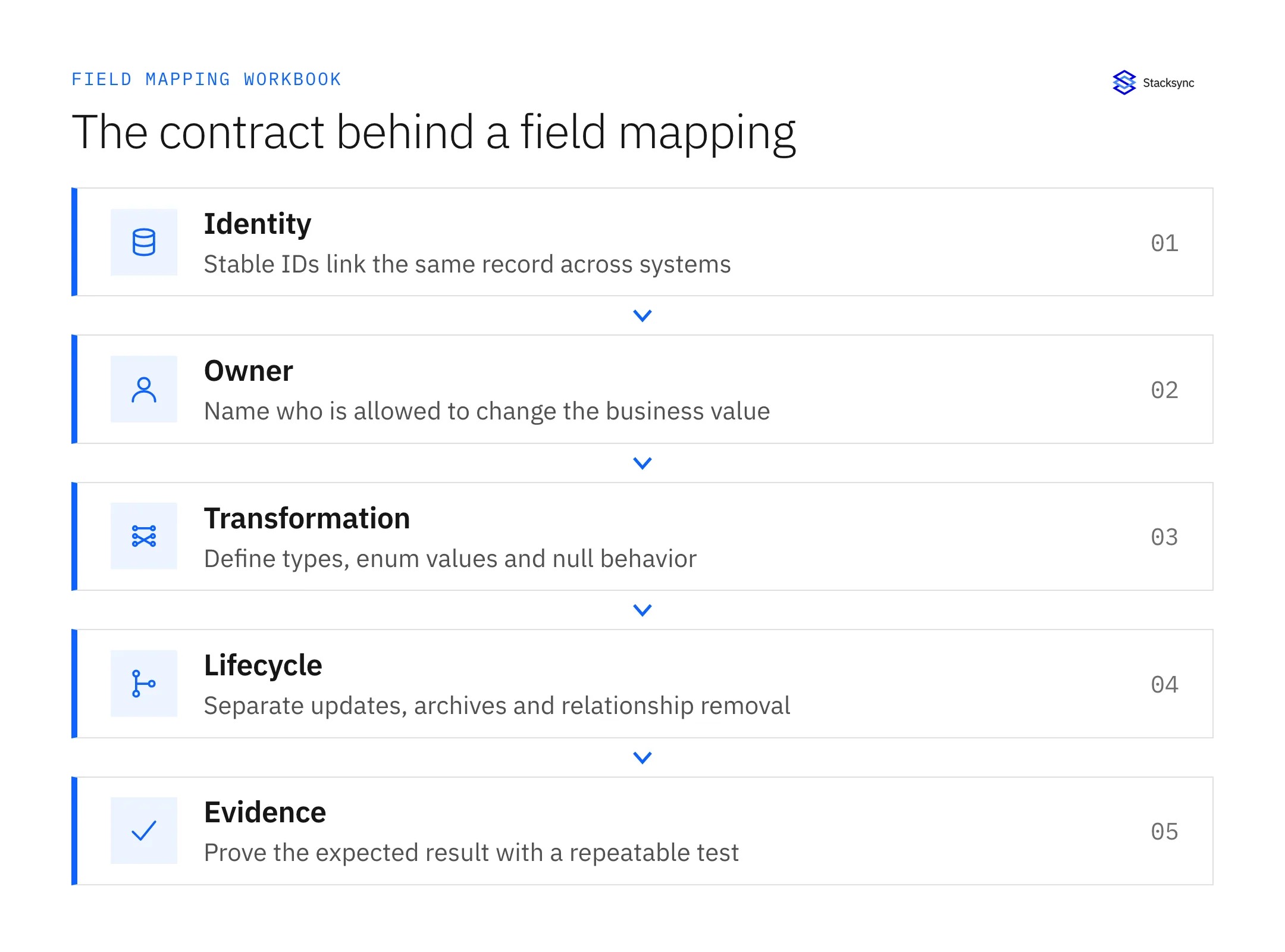
Field mapping is where most homegrown syncs fall down. Two systems rarely use identical field names, types, or structures: "Customer_ID" versus "ClientID," a single "Full Name" field versus separate first and last names, text status labels versus numeric codes. Reliable sync needs direct mapping for matching fields, transformation mapping for format differences, and conditional rules where the right target depends on the value. A text field cannot silently land in a numeric field without a conversion rule, and required fields that exist on only one side need an explicit default.
Two-Way Sync vs One-Way Sync, ETL, Replication, and iPaaS
"Sync" gets used loosely for several different data-movement patterns. They are not interchangeable: each optimizes for a different goal, from analytics loading to disaster recovery to live operational consistency. The table below maps the main approaches against the dimensions that matter when you choose one.
| Approach | Direction | Typical latency | Conflict handling | Best for |
|---|---|---|---|---|
| One-way sync | Source → target | Seconds to scheduled | Not needed (single source of truth) | Backups, read-only mirrors, feeding analytics |
| Two-way (bidirectional) sync | Both directions (A ⇄ B) | Real-time / sub-second | Required | Operational systems that multiple teams edit |
| Batch ETL / ELT | Source → warehouse | Minutes to hours | Not applicable | Loading a warehouse for BI and reporting |
| Reverse ETL | Warehouse → operational app (one-way) | Scheduled to near real-time | Not applicable | Activating warehouse data back in SaaS tools |
| Data replication | One direction, full/continuous copy | Continuous / near real-time | Not applicable | Disaster recovery and read replicas |
| Change data capture (CDC) | Mechanism (powers one- or two-way) | Real-time | Depends on use | Detecting row/field changes to drive sync or streams |
| iPaaS / workflow automation | Configurable, often per-recipe | Varies | Varies or manual | Broad app-to-app automation and event triggers |
The cleanest way to remember the ETL distinction: ETL is a one-way, batch-oriented process that moves data into a warehouse on a schedule, designed for analytics. Two-way sync is real-time and bidirectional, designed to keep operational systems in continuous alignment. Replication copies entire datasets one direction for redundancy, while sync updates only the specific fields that changed. iPaaS and workflow tools can move data between apps, but most run scheduled jobs or one-directional "recipes" rather than maintaining true bidirectional state with conflict handling. Pick one-way sync or ETL when a single system owns the data; pick two-way sync when both systems are actively edited and both sets of changes must survive.
Why Two Stitched-Together One-Way Pipelines Aren't True Bidirectional Sync
The most common mistake when building sync in-house is to assume that two one-way pipelines (A → B and B → A) add up to two-way sync. They do not. Two independent one-way flows have no shared notion of which change happened first, no field-level conflict logic, and no way to tell their own writes apart from genuine user edits. The result is the failure mode every data team eventually hits.
- Infinite loops: pipeline A → B writes a record into B, which B's change detector sees as a "new" change and ships back to A, which ships it to B again, forever.
- Lost updates: when both sides change the same record between runs, the last pipeline to fire silently overwrites the other edit with no record that it happened.
- No conflict arbitration: there is no shared rule deciding whose version wins at the field level, so consistency depends on timing and luck.
- Drift over time: small unresolved discrepancies accumulate until the two systems no longer agree, which is exactly the problem sync was supposed to prevent.
Conflict Resolution: Handling Simultaneous Edits
A sync conflict occurs when the same field of the same record is changed in both systems before either has synced. Because both systems are valid sources of truth, the engine must decide which value wins, and that decision should be a deliberate policy, not an accident of timing. Most platforms support several strategies, and the right one differs by data type: inventory counts can safely use last-write-wins, while a legal contract field should be flagged for human review.
| Strategy | How it works | Best for | Trade-off |
|---|---|---|---|
| Last-write-wins (timestamp) | The most recent change wins, based on update time | High-volume, low-stakes fields | Can overwrite a more accurate older edit; needs synchronized clocks |
| System priority (source of truth) | A designated system always wins for given data (e.g. ERP owns billing) | Data with clear ownership | Inflexible when ownership is genuinely shared |
| Field-level rules / merge | Different fields resolve to different systems, so non-overlapping edits both survive | Records edited by multiple teams | Requires field-level change tracking, not just record-level |
| Manual review queue | Conflicts are flagged and a human chooses the surviving version | Critical or ambiguous data (contracts, balances) | Slower; needs an owner to action the queue |
Field-level resolution is the quiet hero here. If a salesperson updates a customer's email in the CRM while a billing agent updates the same customer's phone in the ERP, field-level merging keeps both edits and never raises a conflict at all; a true conflict only arises when both sides touch the same field. To stop the echo problem, engines prevent loops by tagging or tracking the origin of each change and ignoring updates that originated from the sync process itself (using integration users, sync flags, or origin tracking). You can further reduce conflicts by syncing more frequently and defining clear data ownership per field up front. Deletions follow the same configurable logic: propagate the delete to both systems, archive instead of deleting, or require confirmation before removing a record.
Real-Time vs Batch Two-Way Sync: Webhooks, Polling, and CDC
Direction and timing are two separate questions. Two-way describes the direction data flows; real-time versus batch describes how quickly it flows. A two-way sync can run in real time or on a schedule, and the choice has real operational consequences.
- Real-time: updates appear within seconds, driven by webhooks, event triggers, or CDC. Keeps systems tightly aligned but uses more processing and more API calls.
- Near real-time: updates appear within a few minutes, typically via short-interval polling.
- Batch / scheduled: changes are collected and applied together on an interval (hourly, nightly). Cheaper on resources and API quota, but systems show stale data between runs.
For operational data, latency is not a cosmetic detail. If a rep quotes inventory that sold out an hour ago, or support tells a customer a ticket is open when engineering already closed it, the batch window itself becomes the bug. Real-time wins whenever a human or an automated workflow acts on the data immediately: inventory, pricing, order status, support state, and anything customer-facing. Scheduled sync is a reasonable choice for rate-limited systems, very large historical backfills, or genuinely non-urgent fields. In practice the most robust setups combine both: event-driven updates for freshness, plus periodic polling as a safety net to catch anything an event missed.
What Reliable Two-Way Sync Requires
Demoing a sync between two clean test records is easy. Running one in production across millions of records and evolving schemas is the hard part. A bidirectional sync you can actually trust needs the following foundations.
- Field-level change detection: capture changes per field rather than replacing whole records, which cuts bandwidth, avoids needless writes, and enables field-level conflict rules.
- Idempotency and origin tracking: applying the same change twice must not create duplicates or trigger loops, so every write is tagged and deduplicated.
- Robust schema and field mapping: handle name, type, and structure differences, plus transformation rules and sensible defaults for fields that exist on only one side.
- Retries and replay: when an API is rate-limited or a system is briefly offline, changes are queued and retried with backoff, then replayed when connectivity returns, instead of being dropped.
- Referential integrity: preserve relationships between records (accounts and contacts, orders and line items) by sequencing related writes correctly.
- Monitoring and audit logging: surface latency, error rates, conflict counts, and a record of every change so failures are caught early and resolutions are auditable.
- Scale techniques: incremental/differential sync (only changed records), batching, and chunked initial loads to stay within API limits and avoid timeouts.
Schema drift is the slow killer: as systems evolve, fields get added, renamed, and retyped, and a sync that doesn't adapt quietly breaks. Treat mapping maintenance, monitoring, and retry handling as core requirements, not nice-to-haves.
Two-Way Sync Use Cases and Real-World Examples
Bidirectional sync earns its keep wherever the same entity lives in two systems that different teams update independently. Three operational examples show the pattern clearly.
Example 1: Marketing and sales lead management
Marketing captures and scores leads in an automation platform while sales works prospects in the CRM. Without sync, lead scores and statuses diverge, follow-up is uncoordinated, and response times slip. A two-way sync keeps lead scores, engagement signals, and qualification status consistent across both systems in real time, so marketing sees what sales is doing with a lead and sales sees the behavioral context behind it. Because qualification edits happen on both sides, this is exactly the case that needs field-level change detection and clear ownership rules rather than a one-way push.
Example 2: Support and engineering collaboration
Support manages customer issues in a help desk; engineering tracks the same problems as issues in a development tool. The gap between them creates delayed resolutions and inconsistent customer updates. Bidirectional sync mirrors status changes and comments in both directions: when engineering moves an issue to "in progress" or "resolved," the support agent sees it without leaving the help desk and can update the customer, while engineering gets the customer impact and priority attached to the ticket. Resolution times drop because nobody is manually copying status between tools.
Example 3: Financial operations across CRM and ERP
This is the flagship use case. Sales owns the account and opportunity in the CRM (Salesforce, HubSpot); finance owns invoicing, payments, and credit terms in the ERP (NetSuite, SAP). When a rep updates shipping preferences in the CRM, they should appear in the ERP; when finance marks an invoice "Paid" or changes payment terms in the ERP, the account manager should see it in the CRM. Two-way sync keeps customer details, order status, and payment state aligned, which is what makes quote-to-cash, revenue recognition, and a real customer 360 possible without nightly reconciliation.
The same pattern extends beyond these three. App ↔ operational database: enrich CRM records with live product-usage data from PostgreSQL or MySQL, and write computed values like lifetime value back so sales can act on them. Inventory ↔ e-commerce: keep stock levels consistent between an ERP and the storefront to prevent overselling. SaaS ↔ SaaS: keep contacts and statuses aligned across the many tools a modern team runs. And because a closed deal can automatically update the ERP, generate an invoice, and notify finance, two-way sync is also the reliable backbone underneath workflow automation, not a separate concern.
Build vs Buy: The Real Cost of In-House Bidirectional Sync
Building one-way sync is a weekend project. Building two-way sync that survives production is not, because the hard parts are exactly the ones that don't show up in a prototype. Teams that attempt it in-house run into the same five engineering challenges, each of which is ongoing rather than one-time.
- Conflict resolution: deciding, per field, whose change wins when both systems edit the same record.
- Schema differences: reconciling different field names, types, and validation rules, then keeping mappings current as both systems change.
- Referential integrity: maintaining relationships (one-to-many, many-to-many) so related records stay linked across systems.
- Performance at scale: what works for thousands of records has to be re-architected for millions, with rate limits and timeouts in the way.
- Error handling and recovery: gracefully surviving outages and API limits without propagating inconsistencies, which means queues, backoff, retries, and replay.
| Factor | Build in-house | Buy a sync platform |
|---|---|---|
| Time to first sync | Weeks to months of engineering | Days, via prebuilt connectors |
| Conflict resolution | Hand-coded per field and edge case | Configurable strategies out of the box |
| Schema / API changes | Ongoing manual maintenance as fields change | Absorbed by maintained connectors |
| Reliability | You build queues, backoff, and dead-letter handling | Built-in retries and replay |
| Scaling | Re-architect as volume and systems grow | Managed infrastructure scales for you |
| Cost model | Engineer salaries plus opportunity cost | Usage-based / tiered subscription |
The build path also carries a hidden tax: integration plumbing typically consumes a meaningful slice of engineering time that could go to the product, and that maintenance burden never ends because the connected systems never stop changing. For most teams, a purpose-built platform is cheaper once you count engineer-months and the cost of a sync that fails silently. Build only when your requirements are genuinely unusual and you can dedicate ongoing engineering to it.
How to Choose a Two-Way Sync Tool
If you buy rather than build, evaluate solutions against the dimensions that determine whether sync stays reliable in production, not just the connector logos on the homepage.
- 01Connector coverageConfirm native, maintained connectors for your specific CRMs, ERPs, databases, and SaaS tools, including the long-tail ones.
- 02True bidirectional modelVerify it is a real two-way engine with field-level change detection and loop prevention, not two one-way pipelines bolted together.
- 03LatencyMatch real-time (sub-second to seconds) versus scheduled to your operational needs; confirm it supports both.
- 04Conflict handlingCheck for configurable strategies (last-write-wins, system priority, field-level rules, manual review) you can set per field.
- 05ReliabilityLook for automatic retries, replay, error logging, and monitoring/alerting on sync health.
- 06CustomizationFlexible field mapping, transformations, and filtering so you sync only the data you need.
- 07Security and complianceEncryption in transit, access controls, audit logs, and the certifications your industry requires.
- 08Total cost of ownershipModel the pricing against your record volumes and sync frequency, not just the entry price.
Security and Compliance for Bidirectional Sync
Two-way sync deliberately moves data in both directions, which widens the surface area to secure: transmission channels, APIs, and processing layers all become attack surfaces. That makes security a first-class requirement, not an afterthought, especially in regulated industries like healthcare, financial services, and anything touching personal data.
- Encryption in transit (and at rest where data is stored) over secure protocols such as TLS, with VPN or SSH tunnels for on-prem systems.
- Strong authentication and authorization: OAuth 2.0, SSO, and role-based access control over who can configure and read syncs.
- Audit logging: a record of every change and sync event (who changed what, when, and which system initiated it) for compliance and debugging.
- Data minimization: sync only the fields required for the business function, and use field-level filtering to exclude sensitive data.
- Compliance posture: confirm the platform carries the certifications you need, such as SOC 2, ISO 27001, HIPAA, and GDPR alignment.
How Stacksync Delivers Real-Time, True Bidirectional Sync at Scale
Stacksync is a purpose-built engine for exactly the operational consistency this guide describes. Rather than scheduled batch jobs or two stitched-together one-way pipelines, it propagates changes bidirectionally in real time, regardless of where the change originated, so connected systems behave like one.
- True bidirectional sync engine with field-level change detection, so non-overlapping edits both survive and only same-field edits ever raise a conflict.
- Real-time propagation using CDC and webhooks for sub-second updates, with scheduled options when you want them.
- Automated conflict resolution you configure per field: last-write-wins, system priority, or field-level rules, with resolutions logged for auditability.
- Reliability built in: automatic retries, replay, and error handling so rate limits and brief outages don't drop changes.
- 1,000+ connectors across CRMs, ERPs, databases, and SaaS apps, configured through a no-code interface instead of custom integration code.
- Enterprise security and compliance: SOC 2, ISO 27001, and HIPAA, with encryption in transit and access controls.
- Usage-based, tiered pricing that scales with your sync volume.
The net effect is that teams stand up enterprise-grade bidirectional sync in days rather than months, and stop spending engineering time on integration plumbing. See the two-way sync platform for how it works end to end, and browse the full connector library to confirm coverage for your stack.
FAQ