Attio CRM Review (2026): Features, Pricing, Pros, Cons & Alternatives
Attio CRM pricing tier by tier, what the AI and data-enrichment features actually do, where Attio falls short, and how it compares to HubSpot.
- Author
- Ruben Burdin · Founder & CEO
- Published
- Updated
- Read time
- 15 min read

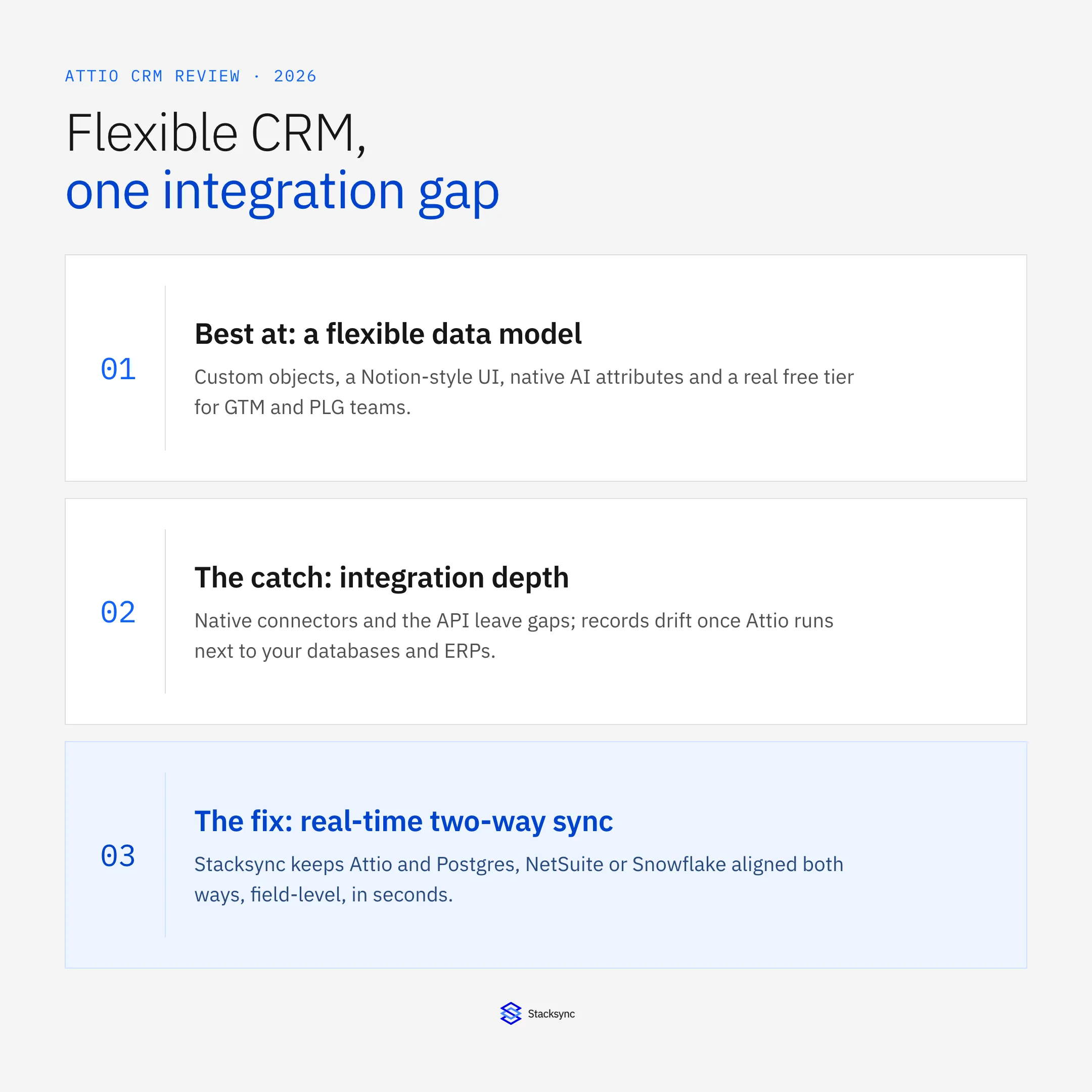
Attio is a data-driven, AI-native CRM built for go-to-market teams that want to model their business their own way instead of bending it to fit a rigid Contacts-and-Accounts schema. It pairs a Notion-style interface with custom objects, automatic enrichment, and AI features baked into the data layer, plus a genuinely usable free tier. That combination has made it one of the more talked-about CRMs for startups, product-led growth (PLG) companies, and modern sales teams.
This review covers what Attio actually does well, where it falls short, what each pricing tier includes, how it stacks up against HubSpot, Salesforce, Airtable, Folk, and Pipedrive, and who should (and shouldn't) buy it. We also look honestly at Attio's biggest practical gap, integration depth, because how Attio connects to your databases, ERPs, and operational systems matters as much as the CRM itself once you scale.
What Is Attio? The AI-Native CRM, Explained
Attio is a customer relationship management platform designed around flexibility. Where most CRMs ship a fixed data model (a contact belongs to a company, a deal belongs to a contact), Attio lets you define your own objects, attributes, and relationships so the CRM mirrors how your business actually works. You can model many users inside one workspace who don't all share the same company, track product accounts separately from billing accounts, or build entirely custom object types, without a Salesforce-style admin layer in between.
That makes Attio especially well suited to product-led and go-to-market motions, where the standard CRM data model breaks down quickly. The interface borrows heavily from Notion and modern data tools: fast, keyboard-friendly, and clean, with spreadsheet-like views layered on top of a real relational data model. AI is treated as part of the platform rather than a bolt-on, which is the angle Attio leans on hardest in 2026.
Attio Core Features: Data Model, Collaboration, Enrichment & Reporting
Attio's feature set centers on two things: a flexible data model and high data quality. Here is what the core capabilities deliver in practice.
Customizable data model
Attio's data platform lets you create custom objects, attributes, and relationship types that match your business structure instead of forcing you into a fixed schema. A sales team can track its own deal stages, industry-specific metrics, or customer segments that off-the-shelf CRMs don't support out of the box. This is Attio's defining strength.
Real-time collaboration
Multiple team members can work the same record at once, with live updates, shared notes, and synchronized task lists across the workspace. For distributed teams that live in the CRM all day, the collaborative editing model removes a lot of friction and stale-data guesswork.
Email and calendar integration
Attio pulls email and calendar data in so every interaction, thread, and meeting appears alongside the contact record. Automated sequences, meeting scheduling, and communication history are built in. The native integration is strongest for Gmail and Outlook; teams on other communication or productivity tools will find the coverage thinner.
Automatic data enrichment
Attio enriches contact and company profiles automatically from external sources, identifying stakeholders, mapping company hierarchies, and filling in firmographic details without manual research. Enrichment runs continuously rather than as a one-off import, which keeps records fresher than CSV-driven CRMs.
Reporting and analytics
Customizable dashboards, automatic report generation, and pipeline tracking let teams build views around the metrics they care about, deal velocity, engagement, revenue by segment. As always, reporting accuracy is only as good as the data feeding it, which becomes relevant once Attio shares records with other systems.
Workflow automation
Attio can trigger actions on record changes, stage transitions, or time-based rules, automating lead assignment, follow-ups, and status updates inside the CRM. These automations work well within Attio's boundary; cross-system workflows (for example, updating an ERP when a deal closes) need external orchestration.
Attio's AI Capabilities in 2026
Attio has folded AI into the data model rather than adding it as a separate chat layer. Three feature sets carry the most practical weight for revenue teams.
- AI attributes: custom fields on any object that auto-fill with AI, summarizing a record, classifying a contact into an ICP tier, or running a web-research agent to find data like funding stage or headcount. Each run consumes workspace credits and fields update on trigger, not automatically. AI attributes require the Plus plan or above.
- Call intelligence (Pro and Enterprise): joins calls, records transcripts, and auto-populates CRM fields from the conversation, with templates for MEDDPICC, BANT, and CHAMP that extract qualification data straight into records.
- AI workflow steps (Pro): insert classification or summarization logic inside multi-step workflows, so a stage change can classify a record, update a field, and route it to the right owner without manual input.
One constraint applies across all of it: Attio's AI operates inside the CRM boundary. A contact enriched with funding stage or ICP tier in Attio won't update the matching record in your database or ERP on its own, so keeping AI-generated fields consistent across systems still needs a dedicated sync layer.
Attio Pricing: Plans, Costs & What Each Tier Includes (2026)
Attio uses a per-user, per-month model with four tiers, and all paid plans are billed annually, there is no month-to-month option on paid plans. Here is how the tiers break down (always confirm current numbers on Attio's pricing page, since SaaS pricing shifts).
| Plan | Price | Key additions | Best for |
|---|---|---|---|
| Free | $0 (up to 3 seats) | Real-time contact sync, automatic enrichment, core flexible data model | Individuals and very small teams trying Attio |
| Plus | $29 / user / month (annual) | No seat limit, private lists, enhanced email sending, AI attributes | Small teams growing past the 3-seat free cap |
| Pro | $69 / user / month (annual) | Call intelligence, sequences, AI workflow steps, advanced permissions, priority support | Scaling sales teams running real pipeline |
| Enterprise | Custom (annual) | Unlimited objects and teams, advanced security, SSO and admin controls, dedicated support | Larger orgs with compliance and admin needs |
The free plan genuinely works for individuals and very small teams. Plus is the natural step once you exceed three seats or need AI attributes and private lists. Pro at $69/user/month is where most scaling teams land, because call intelligence, sequences, and AI workflow steps are where the operational value sits. Enterprise is custom-priced and aimed at organizations with security, compliance, and admin requirements at scale.
Attio Pros and Cons: An Honest Assessment
Pros
- Highly flexible, custom data model that fits non-standard and PLG business structures.
- Clean, fast, Notion-style interface with a short learning curve for day-to-day users.
- Native AI attributes, call intelligence, and AI workflow steps built into the data layer.
- Continuous automatic enrichment keeps contact and company data fresh.
- A real free tier and transparent paid pricing, lower entry cost than Salesforce.
- Responsive customer support, frequently praised during onboarding.
Cons
- Advanced customization has a steeper learning curve than the clean UI implies; complex data models and multi-step workflows can need technical help.
- Less mature enterprise tooling than Salesforce or HubSpot, weaker on complex sales processes, territory management, and deep marketing automation.
- A younger, smaller third-party app marketplace and ecosystem.
- Integration depth is the biggest gap: native connectors don't cover every database, ERP, or custom app, and the API requires engineering time to build and maintain.
- Paid plans are annual-only, no month-to-month billing.
- AI features consume workspace credits and don't refresh automatically without a workflow trigger.
What Real Users Say: Attio Reviews & Ratings
Across G2, Capterra, and community threads on Reddit, a consistent picture emerges. Reviewers praise three things most: the flexible data model that lets them build a CRM around their actual workflow, the clean and fast interface that new team members pick up in hours rather than days, and responsive support during setup.
The recurring criticisms mirror the cons above: the gap between the simple-looking UI and the effort required to configure advanced data models, missing enterprise-grade features that Salesforce and HubSpot users expect, and integration coverage that doesn't reach every tool in a complex stack. Ratings and review counts move over time, so check the current scores on G2 and Capterra before deciding.
Attio vs HubSpot, Salesforce, Airtable, Folk & Pipedrive
Attio occupies a specific niche: teams that want data-model flexibility without Salesforce-level complexity or HubSpot's marketing-first orientation. The table below positions it against the CRMs it's most often compared with (positioning is directional, confirm specifics for your use case). For a three-way deep dive, see our Attio vs Airtable vs Salesforce comparison.
| CRM | Best for | Data-model flexibility | Standout strength | Main watch-out |
|---|---|---|---|---|
| Attio | GTM and PLG teams wanting a modern, flexible CRM | Very high (custom objects and relationships) | Notion-like UX with native AI attributes | Thinner integrations, younger ecosystem |
| Salesforce | Large enterprises with complex sales processes | High, but admin-heavy | Deepest feature set and app marketplace | Cost and admin overhead |
| HubSpot | Marketing-led teams wanting an all-in-one suite | Moderate (custom objects gated to higher tiers) | Marketing, sales, and service in one platform | Object model less flexible than Attio |
| Airtable | Teams building custom data apps more than pure CRM | Very high (database-style) | Spreadsheet-database hybrid flexibility | Not a purpose-built CRM out of the box |
| Folk | Relationship-led small teams and agencies | Moderate | Lightweight, contact-first simplicity | Limited depth for complex pipelines |
| Pipedrive | SMB sales teams focused on pipeline | Low to moderate | Simple, sales-pipeline-first design | Less customization and data modeling |
Attio vs Salesforce
Salesforce offers a deeper feature set, larger marketplace, and more mature enterprise tooling. Attio counters with a cleaner interface, faster setup, and far lower cost for small teams, plus no need for a dedicated admin. For teams under ~50 people that don't need Salesforce's ecosystem, Attio delivers comparable core CRM functionality at a fraction of the cost and overhead.
Attio vs HubSpot
HubSpot bundles marketing, sales, and service with a generous free tier, and Attio doesn't try to compete on marketing automation. Where Attio wins is data-model flexibility: HubSpot's object structure is more rigid and custom objects are gated behind higher tiers. Teams that prioritize CRM data architecture over marketing features will find Attio more adaptable. For a feature-by-feature breakdown, see the HubSpot vs Attio comparison.
Attio vs Airtable, Folk & Pipedrive
Airtable is the most flexible of the group but it's a database builder first, not a purpose-built CRM, so you assemble the CRM yourself. Folk targets relationship-driven, contact-first workflows with a lightweight feel, ideal for small teams and agencies but limited for complex pipelines. Pipedrive is a simple, pipeline-first sales CRM for SMBs that trades customization and data modeling for ease of use. Attio sits between them: more structured than Airtable, deeper than Folk, and more flexible than Pipedrive. For a closer look at the lightweight end, see our Attio vs Folk face-off.
Who Attio Is Best For (and Who Should Look Elsewhere)
Attio is a strong fit if you are:
- A startup, PLG, or GTM team that needs a CRM modeled around your own data, not Contacts-and-Accounts.
- A small-to-mid team that wants a fast, modern interface without a dedicated admin.
- A revenue team that wants native AI enrichment, call intelligence, and AI workflows.
- Cost-conscious and want a real free tier with predictable per-seat pricing.
Look elsewhere if you are:
- A large enterprise needing deep territory management, complex sales processes, or a vast app marketplace (Salesforce).
- A marketing-led org that wants email marketing, landing pages, and service in one suite (HubSpot).
- A team whose primary need is a no-frills, low-cost sales pipeline (Pipedrive).
- Running a complex stack where the CRM must stay in live two-way sync with databases and ERPs, in which case plan for a dedicated sync layer alongside Attio.
Attio's API, Integrations & Automation Ecosystem
Attio ships native integrations for popular tools (email, calendar, and common SaaS apps) plus a capable REST API for building custom connections (see our guide to getting an Attio developer account and working with the API). For teams that live mostly in mainstream tools, the native catalog covers a lot of ground, and the API gives developers a clean way to push and pull data.
The honest caveat is depth and breadth. The native connector library is younger and smaller than Salesforce's or HubSpot's, so organizations running diverse stacks, multiple databases, ERPs, and custom applications, will hit gaps. Filling those gaps through the API is doable, but it means owning authentication, pagination, rate limits, transformations, monitoring, and error handling yourself.

Attio's Biggest Limitation: Data Silos at Scale
Most organizations run Attio alongside existing databases, ERP systems, and other operational apps. The moment the same customer, account, or deal lives in more than one of them, the records start to drift, and Attio's native integrations and one-off API scripts don't solve that on their own. Enrichment and AI fields generated in Attio stay in Attio unless something actively propagates them outward.
The common ways teams try to bridge this all have failure modes:
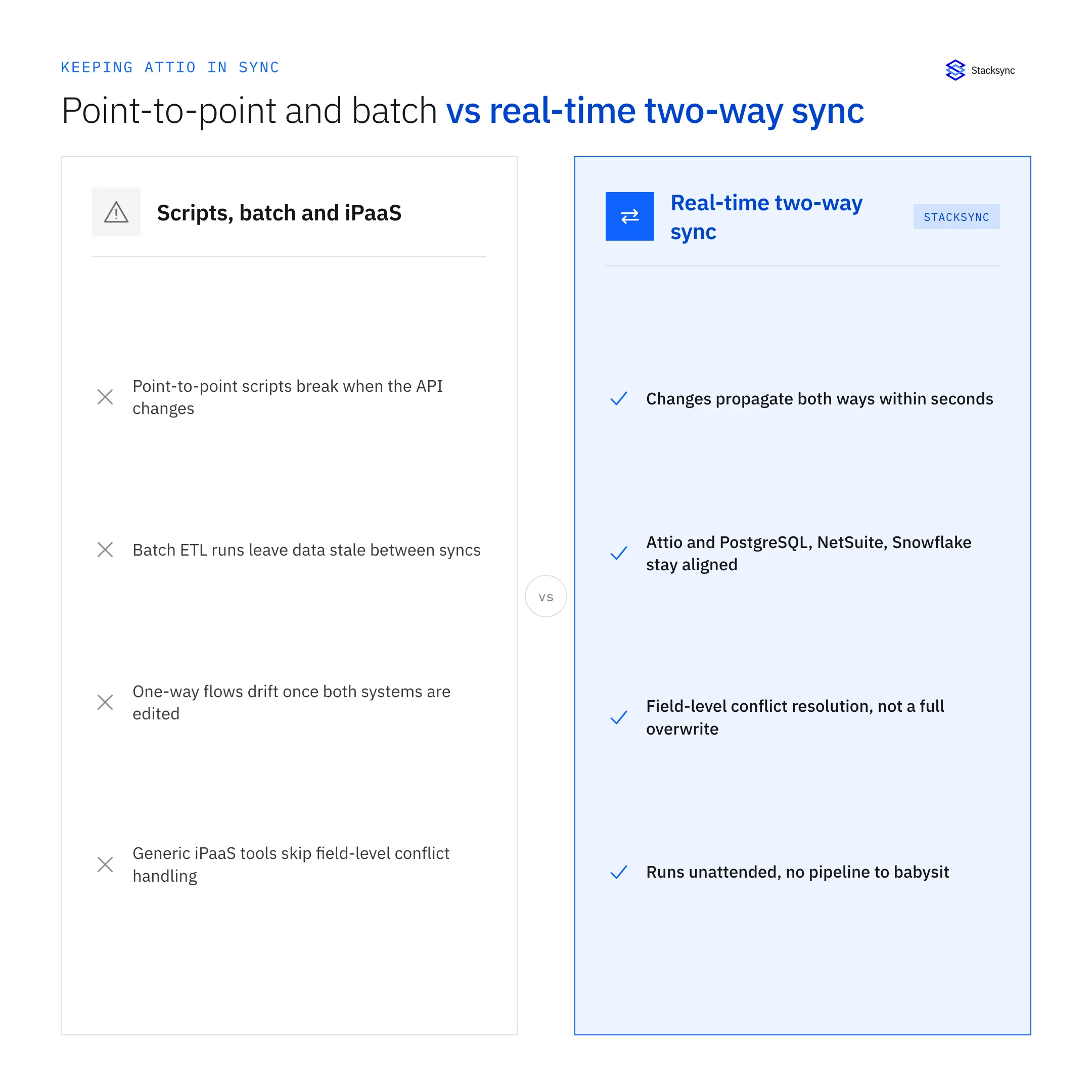
- Point-to-point API scripts are fragile, break when APIs change, and demand constant maintenance.
- Batch sync and traditional ETL/ELT introduce delays that make operational data stale between runs.
- One-way data flows can't stay consistent when both systems are edited, so records drift.
- Generic iPaaS tools automate workflows but often lack true real-time, bi-directional sync with field-level conflict handling.
For analytics-only use cases, batch loading into a warehouse is fine. For operational data that multiple teams edit, the gap is real two-way, real-time consistency, which is a different problem than Attio is built to solve. See bi-directional sync walked through three real-world examples.
Keep Attio in Sync With Your Stack: Real-Time Two-Way Sync
If you run Attio alongside operational systems, the practical fix is a dedicated sync layer that keeps records aligned in both directions in real time. Stacksync's Attio connector propagates changes bi-directionally between Attio and systems like PostgreSQL, NetSuite, Snowflake, and other CRMs, so a change made in either system shows up in the other within seconds, no custom pipeline to build or babysit.
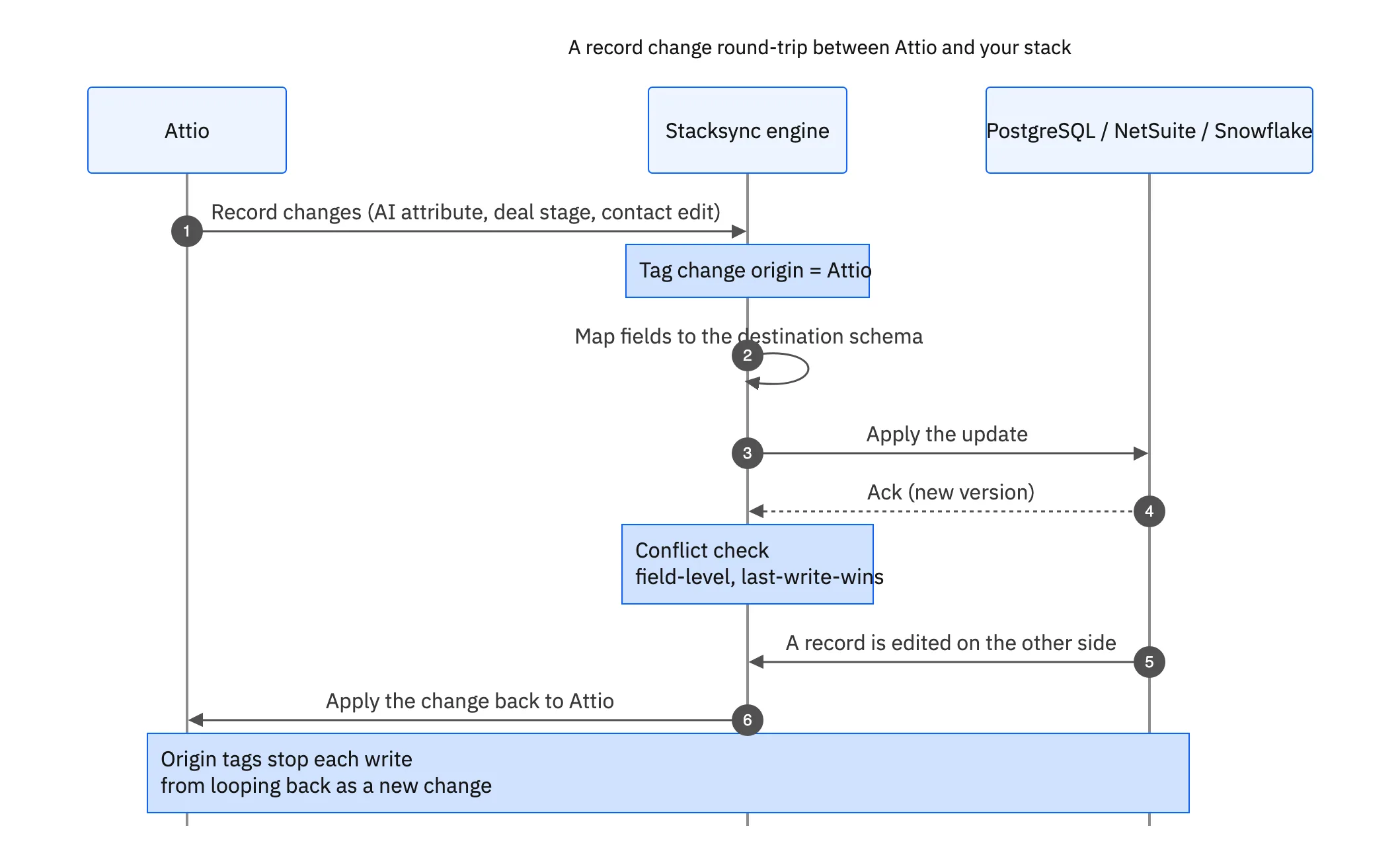
Unlike generic workflow automation, this is purpose-built two-way sync: it handles conflict resolution, schema mapping, and field-level change detection rather than firing one-directional recipes. Stacksync offers 1,000+ pre-built connectors and carries SOC 2 Type II, ISO 27001, HIPAA, and GDPR compliance, with usage-based pricing, so AI-enriched and human-edited fields stay consistent across your whole stack instead of stranded inside the CRM. For a concrete example, see how teams set up real-time two-way sync between Attio and Airtable.
Getting Started With Attio: Setup, Import & Migration
Standing up Attio is fast compared with legacy CRMs. A typical rollout looks like this.
- 01Sign up and invite your teamStart on the free plan with up to 3 seats to evaluate, then upgrade when you outgrow it.
- 02Model your dataDefine the objects, attributes, and relationships that match how your business works, this is the step that pays off later, so don't just replicate Contacts-and-Accounts.
- 03Import existing recordsBring in contacts, companies, and deals via CSV or migration from your previous CRM, mapping fields to your new objects.
- 04Connect email and calendarLink Gmail or Outlook so interactions and meetings attach to records automatically.
- 05Build views, workflows, and AI attributesCreate the pipeline views, automations, and AI fields your team will use day to day.
- 06Sync Attio with the rest of your stackConnect Attio to your databases, ERP, and other SaaS tools so data stays consistent everywhere, using a real-time two-way sync where operational systems are involved.
Top Attio Alternatives to Consider in 2026
- HubSpot: best if you want marketing, sales, and service in one suite with a strong free tier.
- Salesforce: best for large enterprises needing depth, customization at scale, and a vast marketplace.
- Pipedrive: best for SMB sales teams that want a simple, affordable, pipeline-first CRM.
- Airtable: best if you'd rather build a custom data app than use a packaged CRM.
- Folk: best for relationship-led small teams and agencies wanting a lightweight, contact-first CRM.
- Close: best for high-volume inside-sales teams that want calling and email built in.
The Verdict: Is Attio Worth It in 2026?
Attio is worth it for startups, PLG, and modern GTM teams that need a flexible, data-driven CRM with fast setup, native AI, and a real free tier. Its custom data model and clean interface are genuinely differentiated, and the per-seat pricing is reasonable for what you get. The main trade-off is integration depth and enterprise maturity: large orgs with complex processes will find it thinner than Salesforce or HubSpot, and any team running Attio alongside databases and ERPs should plan for a dedicated sync layer to keep data consistent across systems. Judge it on whether its flexibility fits your workflow, and on whether you can close the integration gap, because that's where Attio's value either compounds or leaks away.

FAQ
Frequently asked questions










Related articles